


GOOGLE PAY
novobanco is on Google Pay.
Google Pay
-
 Mobile payments with no sign-up fee at novobanco
Google Pay has arrived at novobanco. You can now shop in a simple, fast and secure way with your novobanco debit and credit card. Pay easily using an Android smartphone, a Wear OS smartwatch or a tablet.
Discover how Google Pay works so you can start using it for your purchases.
How does Google Pay work?



Add your novobanco card
Enter your novobanco card details manually

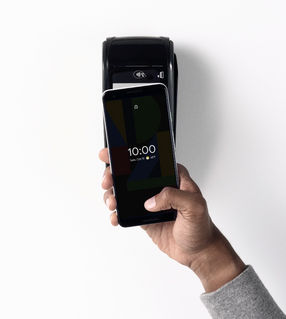
Make your purchases
Start paying with Google Pay with maximum security in shops or online
How to use Google Pay
Add your novobanco debit and credit card to Android smartphones and Wear OS smartwatches. See how below.
- On smartphone
- On smartwatch
Add your card on smartwatch
1) Open the Google Wallet app on your smartwatch;
2) Select the option “Add card”;
3) Unlock the keypad and connect your smartphone;
4) Check your added novobanco cards;
5) Make sure the smartwatch and smartphone stay paired during setup.
Is paying with Google Pay safe?
Encrypted data
When you pay online, Google Pay encrypts data to keep the payment secure.

Protected information
When you pay, Google Pay does not share your card number. Your information stays protected.
Secure authentication
Protect your device with a personal PIN, a pattern or a fingerprint before completing the payment.
Benefits of using Google Pay
-
 Easy and digital
Pay with Google Pay without using a physical wallet. Just use your smartphone
-
 Security and privacy
Google Pay uses end to end encryption and token technology to protect your financial information during transactions
-
 Accepted in thousands of stores
Google Pay is accepted in shops and online worldwide wherever contactless payments are accepted
-
 Your cards in the palm of your hand
Add and keep your debit and credit cards updated in one place for simpler management
-
 A fast solution
No need to create an account or fill out long forms to pay online or in apps
-
 Instant integration with other apps
Google Pay can be integrated with travel or shopping apps to make payments and online shopping easier
Where to pay with Google Pay
Shops
Just tap your smartphone on a contactless payment terminal to buy in seconds
Apps and sites
Buy products and services in apps and on websites
Google stores and browser
Autofill forms in Google Chrome and buy products in Google Store or Google Play

Strong customer authentication
Safer transactions, fewer worries.
Useful links
Documentation
Frequently asked questions
Google Pay is a mobile payment service that lets users make purchases using an Android smartphone, tablet or smartwatch.
To set up Google Pay, you need a compatible Android device, a Google account, and you need to add your novobanco debit or credit card.
You can add novobanco debit and credit cards.
Google Pay can be used in shops and online where Visa contactless payments are accepted or through mobile payment services.
Yes. Google Pay can also be used on compatible Android smartwatches and tablets.
- If you check purchases in Google Wallet, you can see them right away, often with extra details such as the location where they were made.
- If you check on novobanco Online or on the App, purchases affect your current account balance immediately, but they may not appear in the transaction list straight away. They usually appear after one or two days.
No. When you use Google Pay with novobanco, there are no transaction fees.
Related topics



PUB | NOVO BANCO S.A. | Registered no. 7 at Banco de Portugal