


Recover access details
One single access. Multiple channels.
I need to reactivate my access to Digital Channels
If you’ve lost access to Digital Channels or forgotten your details, we can help. Discover the main reasons and the solutions to reactivate your access and get back to your online banking quickly and easily.
Main reasons
1. I don’t have my registration number
1. I don’t have my registration number
1. I don’t have my registration number
2. I don’t remember my access PIN
2. I don’t remember my access PIN
2. I don’t remember my access PIN
3. My access was blocked after incorrect attempts
3. My access was blocked after incorrect attempts
3. My access was blocked after incorrect attempts
5. My personal details are not up to date
5. My personal details are not up to date
5. My personal details are not up to date
7. I haven’t activated the master card
7. I haven’t activated the master card
7. I haven’t activated the master card
1. I don’t have my registration number
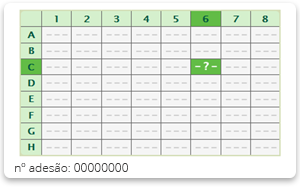
You can find your registration number on your master card, in the bottom‑left corner, on the side of the card where the matrix is printed.
If your master card does not display the registration number, please check the information that was sent to you during the Digital Channels registration process.
If you do not have the Digital Channels registration details or do not have your master card, you will need to submit a new registration request.
2. I don’t remember my access PIN
If you don’t remember the PIN used to access novobanco Online and the App, there are two ways to recover it.
To proceed, you will need:
Your registration number
Your master card




A. Chave Móvel Digital
You can reset your access PIN immediately using your Chave Móvel Digital, from your computer, by following the steps below.
Submit request with Chave Móvel Digital

Digital Mobile Key
Confirm your Chave Móvel Digital details

Registration number and master card
Enter your registration number and confirm the requested master card positions

PIN
Define a new access PIN
*By clicking this button, you will be redirected to a Portuguese-language page. If you would like to complete the process in English, please access it through the novobanco App.
B. Request a new PIN via mobile notification
Submit request online

Registration number
Enter your registration number to access novobanco Online

Master card
Confirm your identity by entering 3 digits from the security matrix

PIN
Choose how you would like to receive the PIN.
If you have the novobanco App installed and notifications enabled, select this option and receive a unique code that will allow you to reset your PIN
*By clicking this button, you will be redirected to a Portuguese-language page. If you would like to complete the process in English, please access it through the novobanco App.
C. Request a new PIN at a branch
You may also visit a novobanco Branch.
To do so, you will need your Citizen Card.
If you prefer, or if you are unable to submit the request online, you can always go to one of our Branches.
-
Step 1
Go to a novobanco Branch with your citizen card and request the PIN reissue
-
 Step 2
Receive a 4‑digit code on your mobile phone
-
 Step 3
Provide the code to the relationship manager
-
Step 4
Receive your new PIN on your mobile phone
3. My access was blocked after incorrect attempts
If you entered your PIN incorrectly several times, your access may have been temporarily suspended.
If you do not wish to wait for the suspension period to end, you can reactivate your access by contacting the Direct Line to request the PIN unlock.
Please make sure you have your master card with you.
*By clicking this button, you will be redirected to a Portuguese-language page. If you would like to complete the process in English, please access it through the novobanco App.
Still getting an error or unable to proceed?
If you do not have your master card and therefore cannot confirm your registration number, you will need to submit a new Digital Channels registration request

I don’t have my master card
If you do not have your master card and therefore cannot confirm your registration number, you will need to submit a new Digital Channels registration request
If you have your master card but do not know or remember the correct PIN, you should request a PIN reissue.

I have the Matrix Card but not the correct PIN
If you have your master card but do not know or remember the correct PIN, you should request a PIN reissue.
*By clicking this button, you will be redirected to a Portuguese-language page. If you would like to complete the process in English, please access it through the novobanco App.
4. I don’t have my master card
If you have lost your master card, you must:
Cancel your existing Digital Channels registration, and
Submit a new registration request.
This is required to ensure your security.
5. My personal details are not up to date
If your mobile phone number and/or address are not up to date, and because these are non‑declarative details with security implications, you can update them by:
Using novobanco Online, or
Visiting one of our branches, where you must present your identification document
*By clicking this button, you will be redirected to a Portuguese-language page. To find your preferred Branch, please search by Branch name or location.
6. My master card was blocked
If your access to Digital Channels only allows you to view information and you are unable to complete transactions, your master card may be blocked.
In this case, please:
Contact the Direct Line to request the unblock of your master card
Have your master card available during the call
7. My master card is not active
When you register for Digital Channels via the website, you will receive a letter by post containing your master card.
To complete your registration:
Follow the activation instructions included in the letter
Activate the master card to ensure your Digital Channels access is fully operational

Activate your Digital Channels and start using them right away.