ONLINE SECURITY:

Report fraud

Contact novobanco via the Direct Line service

*The call cost for Direct Line through 218 837 700 is the cost agreed between the customer and their telecommunications operator, and through 707 247 365 it is €0.09 per minute from the fixed network and €0.13 per minute from the mobile network, plus VAT at the legal rate in force. Personalized support on weekdays from 8 a.m. to 10 p.m., and on weekends and public holidays from 9 a.m. to 6 p.m.

We would like to remind you that novobanco:

  • NEVER communicates via WhatsApp or uses a “Virtual Assistant” for this purpose
  • NEVER call you asking for master card positions or SMS codes to supposedly reverse transactions
  • NEVER send SMS messages with links requesting device registration or access reactivation, especially under threats of “fines”
  • NEVER ask you to send photos of your master card

Stay informed about the latest fraud attempts, follow the recommended best practices, protect your computer and always keep up to date with our security advice.

Fraud examples
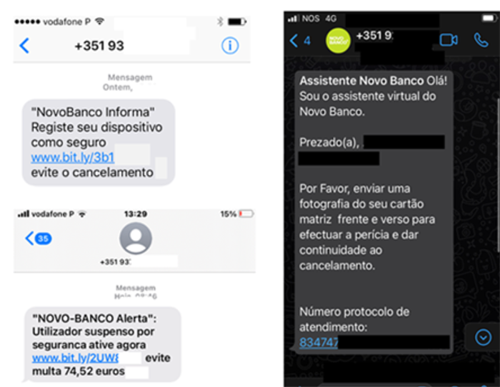
 

Following the sending of fraudulent SMS messages, phone calls are being made in which malicious individuals claim to be employees of a novobanco security department.

During these phone calls, personal and strictly confidential data is requested. This information must NEVER be shared with third parties.

If you are confronted with any of these fraud schemes (examples shown below), contact novobanco immediately, do not provide any master card details, and always carefully read the content of SMS messages sent by the Additional Security System.

Never provide master card positions or SMS security codes in unexpected situations or in processes that were not initiated by you. 


We remind you that novobanco:

• NEVER sends SMS messages with links requesting device registration or access reactivation under threats of “fines”. 
• NEVER communicates via WhatsApp, or usesnor do we use a “Virtual Assistant” for this purpose. 
• NEVER asks you to send photos of your master card. 
• NEVER calls you requesting master card positions or SMS codes to supposedly cancel transactions.


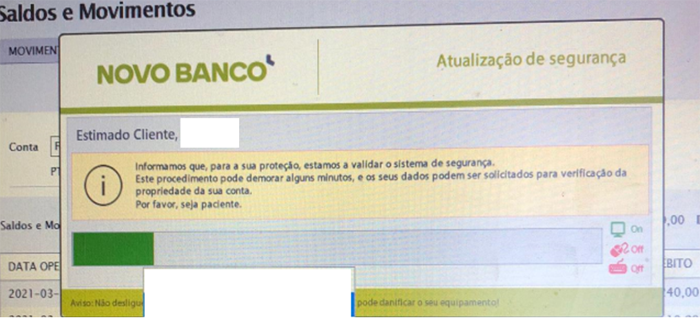
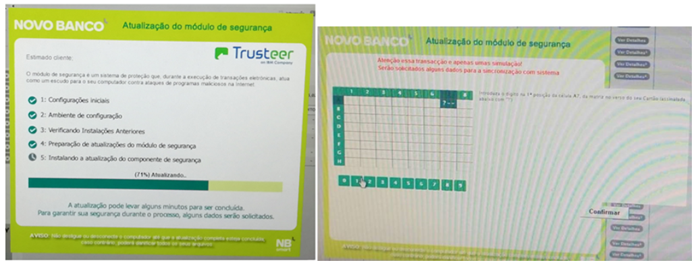
When using NBnet or NBnetwork, if you are confronted with the screen shown below, it is very likely that your computer is infected with a virus, malware or banking Trojan.

novobanco never requests “Security Updates” or the “Installation of Security Modules” when using the digital channels NBnet, NBnetwork or mobile apps.

If you see this screen, contact novobanco immediately, do not provide any master card details, and always carefully read the contents of SMS messages sent by the Additional Security System. 
Do not provide your data or security codes in unexpected situations or in processes that were not initiated by you.


Please also pay attention to the following recommendations:

• Do not click on links included in unknown or unsolicited emails or SMS messages. 
• Do not open attachments (such as PDFs, DOCX or DOC files) without first confirming with the sender that the content is safe and that the message was genuinely sent by them. 
• Do not share any Internet or Mobile Banking access credentials with third parties. 
• Do not provide any sensitive personal data, such as phone numbers or email addresses. 
• Do not install applications on your smartphone outside official app stores. 
• Do not forward or reply to suspicious messages.

Following the sending of SMS messages, fraudulent phone calls are being made in which someone claims to be an employee of novobanco.
During these calls, the caller requests the Additional Security SMS code.

If you receive a call from someone claiming to represent NOVO BANCO, please be aware that we will never ask you for SMS security codes under any circumstances.

If this happens:

• End the call immediately 
• Contact us straight away by calling 707 247 365 to report the incident


Important reminder

novobanco never requests security codes by phone, regardless of the reason given.
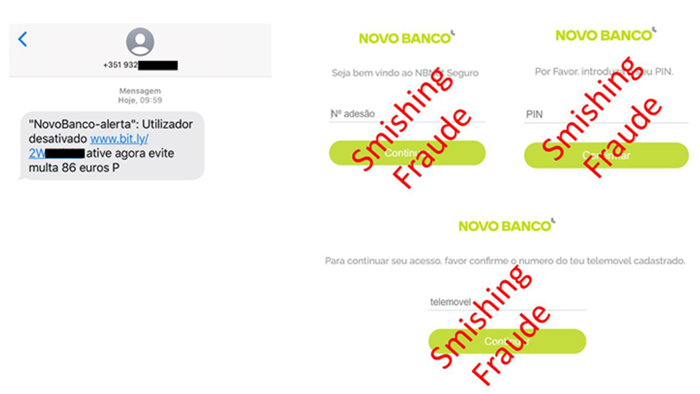
 

Fraudulent SMS messages pretending to be from novobanco are currently being reported.

Under no circumstances should you click on any links contained in these messages.

Key security rules. How to recognise a fraudulent message

Fraudulent messages usually share two common characteristics:

• They are unexpected messages. Unsolicited communications. 
• They urge immediate action, encouraging you to click on a link or open a file.

What should you do?

If you receive an unsolicited message prompting immediate action:

• Do not click on links or images 
• Do not open any attachments

If you have any doubts, please contact NBdireto on 707 247 365.


Email messages and their attachments are frequently used to spread viruses or to provide hackers with a gateway to access your computer.

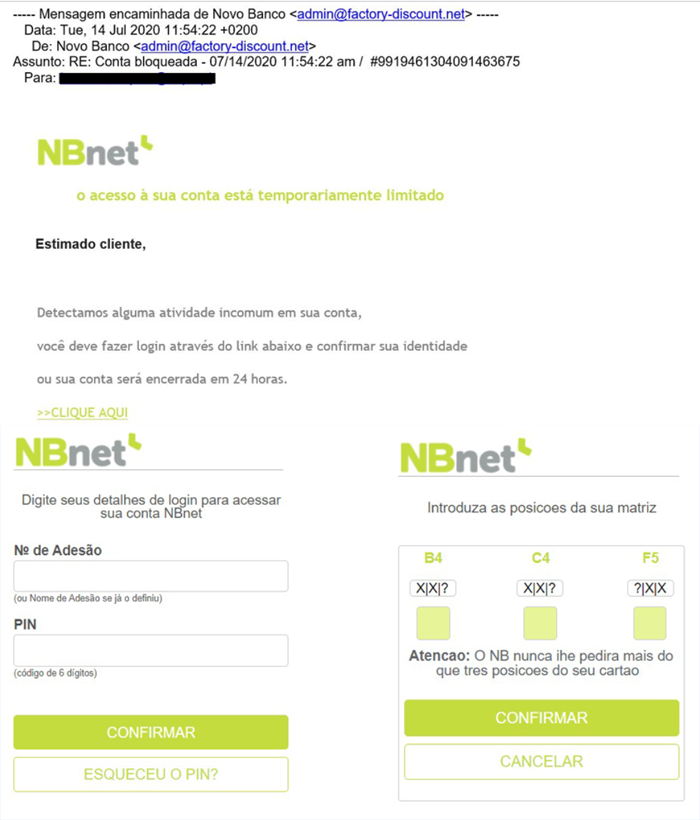
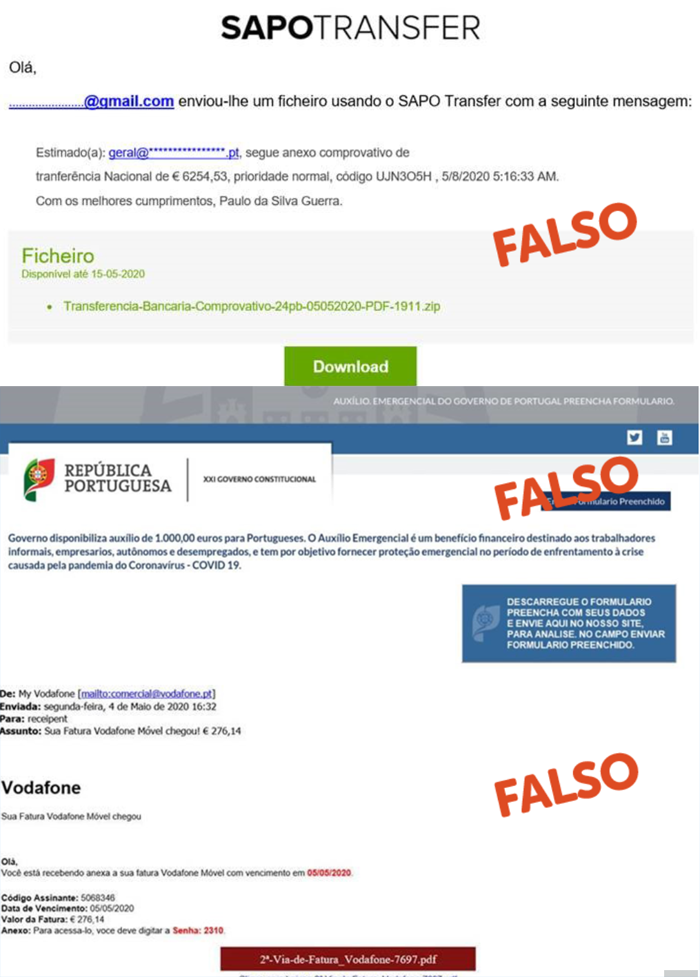
If you receive an email similar to this, be immediately suspicious.

You are very likely being targeted by an attempt to deceive you. This type of fraud is generally known as phishing. You should delete the message without opening it, even if the subject line appears appealing.

No matter how attractive the subject may be: 

• Do not download any documents, invoices or forms 
• Do not click on links included in the email 
• Do not open attachments (such as PDFs, DOCX or DOC files) unless you have confirmed with the sender that the content is safe and that the message was genuinely sent by them 
• Do not forward the message 
• Do not reply to the message

If you receive an email you were not expecting, even if the sender appears trustworthy, always confirm the authenticity of the email directly with the relevant organisation by phone.


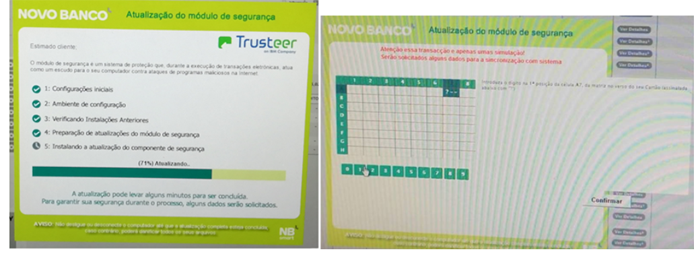
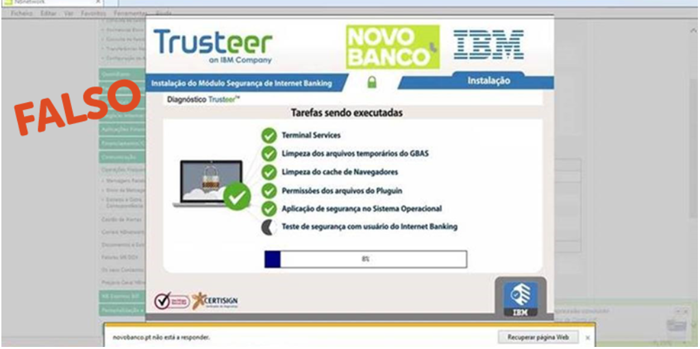
When using NBnet or NBnetwork, if you are presented with this type of message, it is very likely that your computer has been infected with a virus, malware or banking Trojan.

novobanco never requests the installation of “Internet Banking Security Modules”.

If you encounter this malicious screen, contact novobanco immediately, do not provide any master card details, and always carefully read the content of SMS messages sent by the Additional Security System.


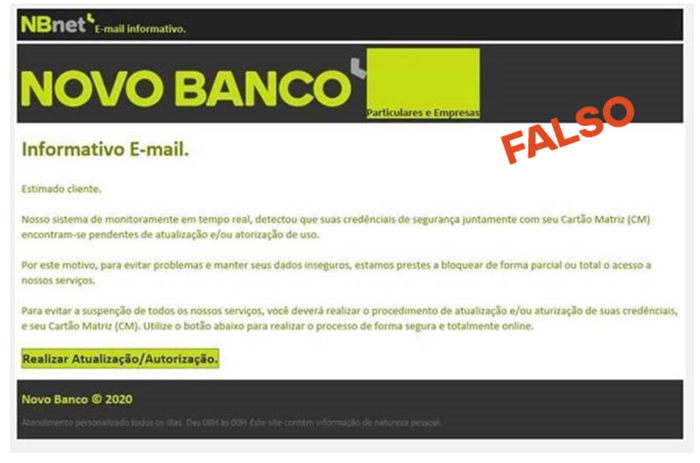
novobanco never requests this type of action.

If you have received this email, you should delete it immediately. 
Do not open it, do not click on links and do not follow any false instructions.

If you have any doubts, do not click on anything. Contact NBdireto immediately on 707 247 365.


Security recommendations

Regularly check the security of your computer or smartphone and follow these security recommendations whenever you receive suspicious messages:

• Do not click on links included in unknown or unsolicited messages 
• Do not share any Internet or Mobile Banking access credentials with third parties 
• Do not provide sensitive personal data, such as phone numbers or email addresses 
• Do not install applications on your smartphone outside the official app stores 
• Do not open attachments (e.g. PDF, DOCX or DOC files) unless you have confirmed with the sender that the content is safe and the message was genuinely sent by them 
• Do not forward or reply to the message


When using NBnet or NBnetwork, if you are confronted with this type of message, it is very likely that your computer has been infected with a virus, malware or banking Trojan.

novobanco never requests the installation of “Internet Banking Security Modules”.

If you encounter this malicious screen, contact novobanco immediately, do not provide any master card details, and always carefully read the content of SMS messages sent by the Additional Security System.


When using NBnet or NBnetwork, if you are presented with this type of information, it is very likely that your computer has been infected with a virus.

novobanco never requests the installation of “Internet Banking Security Modules”!

If you encounter this malicious screen, contact novobanco immediately, do not provide any master card details, and always carefully read the content of SMS messages sent by the Additional Security System.


Email messages and their attachments are frequently used to spread viruses or provide hackers with a gateway to access your computer.

If you receive an email similar to these, if you do not recognise the sender or the subject, and if it contains links and/or attachments, requests private or confidential information, or includes overly attractive job offers, be immediately suspicious.

You are most likely being targeted by a fraud attempt, commonly known as phishing. 
Phishing attacks have evolved rapidly, adapting to the current context. The most recent cases often involve malicious software that is installed when you click on links or open attachments in emails.

You should delete the message without opening it, even if the subject line appears appealing.

No matter how attractive the subject may be:

• Do not download any documents, invoices or forms 
• Always question before clicking. This is the golden rule 
• Do not open attachments (such as PDFs, DOCX or DOC files) unless you have confirmed with the sender that the content is safe and that the message was genuinely sent by them 
• Do not forward the message 
• Do not reply to the message

If you receive an email you were not expecting, even if the sender appears trustworthy, always confirm the authenticity of the email directly with the relevant organisation by phone.

PUB | NOVO BANCO S.A. | Registered no. 7 at Banco de Portugal