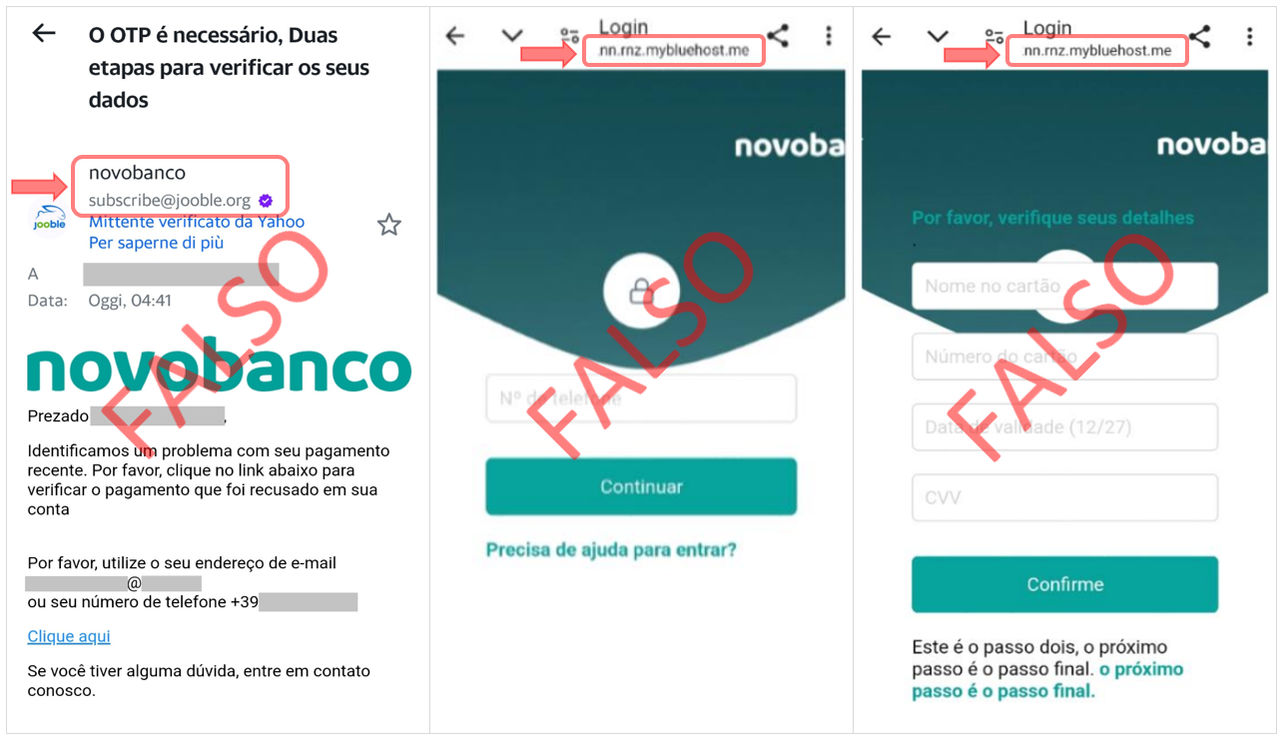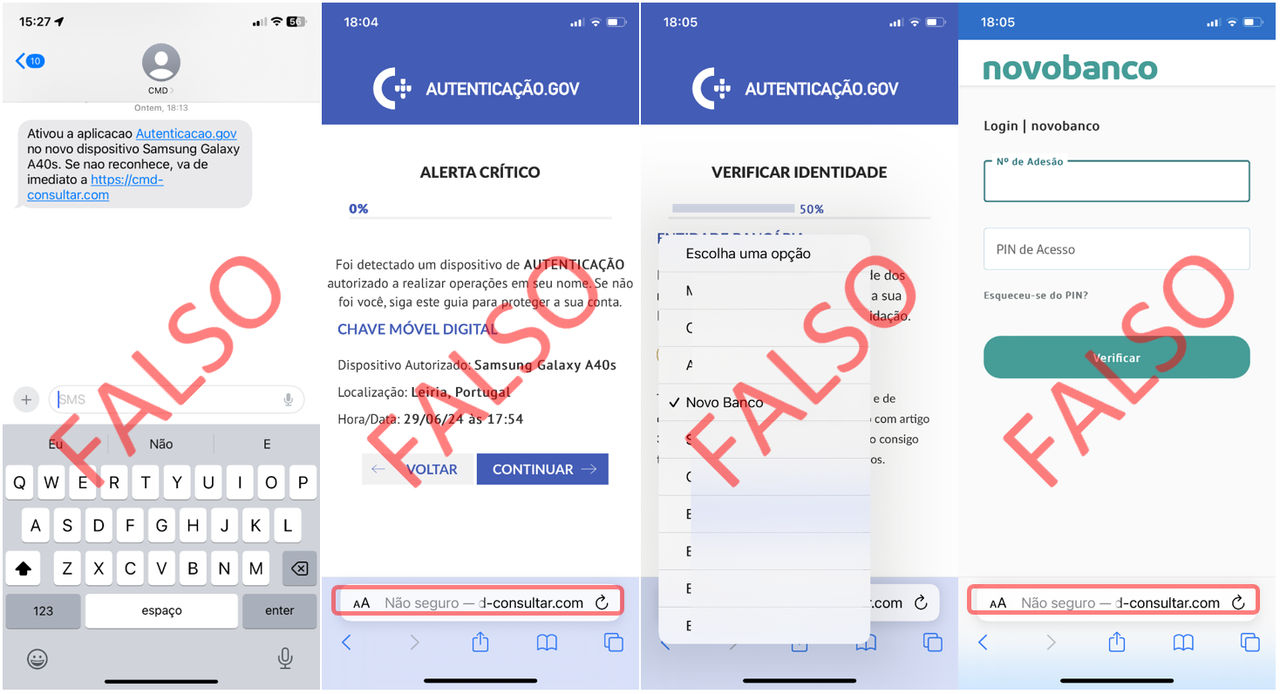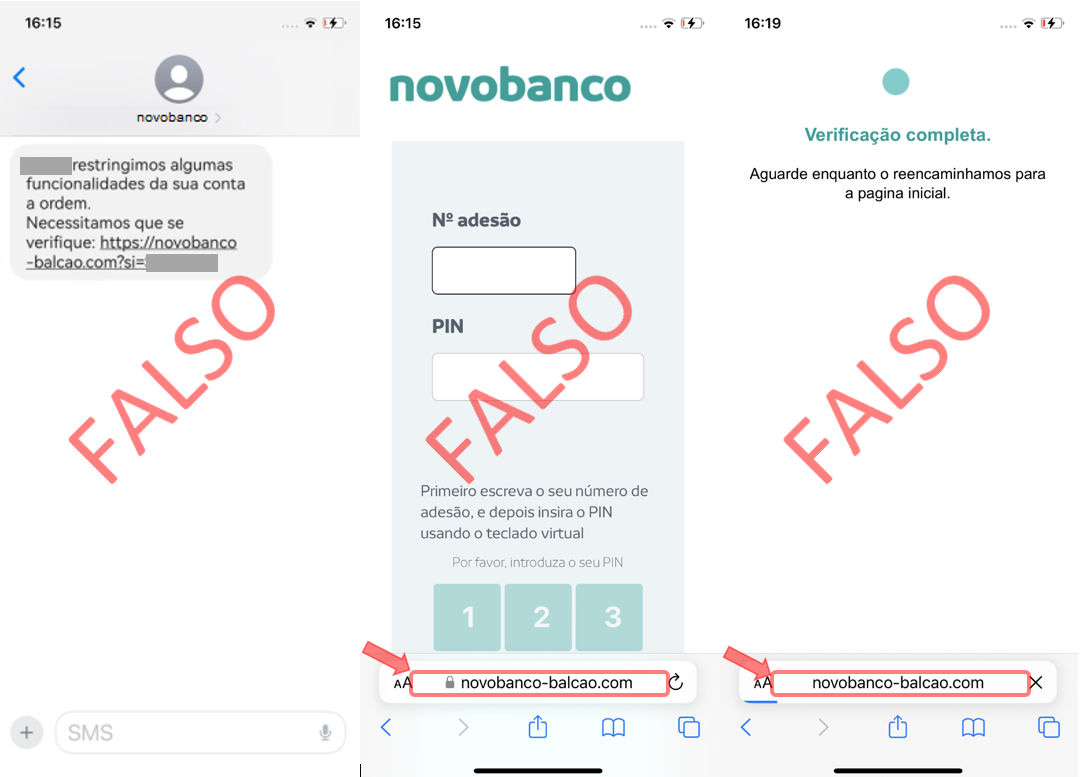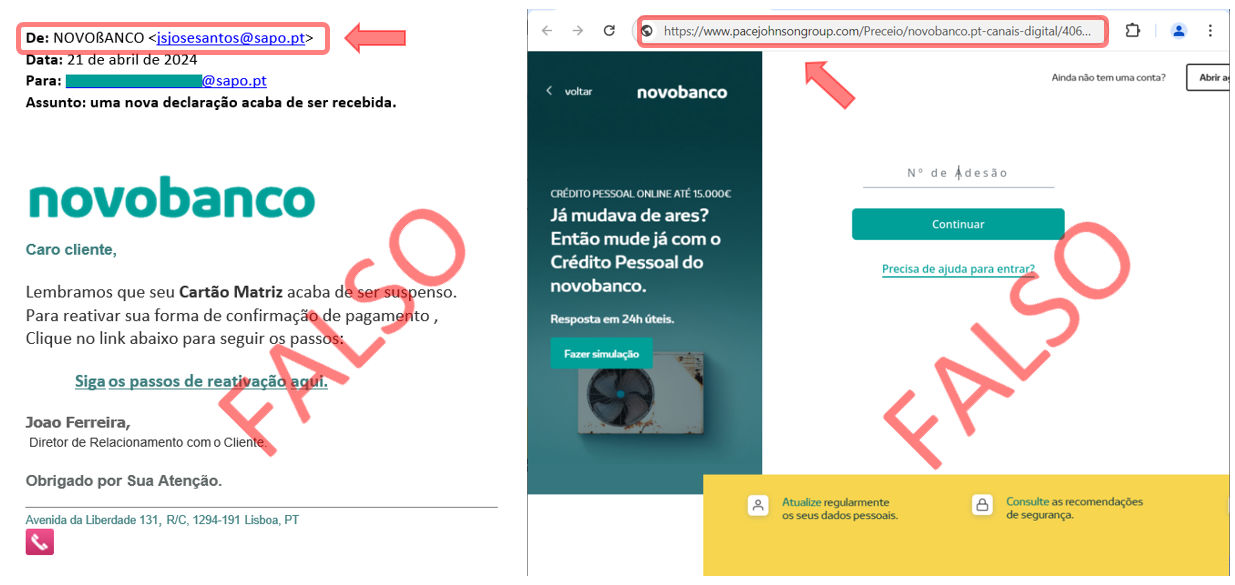
ONLINE SECURITY:

Fraud Alerts 

Contact novobanco through the Linha Direta - Direct Line service

We remind you that novobanco:

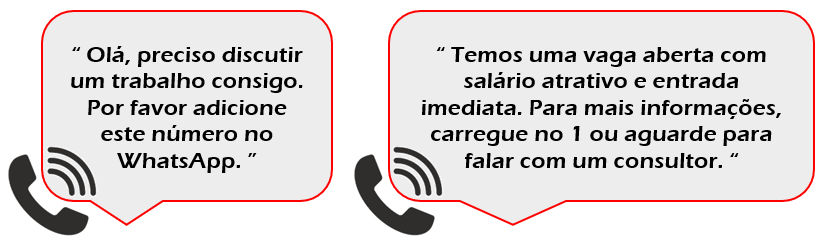
  • NEVER communicates via WhatsApp, and has  “Virtual Assistant” for that purpose. 
  • NEVER calls you asking for Master Card positions or SMS codes for supposed transaction cancellations.
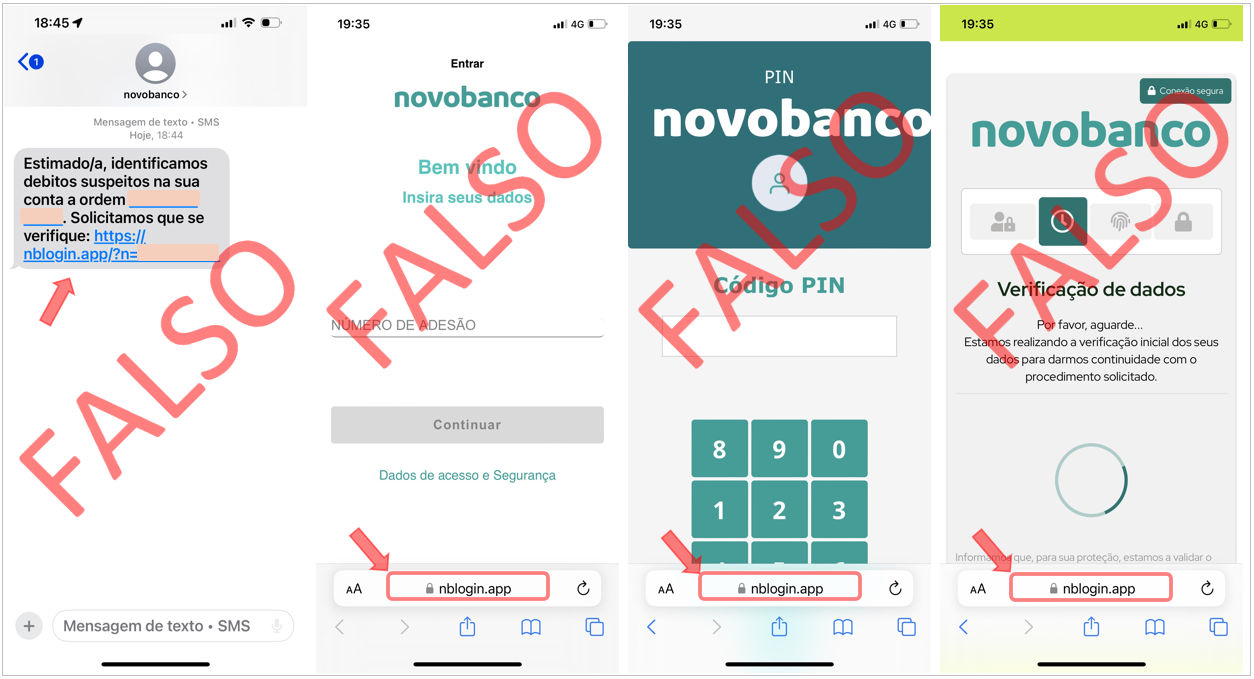
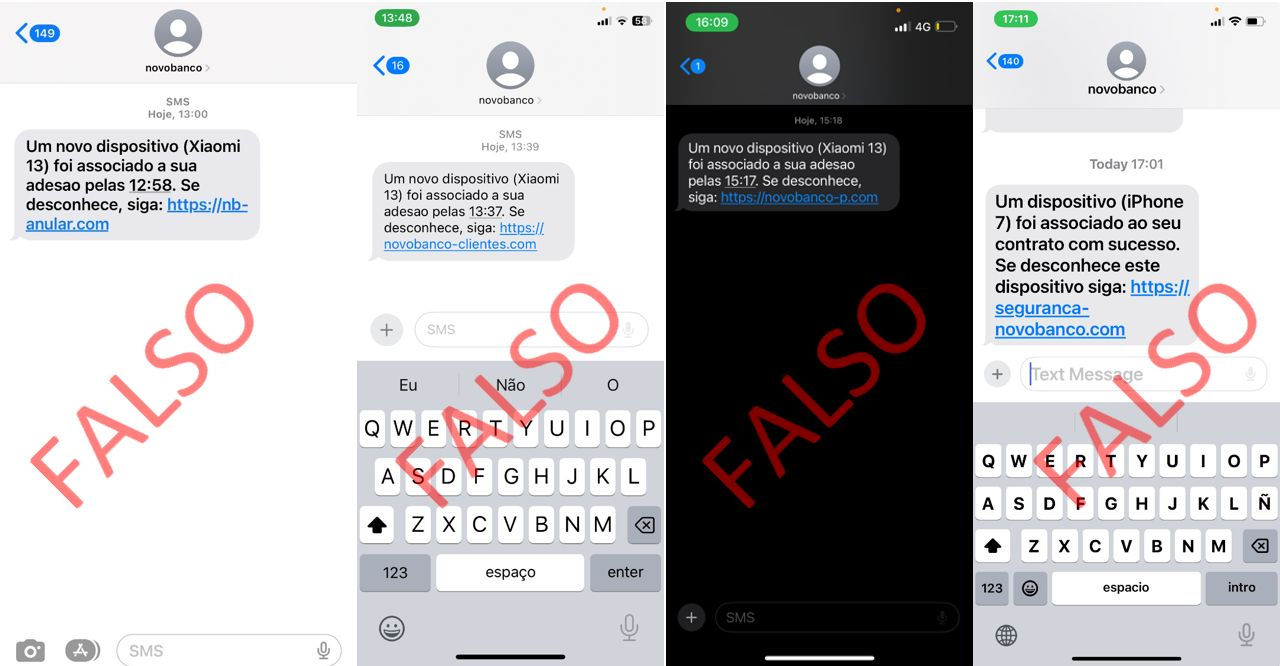
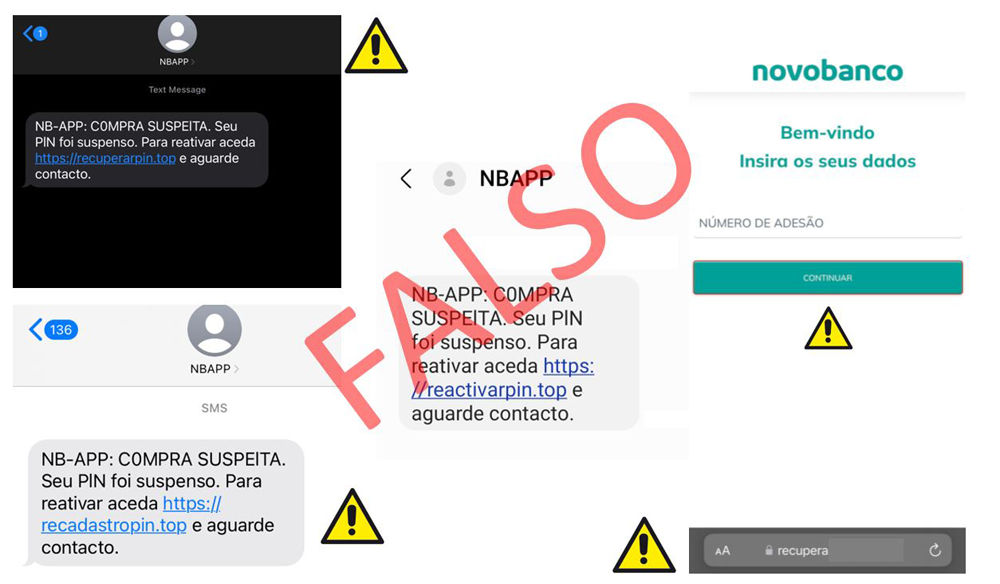
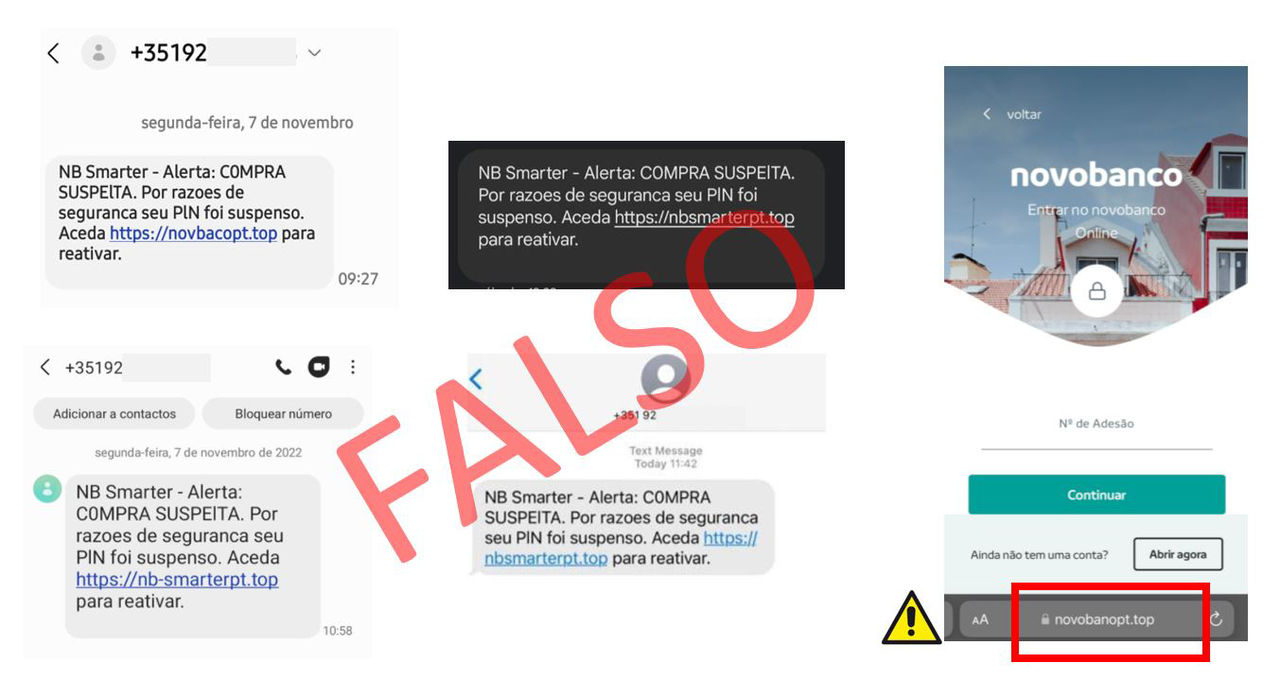
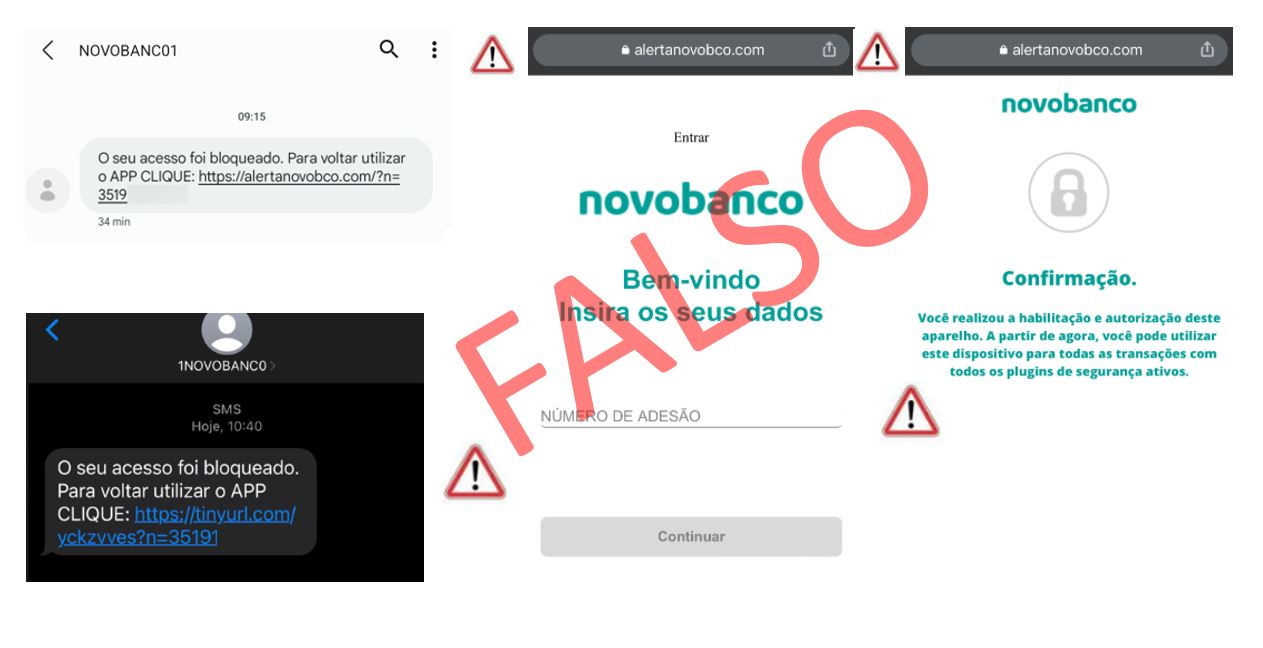
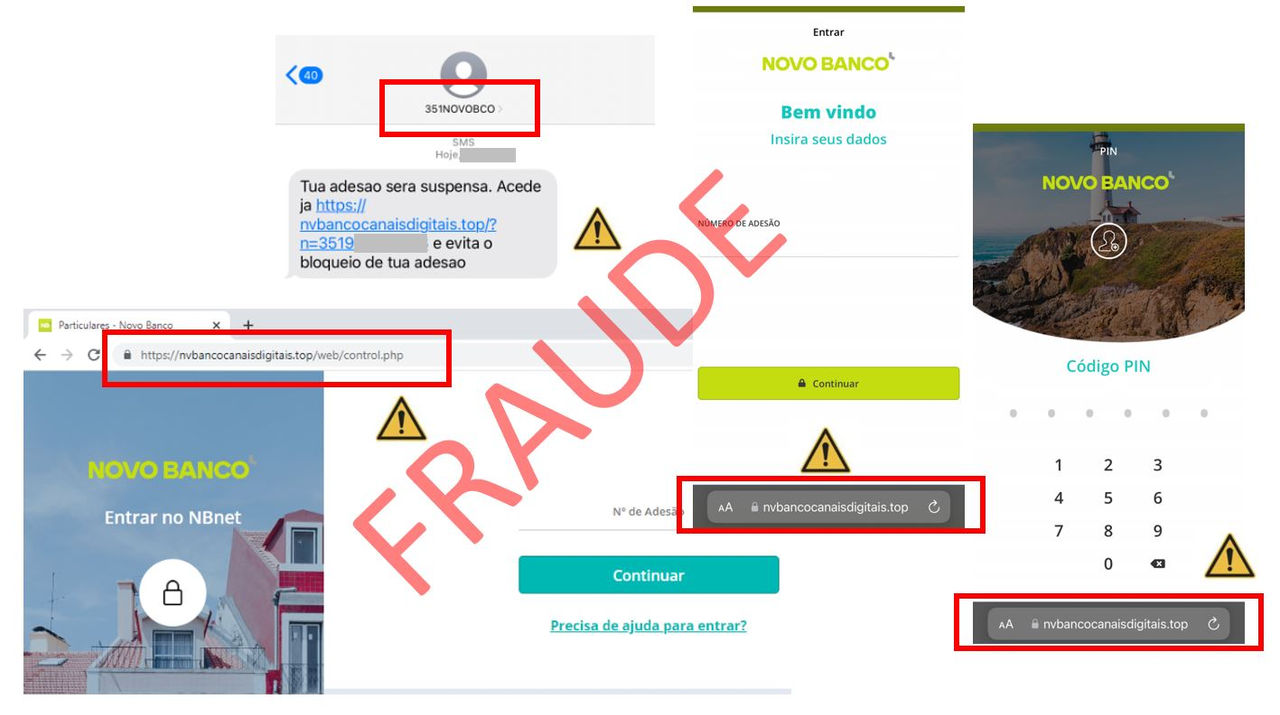
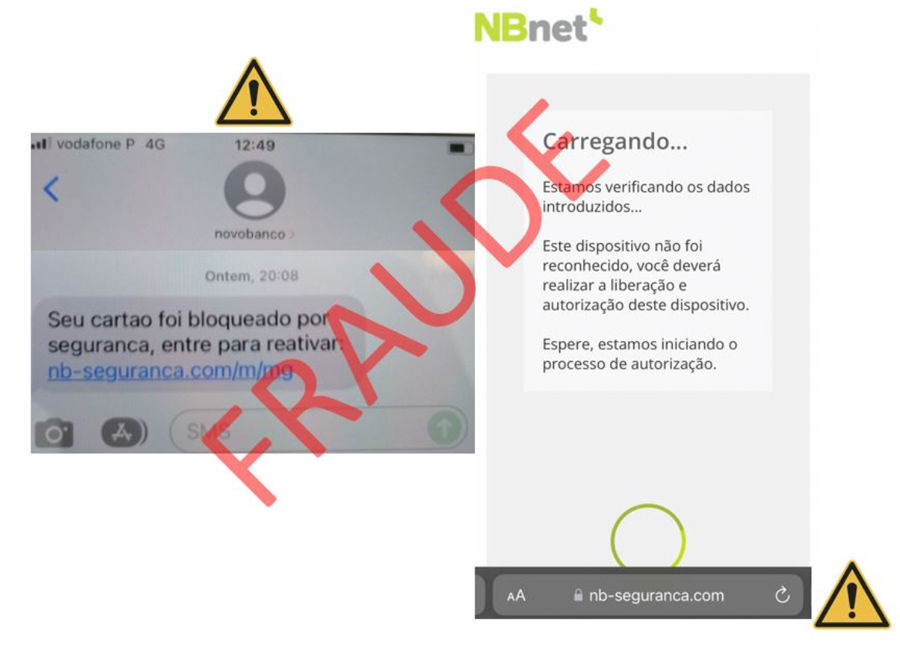
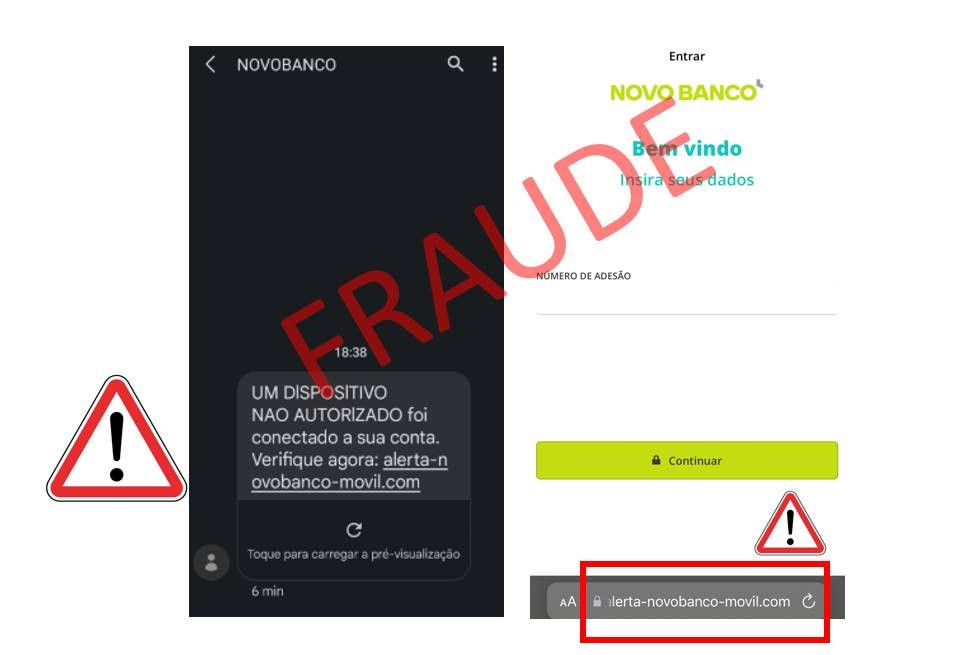
  • NEVER sends SMS messages with links for supposed device registration or access reactivation under threats of “fines”. 
  • NEVER asks you for photographs of your Master Card.

Find out about the latest fraud attempts, follow the recommended good practices, protect your computer and stay informed about our security advice.
July 2026

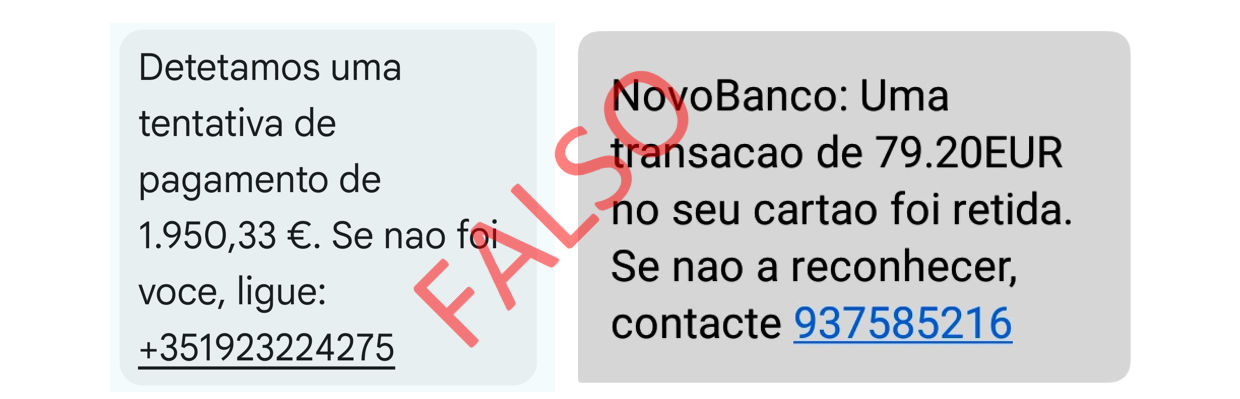
Fraud attempts are becoming increasingly sophisticated, and the best protection is simple: do not click links, do not call unknown numbers and do not give in to pressure.

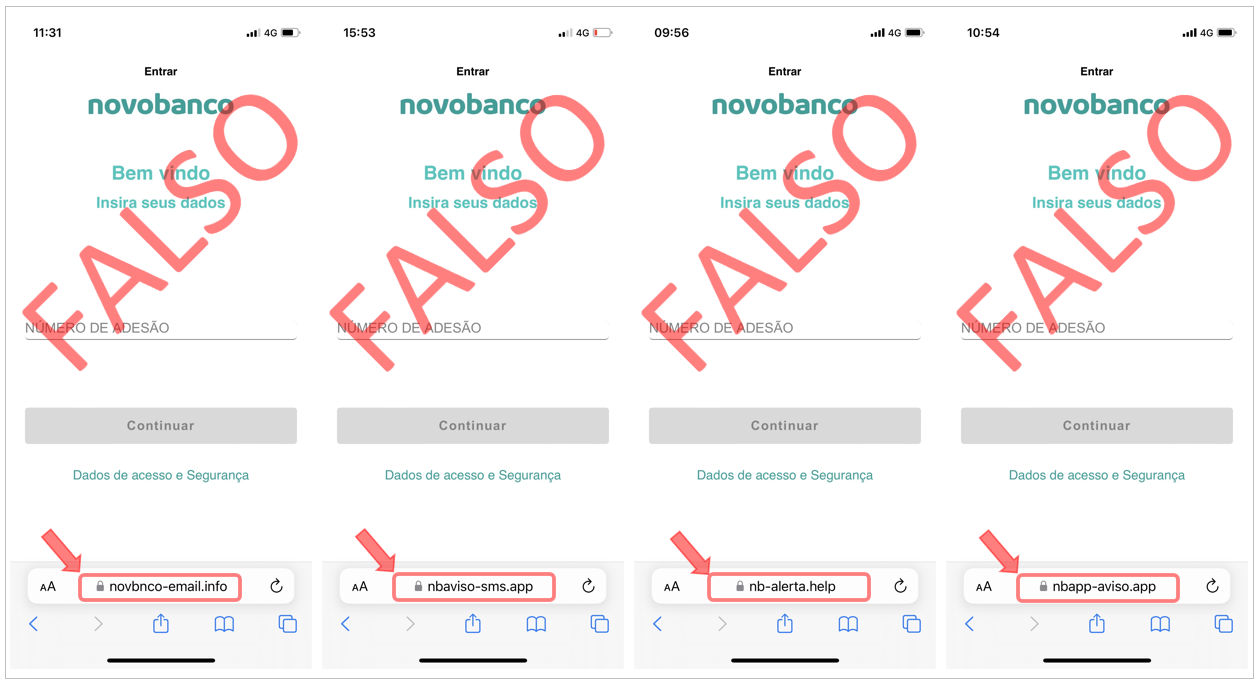
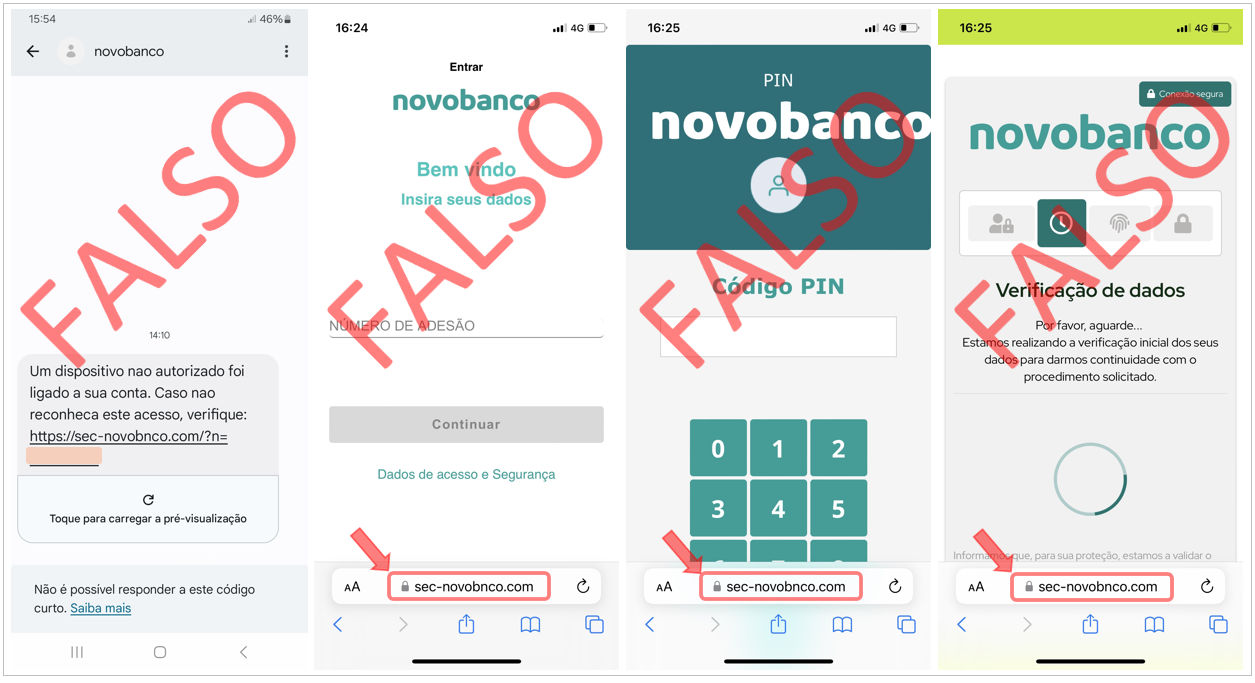
  • In SMS messages, the sender’s name may be falsified through spoofing;
  • In incoming phone calls, the origin of the call may be falsified through spoofing;
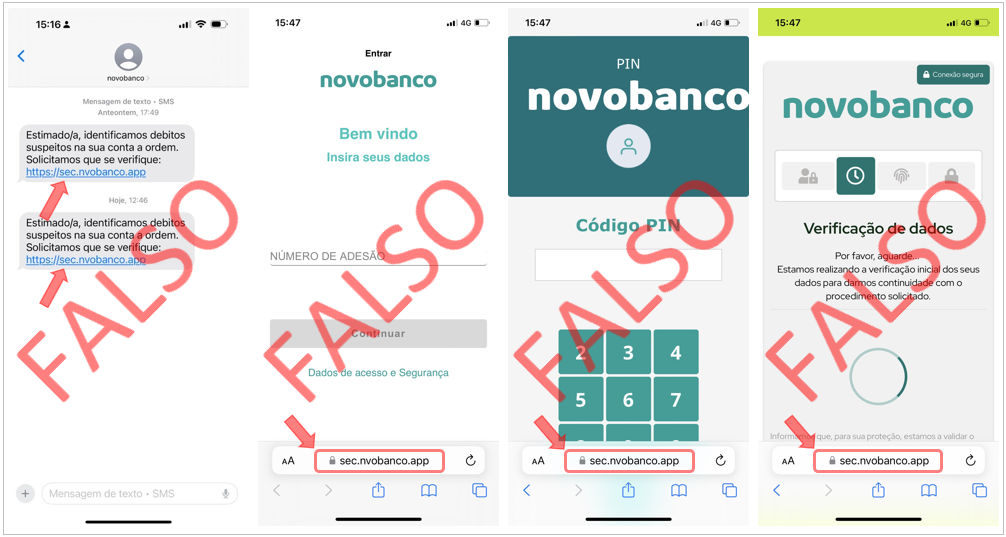
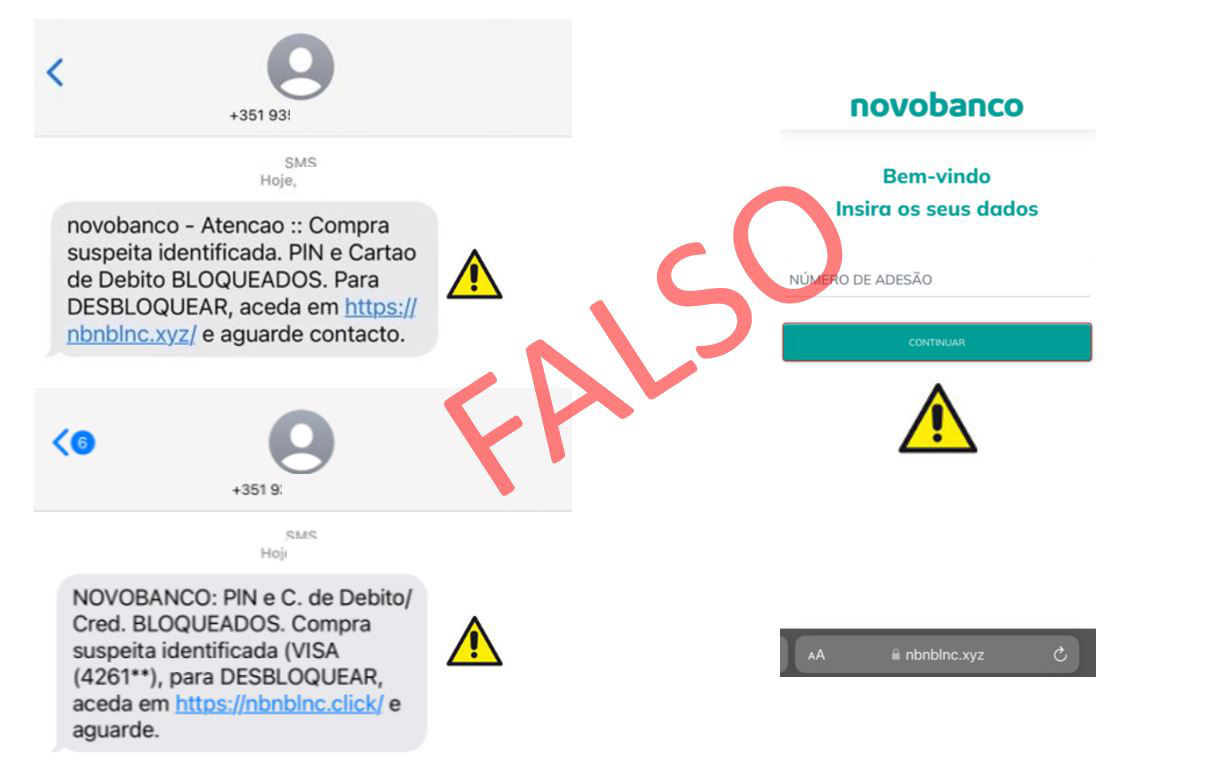
  • novobanco never sends SMS messages containing links;
  • We never send SMS messages from mobile numbers other than the bank’s official contact numbers;
  • Always be suspicious of unexpected phone calls. Does the caller claim to be “from the bank” while asking you for information or requesting that you take action? Hang up immediately and contact your Branch or our Linha Direta - Direct Line yourself;
  • When you use codes or validate a transaction in the novobanco App, you are authorising a transaction. novobanco never asks for codes or validation in the App to block or cancel a transaction. Never provide positions from your Cartão Matriz - Matrix Card or codes sent by SMS, and do not accept validation requests in the App for services or transactions that you did not initiate, even if the caller claims to be “from the Bank”. It is not us.

Do not provide personal data or account details. Contact your Branch or our Linha Direta - Direct Line immediately on 707 247 365

March 2026

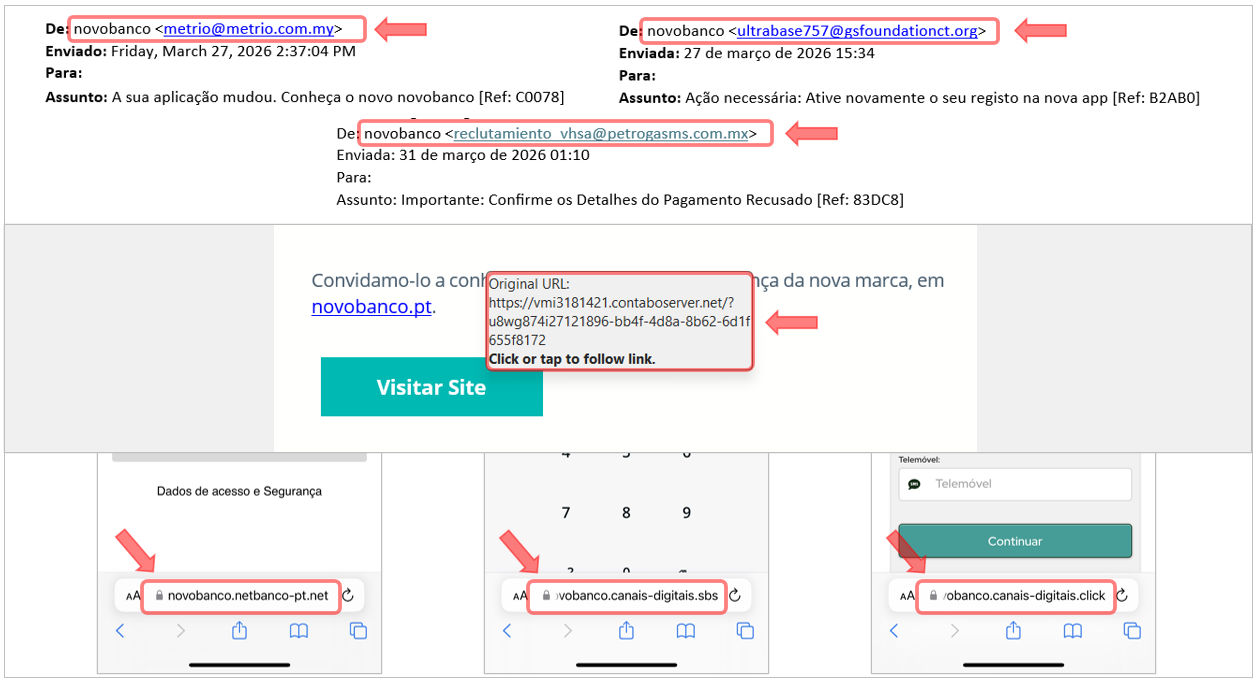
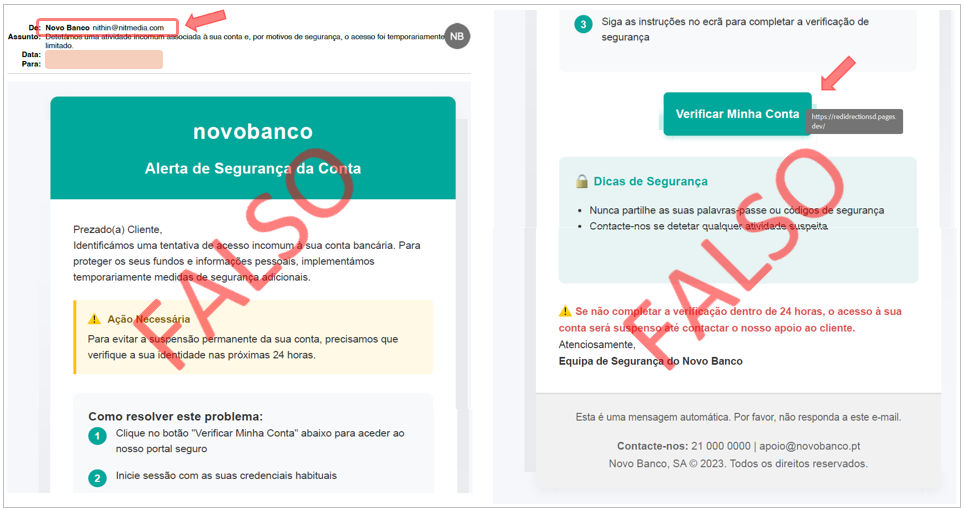
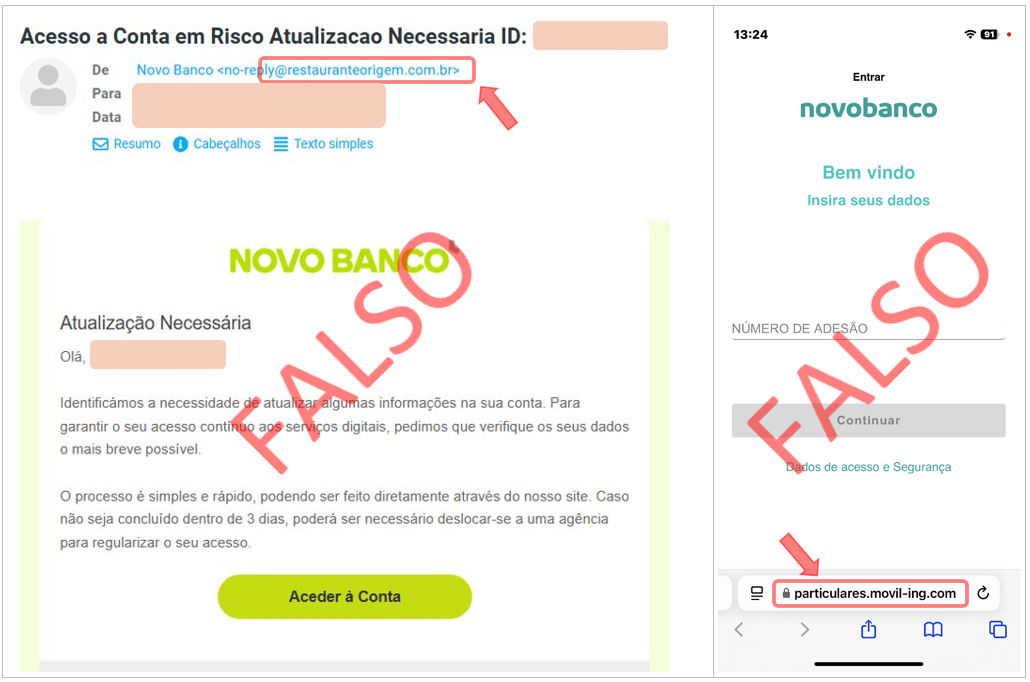
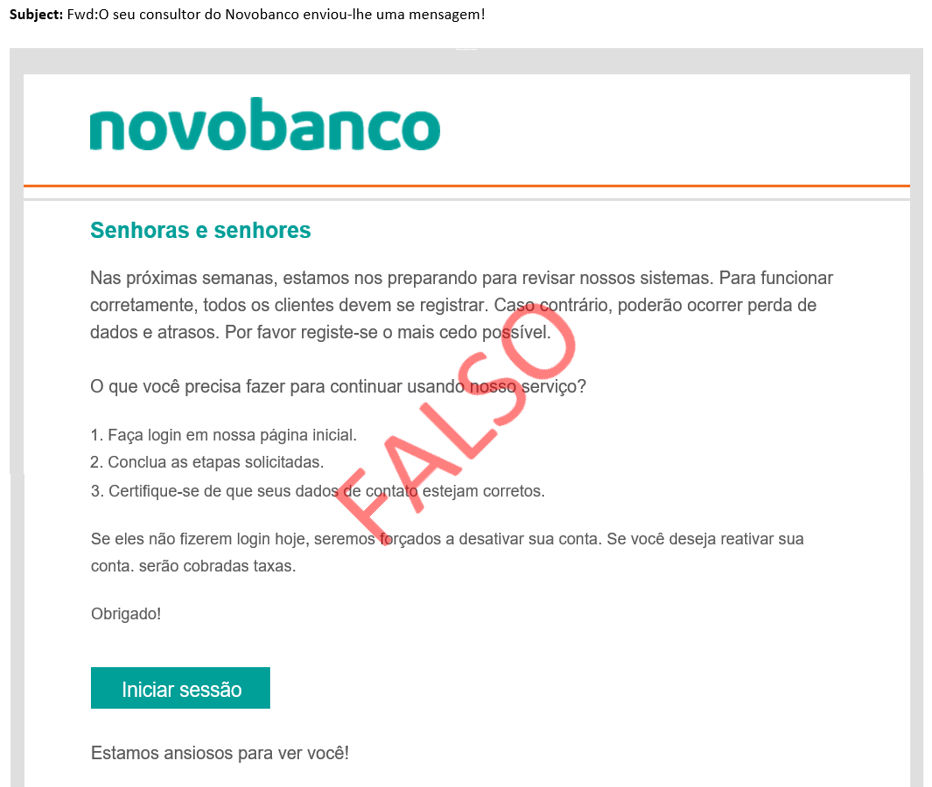
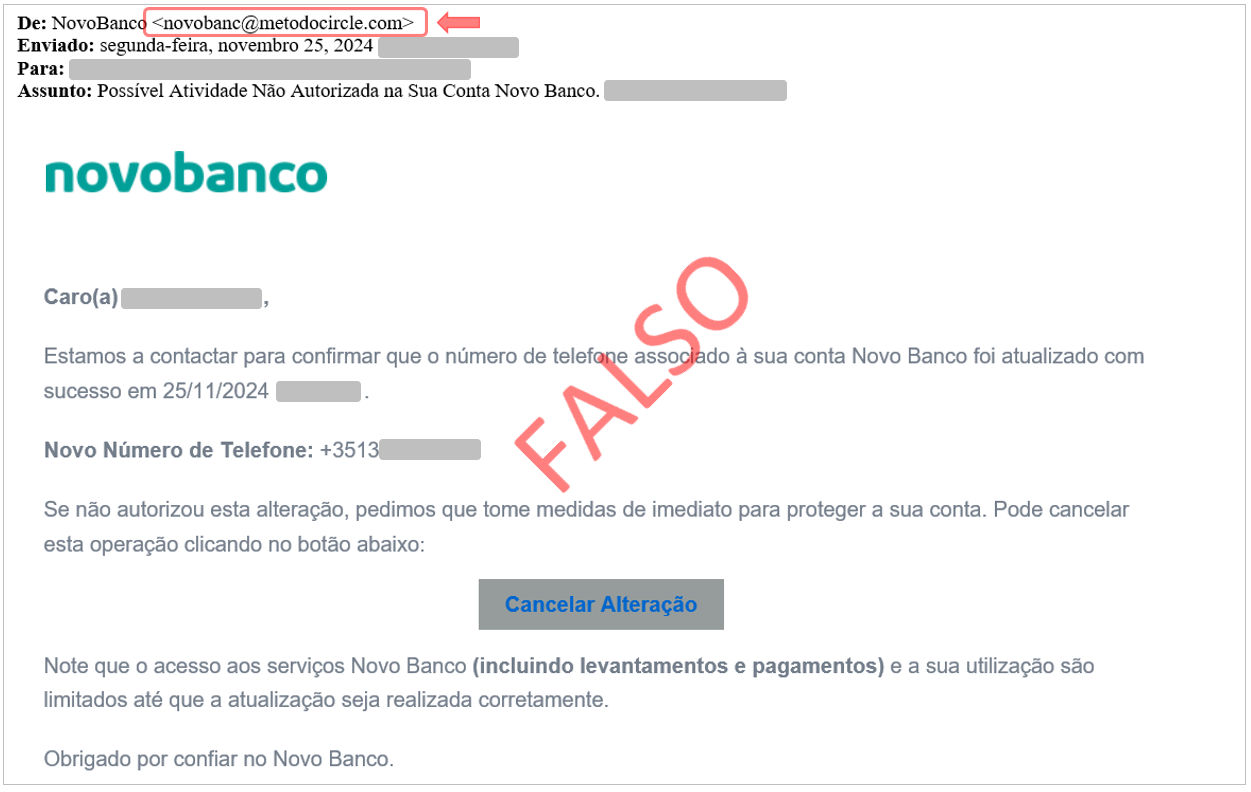
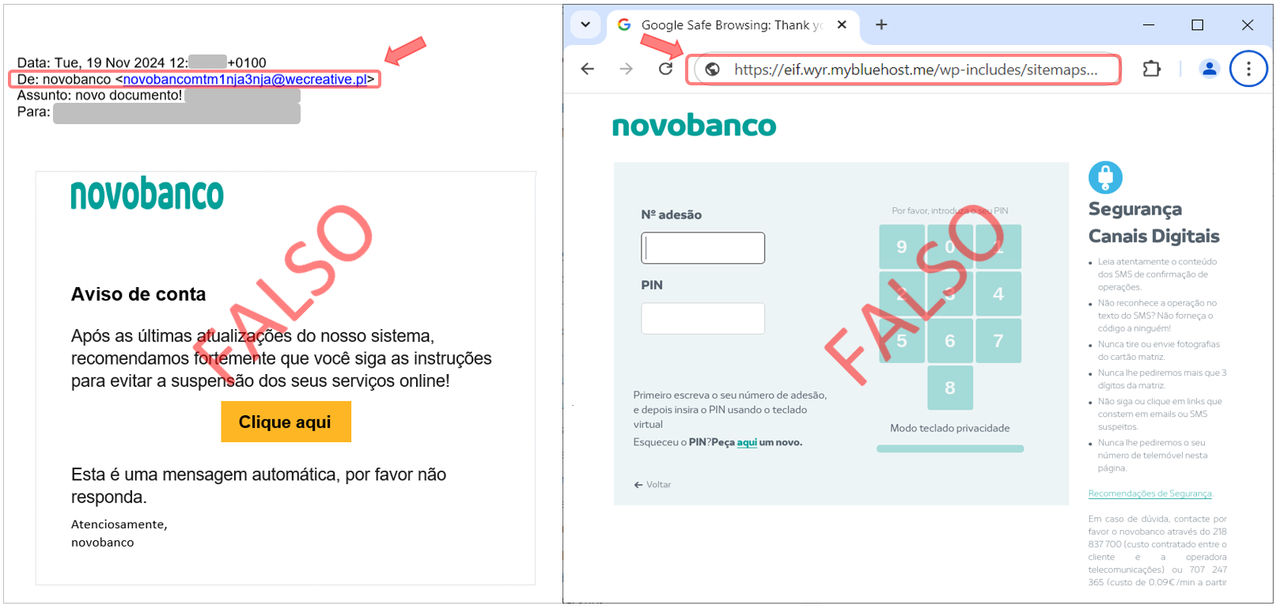
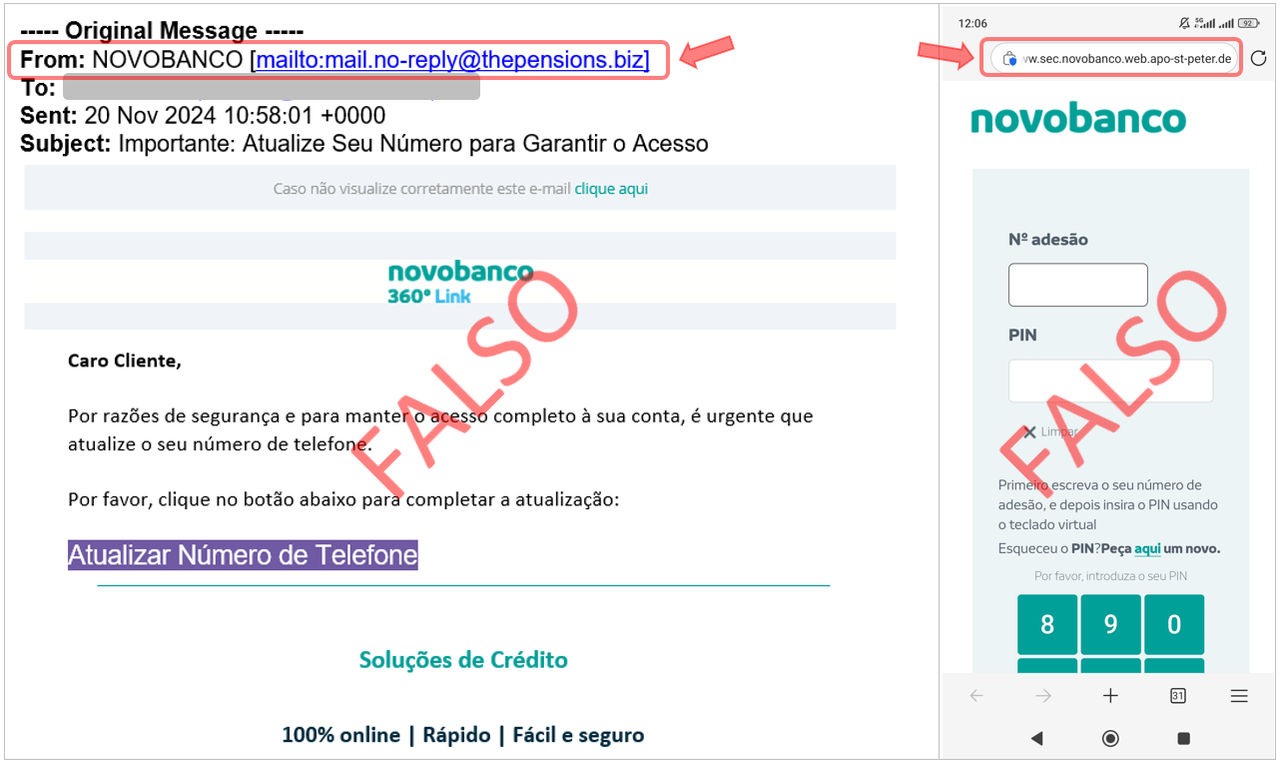
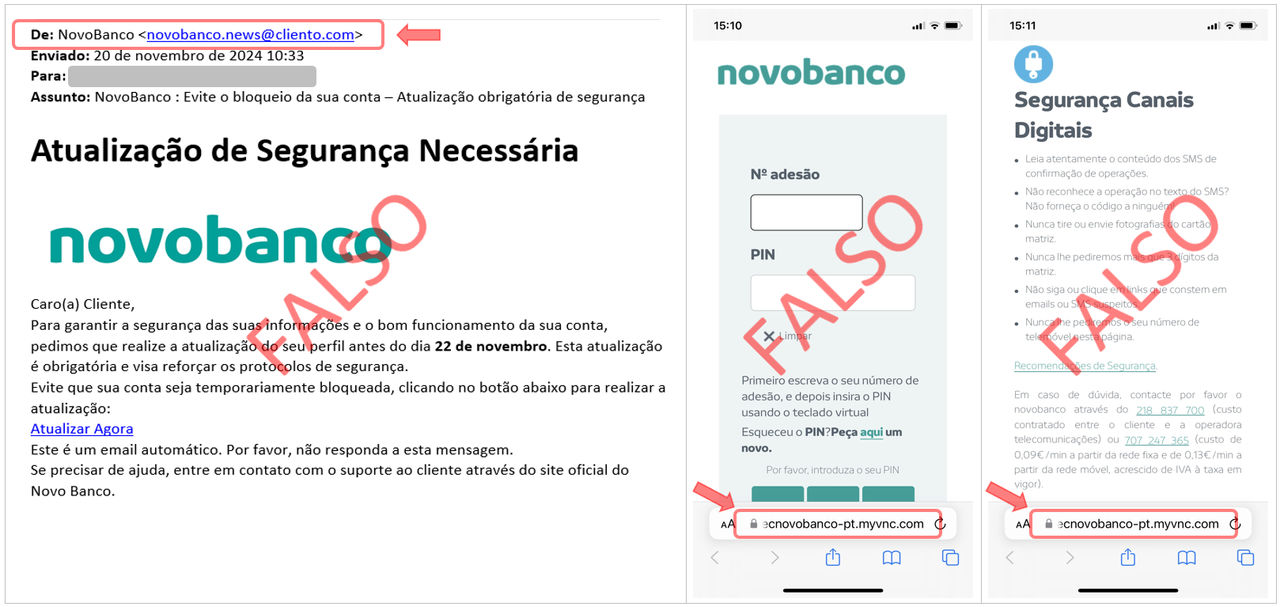
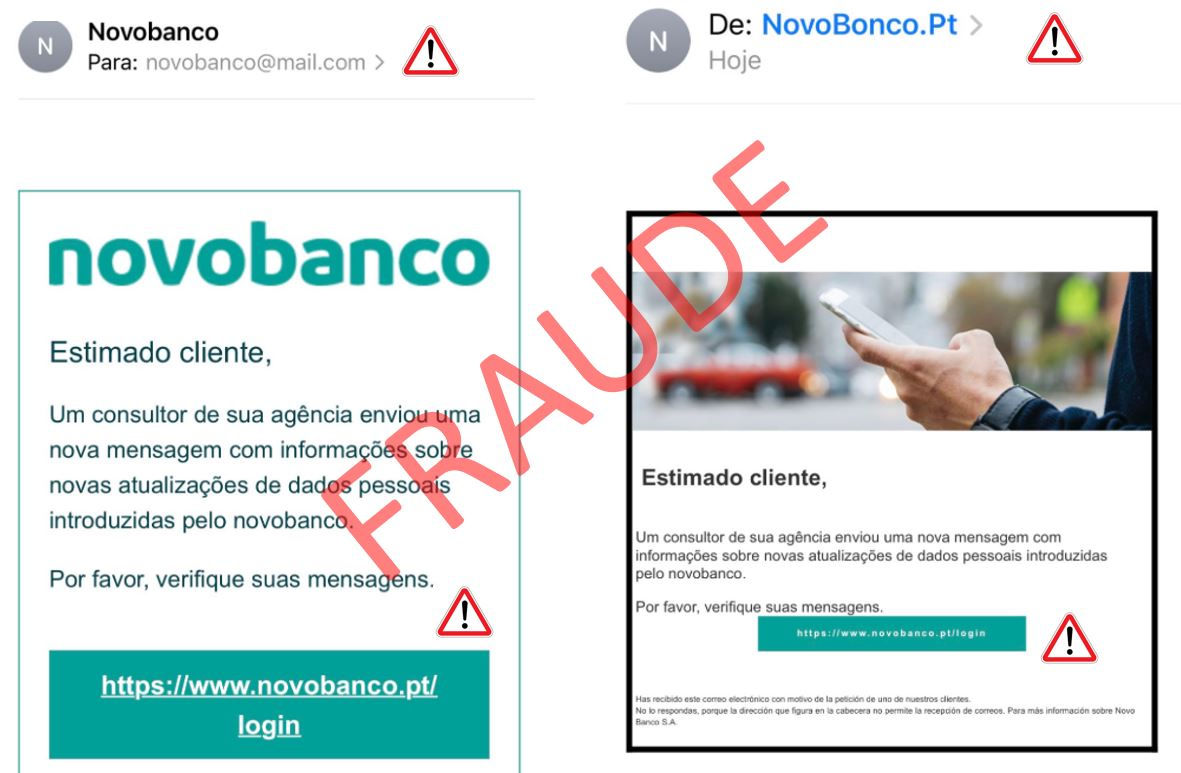
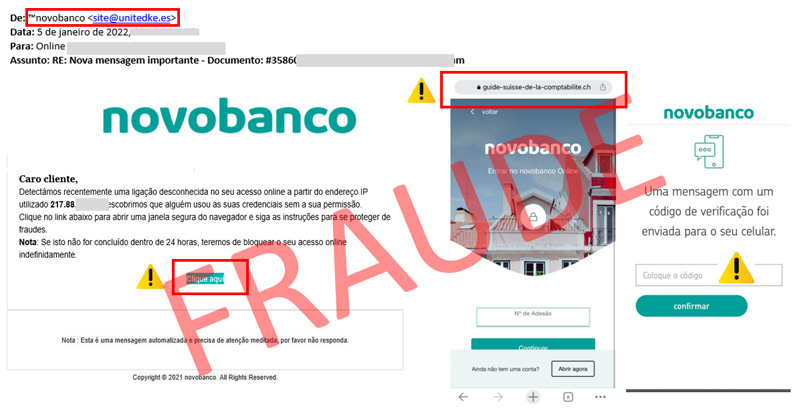
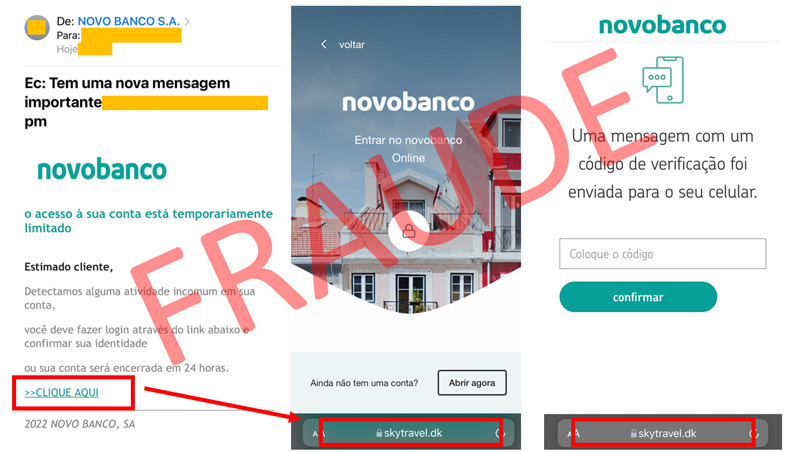
  • Always be suspicious of emails with links indicating a “mandatory procedure” or verification to unlock anything, such as your account, access or cards. 
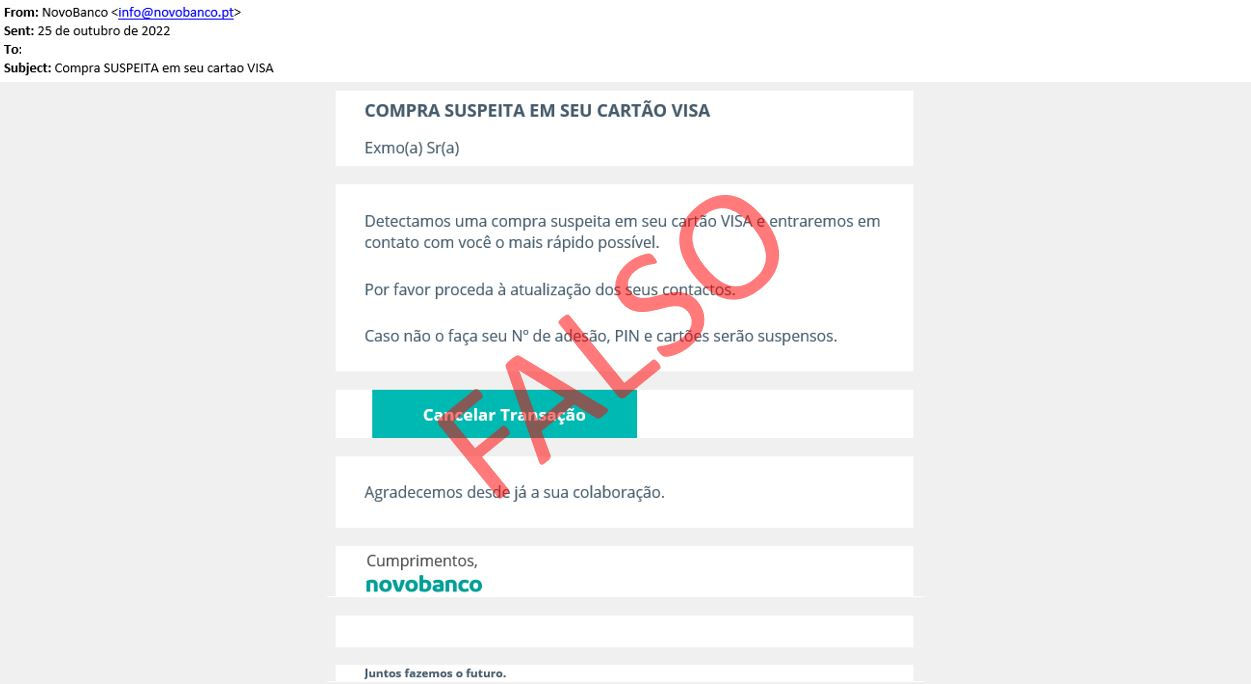
  • Always check the sender of the email. novobanco email addresses always end within “novobanco.pt”. 
  • Are you not a novobanco customer but still received an email? Attackers may have some information but do not know who you are. Do not confirm your identity and do not fill in the requested details. 
  • Always be suspicious of unexpected phone calls. The phone number shown may be falsified (“spoofing”). Never provide Cartão Matriz - Master Card positions or codes sent by SMS and do not accept validation requests via the App for services or transactions that were not initiated by you, even if the person on the “other side” says they are “from the Bank”. 
  • To access your account, use the novobanco App or type www.novobanco.pt into your browser. Avoid accessing your account through links, browser history or search engine results. novobanco’s online address is always https://www.novobanco.pt.

Do not provide personal data or account information. Contact your Branch immediately or our Linha Direta - Direct Line on 707 24 7 365.

March 2026

If you have received an email you were not expecting, no matter how trustworthy the sender may appear, always confirm the authenticity of the email content by phone with the relevant entity, for example a quotation request or invoice.

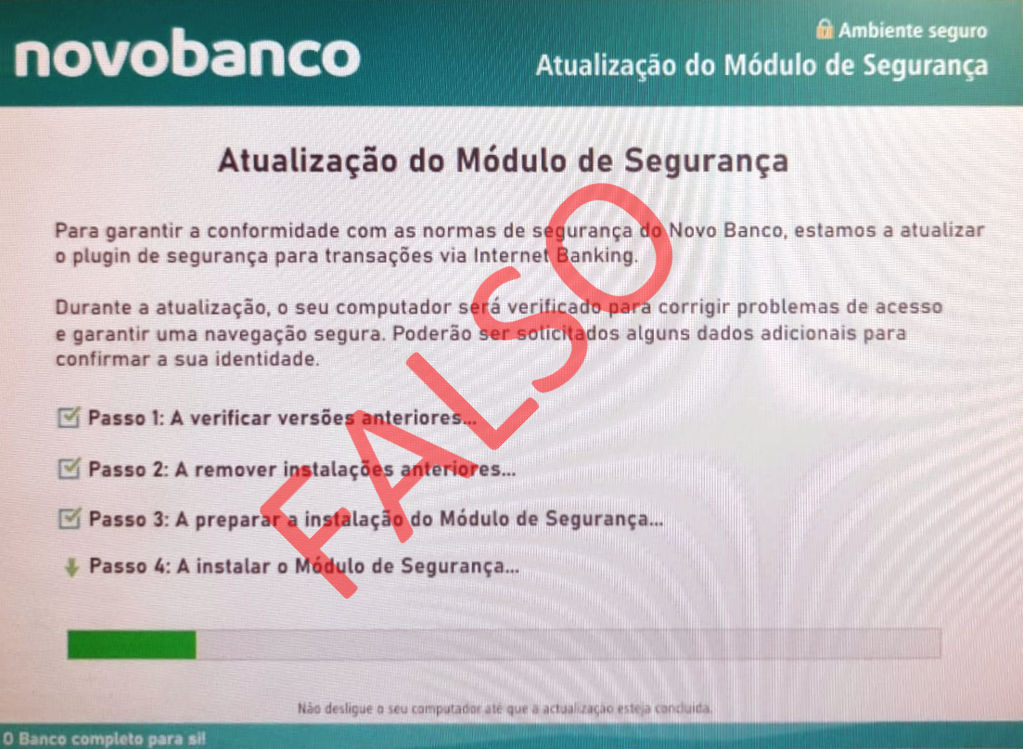
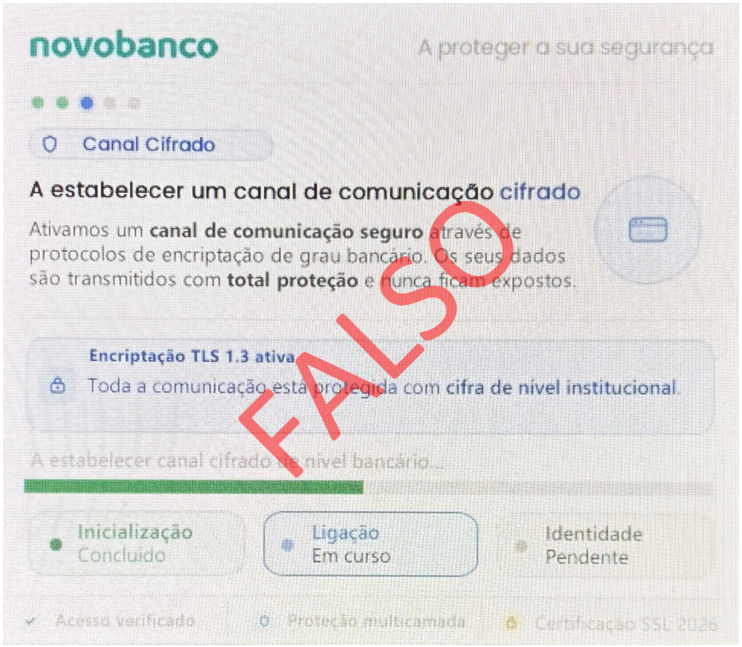
  • novobanco never requests the installation of software to use Digital Channels inon a computer. Always be suspicious of email or SMS messages implying a “mandatory procedure” to install security software. 
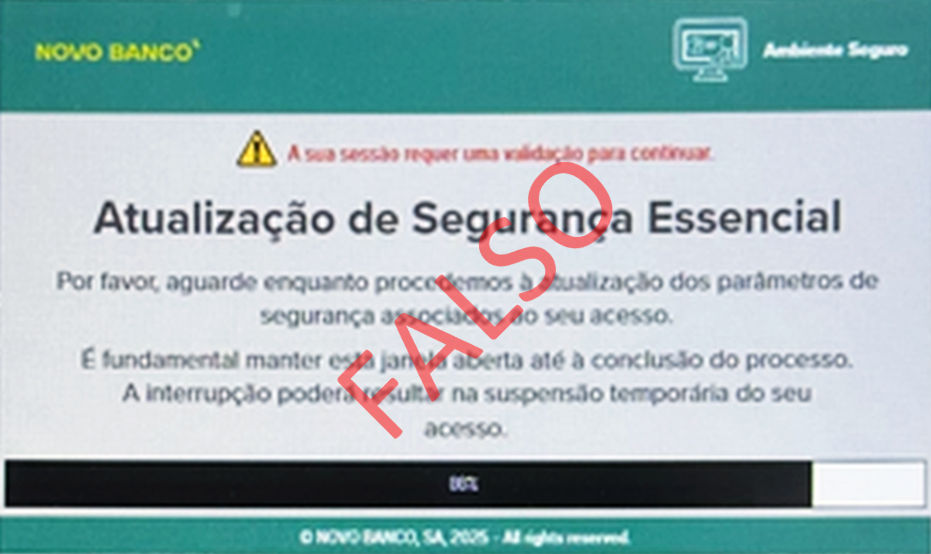
  • Stay alert. If, while using novobanco Digital Channels, your browser becomes blocked and displays a pop-up window, it is not us. Your computer has malicious software installed and is being controlled remotely. Do not provide Cartão Matriz - Master Card positions, codes sent by SMS or any other information on pop-up screens. 
  • Avoid using the computer until the malicious software has been removed. In addition to access to novobanco Digital Channels, other personal data inon the computer may be compromised. Switch off the computer immediately. If necessary, use an IT technician to analyse the computer and remove the Malware.

If your browser becomes blocked while displaying a similar screen, contact our Linha Direta - Direct Line immediately on 707 24 7 365.

December 2025

novobanco informs you that it has become aware of cases of malicious software installed on smartphones that may compromise the security of your personal and banking data. To ensure your protection, follow these 10 essential recommendations:

  1. Install applications only from official sources. Avoid installing or updating apps through alternative websites or links received in messages.

  2. Be suspicious of excessive permissions. If an application requests access to features that are not essential to its operation, such as access to personal data or messages including SMS, think carefully before authorising it.

  3. Avoid clicking suspicious links. Do not open unknown links received by SMS, email or social media.

  4. Keep your operating system and applications up to date. If you do not install updates, you increase the risk of cyber-attacks or malicious app installation.

  5. Check the applications installed on your mobile phone regularly. To keep the device safe and protected against unnecessary risks, delete apps you do not recognise or no longer use.

  6. If you use the Google Play Store, activate Play Protect. This feature regularly checks your phone for harmful behaviour.

  7. Use a reliable antivirus. Install a recognised security app to monitor and block threats.

  8. Do not root your Android device or jailbreak your Apple device. Doing so may disable important protections and make malware installation easier.
  9. Avoid using public Wi-Fi networks when accessing sensitive information, such as social media, online shopping or banking service apps. Public Wi-Fi networks, for example in cafés, shopping centres or airports, may not guarantee the privacy of your data.

  10. Watch out for unusual behaviour on your phone. If you notice slowness or the phone displays unexpected pop-up messages, the device may be compromised. If in doubt, switch off Wi-Fi and mobile data and seek specialist help.

Your security is our priority. If you noticed unusual behaviour when trying to access the novobanco App and your novobanco access was blocked, contact our Linha Direta - Direct Line on 707 24 7 365.65.

November 2025

  • Always be suspicious of emails with links indicating a “mandatory procedure” or verification to unlock anything, such as your account, access or cards. 
  • Always check the sender of the email. novobanco email addresses always end within “novobanco.pt”. 
  • Are you not a novobanco customer but still received an email? Attackers may have some information but do not know who you are. Do not confirm your identity and do not fill in the requested details. 
  • Always be suspicious of unexpected phone calls. The phone number shown may be falsified (“spoofing”). Never provide Cartão Matriz - Master Card positions or codes sent by SMS and do not accept validation requests via the App for services or transactions that were not initiated by you, even if the person on the “other side” says they are “from the Bank”. 
  • To access your account, use the novobanco App or type www.novobanco.pt into your browser. Avoid accessing your account through links, browser history or search engine results. novobanco’s online address is always https://www.novobanco.pt.

Do not provide personal data or account information. Contact your Branch immediately or our Linha Direta - Direct Line  on 707 24 7 365.

November 2025

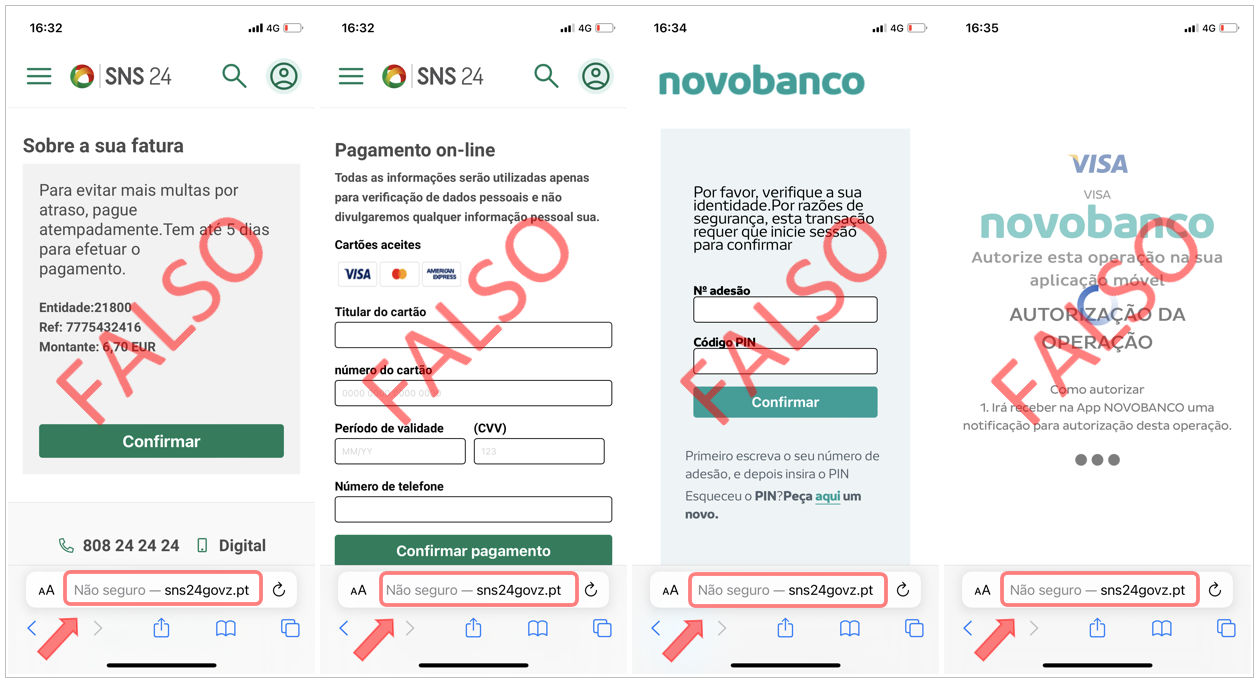
Did you receive an SMS or email using the SNS24 brand containing a link you do not recognise? Be suspicious.

  • Do not enter bank card details to make a payment you do not recognise. 
  • When you enter card details, this not only allows transactions to be made but also identifies your bank. If you are then shown a page with the novobanco image, it is a fraudulent page. 
  • Always check the page address. Do not enter your account access details, Subscriber Number and PIN, on addresses other than https://www.novobanco.pt.

Stay alert.

  • Always be suspicious of SMS messages with links. The sender name shown on your phone may be falsified, “spoofing”, and does not guarantee that the SMS is authentic. 
  • Always be suspicious of unexpected phone calls. The phone number shown may be falsified, “spoofing”. Never provide  Cartão Matriz - Master Card positions or codes sent by SMS and do not accept validation requests viain the App for services or transactions that were not initiated by you, even if the person on the “other side” says they are “from the Bank”. 
  • To access your account, use the novobanco App or type www.novobanco.pt into your browser. Avoid accessing your account through links, browser history or search engine results. novobanco’s online address is always https://www.novobanco.pt.

Do not provide personal data or account information. Contact your Branch immediately or our Linha Direta - Direct Line on 707 24 7 365.

November 2025

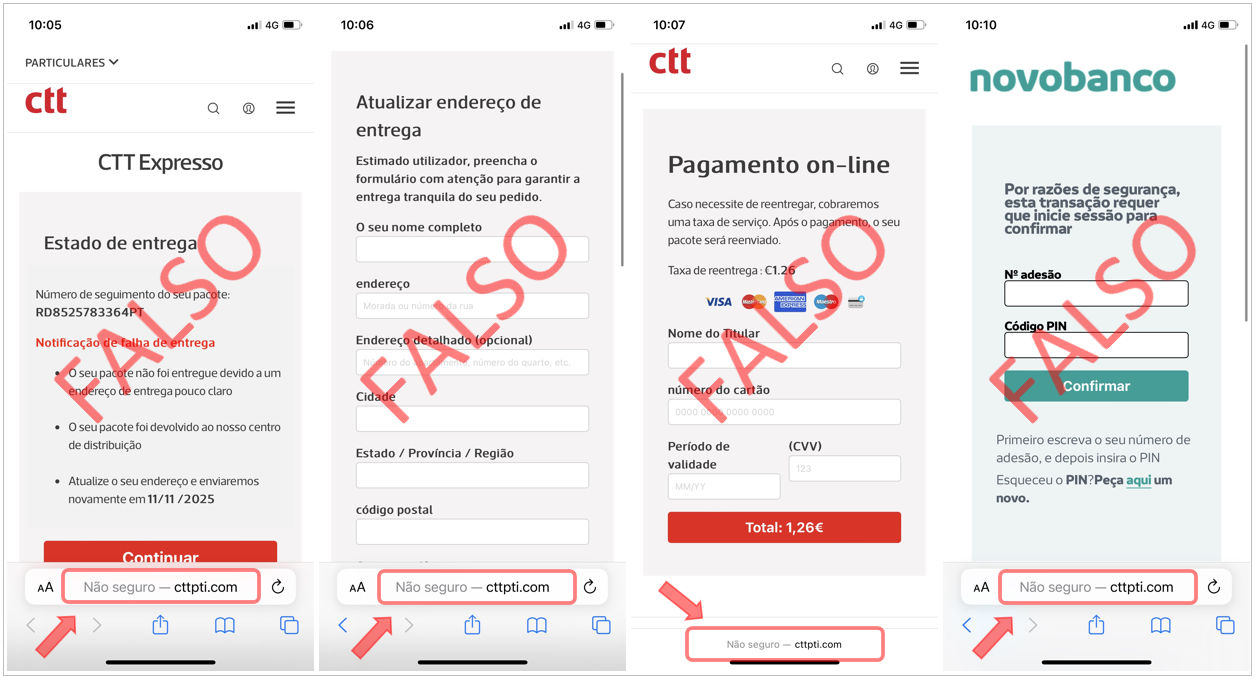
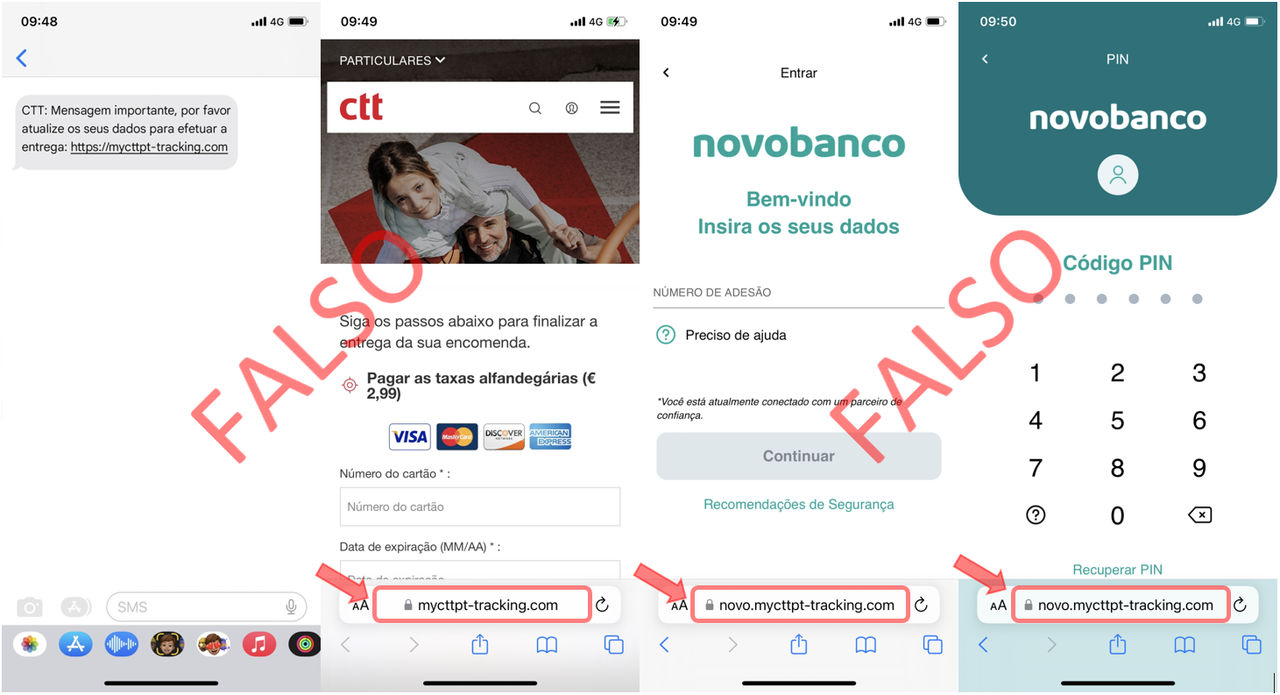
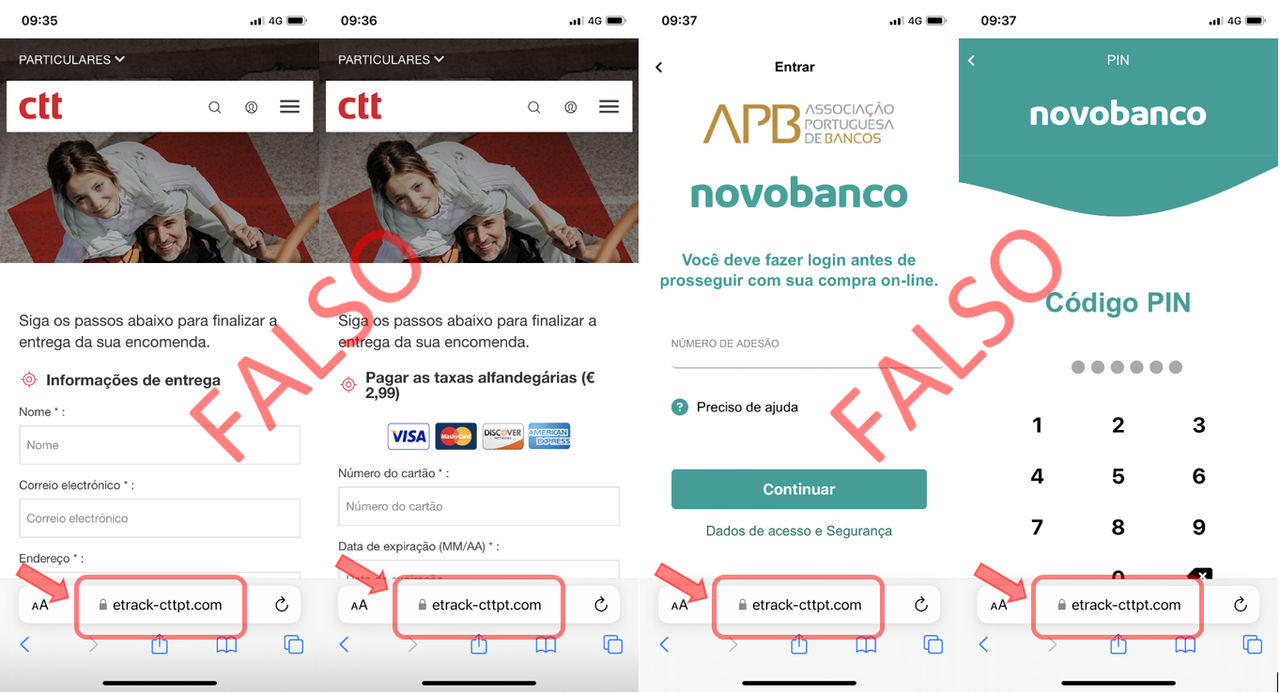
Did you receive an SMS or email using the CTT brand containing a link you do not recognise? Be suspicious.

  • Do not enter bank card details to make a payment you do not recognise. 
  • When you enter card details, this not only allows transactions to be made but also identifies your bank. If you are then shown a page with the novobanco image, it is a fraudulent page. Do not enter your account access details, Subscriber Number and PIN.

Stay alert.

  • Always be suspicious of SMS messages with links. The sender name shown on your phone may be falsified, “spoofing”, and does not guarantee that the SMS is authentic. 
  • Always be suspicious of unexpected phone calls. The phone number shown may be falsified, “spoofing”. Never provide Cartão Matriz - Master Card positions or codes sent by SMS and do not accept validation requests onin the App for services or transactions that were not initiated by you, even if the person on the “other side” says they are “from the Bank”. 
  • To access your account, use the novobanco App or type www.novobanco.pt into your browser. Avoid accessing your account through links, browser history or search engine results. novobanco’s online address is always https://www.novobanco.pt.

Do not provide personal data or account information. Contact your Branch immediately or our Linha Direta - Direct Line on 707 24 7 365.

November 2025

  • novobanco never requests the installation of software to use Digital Channels inon a computer. Always be suspicious of email or SMS messages implying a “mandatory procedure” to install security software. 
  • Stay alert. If, while using novobanco Digital Channels, your browser becomes blocked and displays a pop-up window, it is not us. Your computer has malicious software installed and is being controlled remotely. Do not provide Cartão Matriz - Master Card positions, codes sent by SMS or any other information on pop-up screens. 
  • Avoid using the computer until the malicious software has been removed. In addition to access to novobanco Digital Channels, other personal data inon the computer may be compromised. Switch off the computer immediately. If necessary, use an IT technician to analyse the computer and remove the Malware.

If your browser becomes blocked while displaying a similar screen, contact our Linha Direta - Direct Line immediately on 707 24 7 365.

September 2025

Online fraud attempts are becoming increasingly sophisticated, and the best protection is simple. Do not click links, stay alert, do not give in to pressure and never share your personal data or account details.

  • We never send links in SMS messages. The sender name shown on your phone may be falsified, “spoofing”. If you received an SMS with a link, it was not sent by the bank. 
  • We never ask for validation or cancellation codes by phone. 
  • We never ask for confirmation of transactions by email. 
  • We never make urgent requests or threats. Always be suspicious of messages or emails with links indicating an urgent “mandatory procedure”. 
  • We never request the installation or update of “security software” after you access your account.
  • If you access through your browser and your computer becomes blocked with an “Update” message, unknown individuals are using your computer. Disconnect it from the internet immediately. 
  • Always be suspicious of unexpected phone calls.
  • The phone number shown may be falsified, “spoofing”. Never provide Cartão Matriz - Master Card positions or codes sent by SMS and do not accept validation requests viain the App for services or transactions that were not initiated by you, even if the person on the “other side” says they are “from the Bank”. 
  • To access your account, use the novobanco App or type www.novobanco.pt into your browser. Avoid accessing your account through links, browser history or search engine results. novobanco’s online address is always https://www.novobanco.pt.

Do not provide personal data or account information. Contact your Branch immediately or our Linha Direta - Direct Line on 707 24 7 365.

September 2025

  • novobanco never requests the installation of software to use Digital Channels inon a computer. Always be suspicious of email or SMS messages implying a “mandatory procedure” to install security software. 
  • Stay alert. If, while using novobanco Digital Channels, your browser becomes blocked and displays a pop-up window, it is not us. Your computer has malicious software installed and is being controlled remotely. Do not provide Cartão Matriz - Master Card positions, codes sent by SMS or any other information on pop-up screens. 
  • Avoid using the computer until the malicious software has been removed. In addition to access to novobanco Digital Channels, other personal data inon the computer may be compromised. Switch off the computer immediately. If necessary, use an IT technician to analyse the computer and remove the Malware.

If your browser becomes blocked while displaying a similar screen, contact our Linha Direta - Direct Line  immediately on 707 24 7 365.

August 2025

novobanco never sends you SMS with links, nor will we contact you by phone asking for codes for a supposed account unblock or for transaction cancellation.

  • Always be suspicious of messages with links indicating a “mandatory procedure” or verification to unlock anything, such as your account, access or cards. 
  • It is not us. novobanco will never send you SMS with links. The sender name shown on your phone may be falsified, “spoofing”. 
  • Always be suspicious of unexpected phone calls. The phone number shown may be falsified, “spoofing”. Never provide Cartão Matriz - Master Card positions or codes sent by SMS and do not accept validation requests viain the App for services or transactions that were not initiated by you, even if the person on the “other side” says they are “from the Bank”. 
  • To access your account, use the novobanco App or type www.novobanco.pt into your browser. Avoid accessing your account through links, browser history or search engine results. novobanco’s online address is always https://www.novobanco.pt.

Do not provide personal data or account information. Contact your Branch immediately or our Linha Direta - Direct Line on 707 24 7 365.

August 2025

novobanco never sends you SMS with links, nor will we contact you by phone asking for codes for a supposed account unblock or for transaction cancellation.

  • Always be suspicious of messages with links indicating a “mandatory procedure” or verification to unlock anything, such as your account, access or cards. 
  • It is not us. novobanco will never send you SMS with links. The sender name shown on your phone may be falsified, “spoofing”. 
  • Always be suspicious of unexpected phone calls. The phone number shown may be falsified, “spoofing”. Never provide Cartão Matriz - Master Card positions or codes sent by SMS and do not accept validation requests viathe App for services or transactions that were not initiated by you, even if the person on the “other side” says they are “from the Bank”. 
  • To access your account, use the novobanco App or type www.novobanco.pt into your browser. Avoid accessing your account through links, browser history or search engine results. novobanco’s online address is always https://www.novobanco.pt.

Do not provide personal data or account information. Contact your Branch immediately or our Linha Direta - Direct Line on 707 24 7 365.

Agosto 2025

  • novobanco never requests the installation of software to use Digital Channels on a computer. Always be suspicious of email or SMS messages implying a “mandatory procedure” to install security software. 
  • Stay alert. If, while using novobanco Digital Channels, your browser becomes blocked and displays a pop-up window, it is not us. Your computer has malicious software installed and is being controlled remotely. Do not provide Cartão Matriz - Master Card positions, codes sent by SMS or any other information on pop-up screens. 
  • Avoid using the computer until the malicious software has been removed. In addition to access to novobanco Digital Channels, other personal data in the computer may be compromised. Switch off the computer immediately. If necessary, use an IT technician to analyse the computer and remove the Malware.

If your browser becomes blocked while displaying a similar screen, contact our Linha Direta - Direct Line immediately on 707 24 7 365.

August 2025

novobanco informs you that it has become aware of cases of malicious software installed on smartphones that may compromise the security of your personal and banking data. To ensure your protection, follow these 10 essential recommendations:

  1. Install applications only from official sources. Avoid installing or updating apps through alternative websites or links received in messages.

  2. Be suspicious of excessive permissions. If an application requests access to features that are not essential to its operation, such as access to personal data or messages including SMS, think carefully before authorising it.

  3. Avoid clicking suspicious links. Do not open unknown links received by SMS, email or social media.

  4. Keep your operating system and applications up to date. If you do not install updates, you increase the risk of cyber-attacks or malicious app installation.

  5. Check the applications installed on your mobile phone regularly. To keep the device safe and protected against unnecessary risks, delete apps you do not recognise or no longer use.

  6. If you use the Google Play Store, activate Play Protect. This feature regularly checks your phone for harmful behaviour.

  7. Use a reliable antivirus. Install a recognised security app to monitor and block threats.

  8. Do not root your Android device or jailbreak your Apple device. Doing so may disable important protections and make malware installation easier.
  9. Avoid using public Wi-Fi networks when accessing sensitive information, such as social media, online shopping or banking service apps. Public Wi-Fi networks, for example in cafés, shopping centres or airports, may not guarantee the privacy of your data.

  10. Watch out for unusual behaviour on your phone. If you notice slowness or the phone displays unexpected pop-up messages, the device may be compromised. If in doubt, switch off Wi-Fi and mobile data and seek specialist help.

Your security is our priority. If you noticed unusual behaviour when trying to access the novobanco App and your novobanco access was blocked, contact our Linha Direta - Direct Line on 707 24 7 365.

June 2025

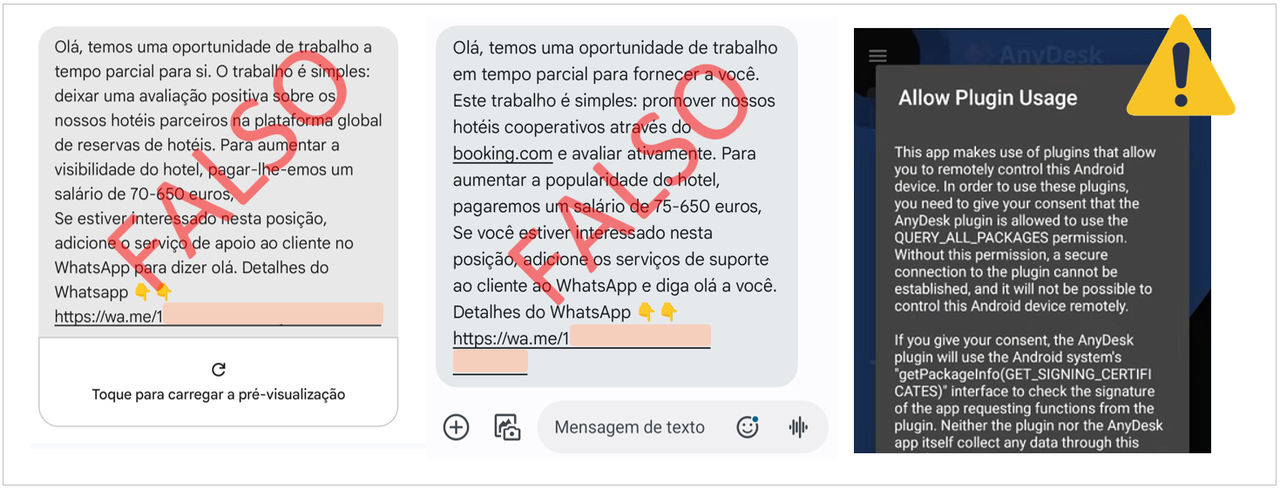
Stay alert. Ignore any “job” offer involving money transfers through your bank account, no matter how authentic it may seem. If an opportunity looks too good to be true, it probably is. Being a “Money Mule” is a crime. #dontbeamule

  • Never disclose your identification and PIN for access to Digital Channels to third parties. 
  • Be suspicious of unsolicited automated recorded phone calls. Be very careful with unsolicited calls and emails or offers made on social media or in person, promising easy money. 
  • Do not install any program or application at the request of third parties. Applications allowing remote control of a mobile phone, for example AnyDesk or TeamViewer, or a computer, are legitimate if used by you. But if you allow third parties to use them, you will compromise your personal data and control of your bank accounts. 
  • Do not join chat groups of unknown origin. If you joined a “work” group on WhatsApp or Telegram expecting to receive extra income but are then asked to make payments, stop transferring money immediately, inform the bank and notify the Police. You may help prevent other people from becoming Money Mules and even help capture the criminals.
May 2025

  • novobanco never requests the installation of software to use Digital Channels in a computer. Always be suspicious of email or SMS messages implying a “mandatory procedure” to install security software. 
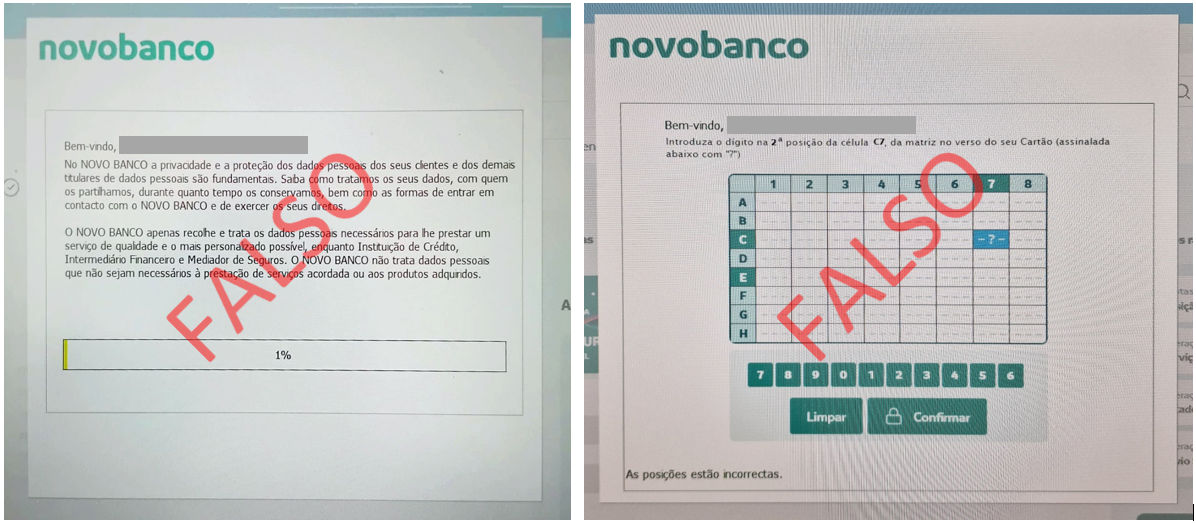
  • Stay alert. If, while using novobanco Digital Channels, your browser becomes blocked and displays a pop-up window like those shown on the following screens, it is not us. Your computer has malicious software installed and is being controlled remotely. Do not provide Cartão Matriz - Master Card positions, codes sent by SMS or any other information on pop-up screens. 
  • Avoid using the computer until the malicious software has been removed. In addition to access to novobanco Digital Channels, other personal data in the computer may be compromised. If necessary, use an IT technician to analyse the computer and remove the Malware.

If your browser becomes blocked while displaying similar screens, contact your Branch immediately or our Linha Direta - Direct Line on 707 24 7 365.

April 2025

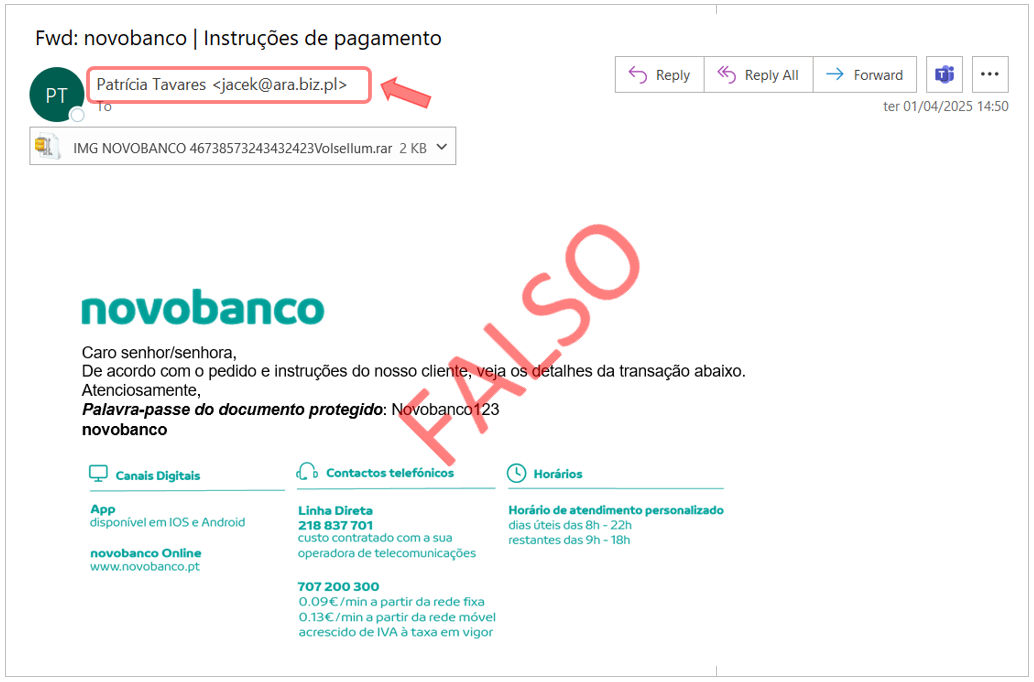
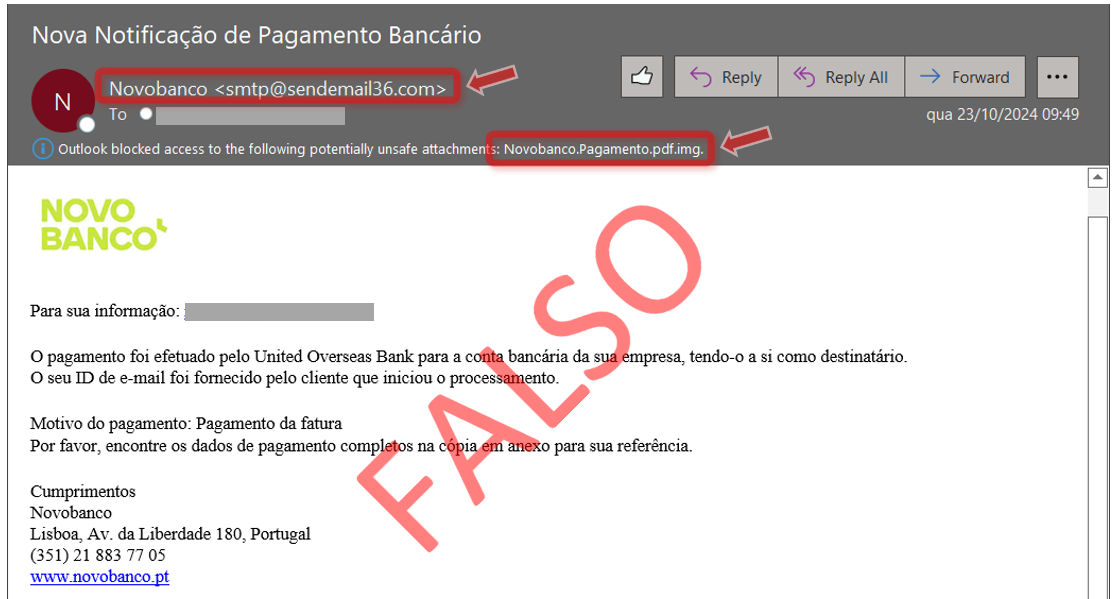
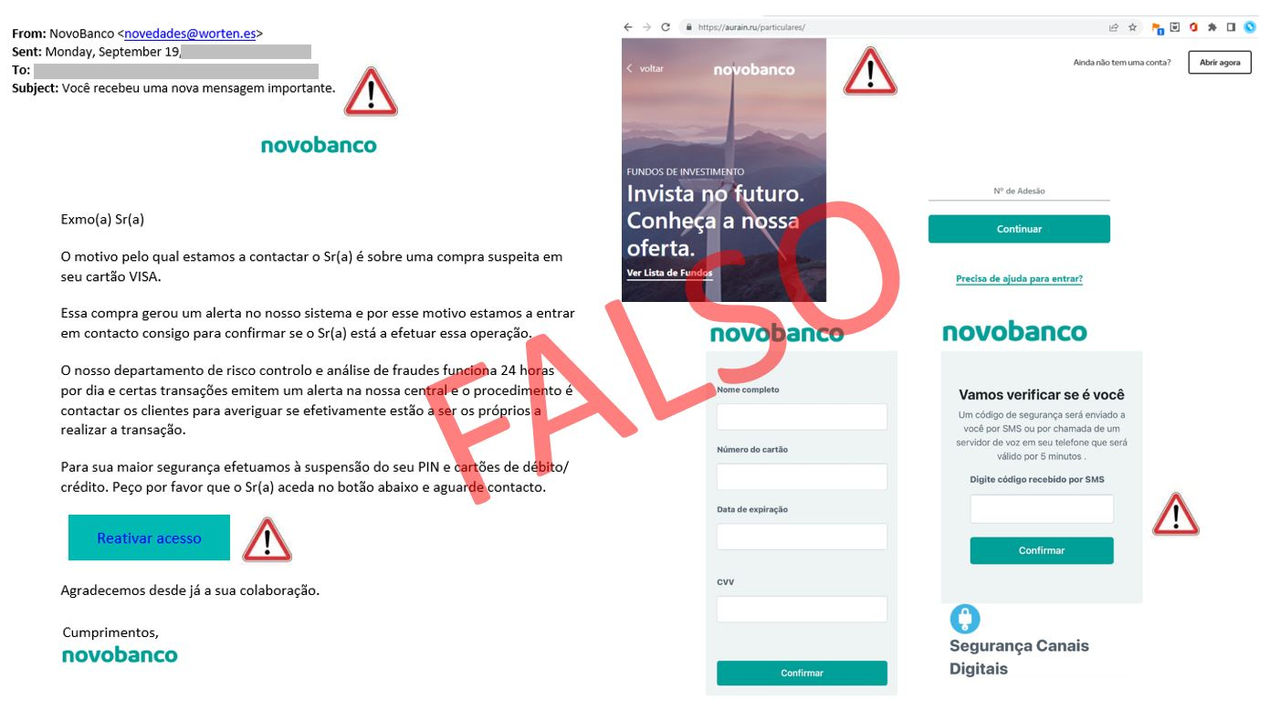
novobanco informs you that it has become aware of phishing emails sent indiscriminately using the novobanco name.

The emails were received by customers and also by recipients who are not novobanco customers.

These emails include an attachment that installs malicious software, malware, which compromises the information on the device and may allow attackers to remotely control that same device.

  • It is not us. Always check the sender’s email address. 
  • Avoid opening attachments in emails from doubtful sources.

If you received a suspicious email apparently sent by novobanco, contact your Branch immediately or our Linha Direta - Direct Line on 707 24 7 365.

February 2025

  • Always be suspicious of emails with links indicating a “mandatory procedure” or verification to unlock anything, such as your account, access or cards. 
  • Always check the sender of the email. novobanco email addresses always end in “novobanco.pt”. 
  • Are you not a novobanco customer but still received an email? Attackers may have some information but do not know who you are. Do not confirm your identity and do not fill in the requested details. 
  • Always be suspicious of unexpected phone calls. The phone number shown may be falsified, “spoofing”. Never provide Cartão Matriz - Master Card positions or codes sent by SMS and do not accept validation requests viathe App for services or transactions that were not initiated by you, even if the person on the “other side” says they are “from the Bank”. 
  • To access your account, use the novobanco App or type www.novobanco.pt into your browser. Avoid accessing your account through links, browser history or search engine results. novobanco’s online address is always https://www.novobanco.pt.

Do not provide personal data or account information. Contact your Branch immediately or our Linha Direta - Direct Line on 707 24 7 365.

February 2025

novobanco never sends you SMS with links, nor will we contact you by phone asking for codes for a supposed account unblock or for transaction cancellation.

  • Always be suspicious of messages with links indicating a “mandatory procedure” or verification to unlock anything, such as your account, access or cards. 
  • It is not us. novobanco will never send you SMS with links. The sender name shown on your phone may be falsified, “spoofing”. 
  • Always be suspicious of unexpected phone calls. The phone number shown may be falsified, “spoofing”. Never provide Cartão Matriz - Master Card positions or codes sent by SMS and do not accept validation requests via the App for services or transactions that were not initiated by you, even if the person on the “other side” says they are “from the Bank”. 
  • To access your account, use the novobanco App or type www.novobanco.pt into your browser. Avoid accessing your account through links, browser history or search engine results. novobanco’s online address is always https://www.novobanco.pt.

Do not provide personal data or account information. Contact your Branch immediately or our Linha Direta - Direct Line on 707 24 7 365.

January 2025

Stay alert. Ignore any “job” offer involving money transfers through your bank account, no matter how authentic it may seem. If an opportunity looks too good to be true, it probably is. Being a “Money Mule” is a crime. #dontbeamule

  • Never disclose your identification and PIN for access to Digital Channels to third parties. 
  • Be very careful with unsolicited emails or offers made on social media or in person, promising easy money. 
  • Do not install any program or application at the request of third parties. Applications allowing remote control of a mobile phone, for example AnyDesk or TeamViewer, or a computer, are legitimate if used by you. But if you allow third parties to use them, you will compromise your personal data and control of your bank accounts. 
  • Do not join chat groups of unknown origin. If you clicked on a link, joined a “work” group on WhatsApp or Telegram expecting to receive extra income but are then asked to make payments, stop transferring money immediately, inform the bank and notify the Judicial Police. You may help prevent other people from becoming Money Mules and even help capture the criminals.

January 2025

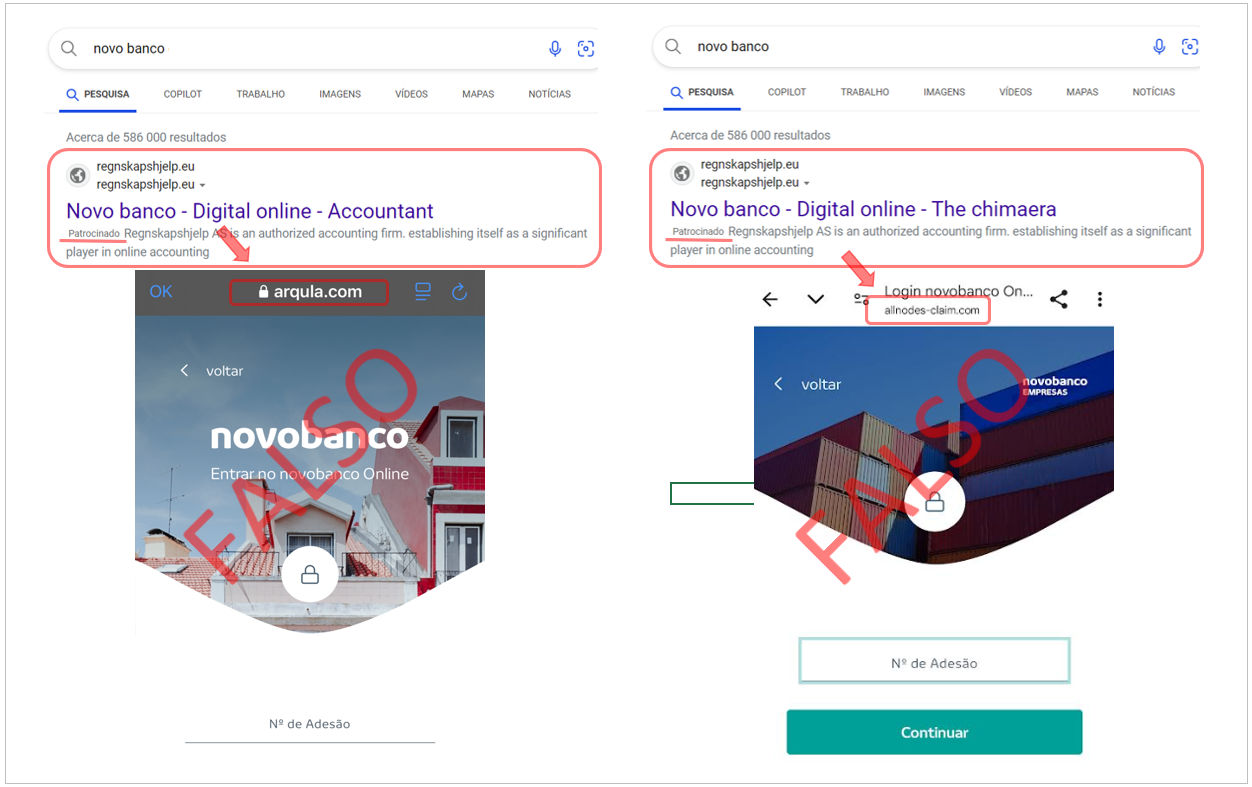
If you search for “Novo Banco” in search engines, pay attention to the results. If, after searching, you click on any of the links shown, always check the address you are accessing.

  • To access your account, use the novobanco App or type www.novobanco.pt into your browser. Avoid accessing your account through links, browser history or search engine results. novobanco’s online address is always https://www.novobanco.pt.

Do not provide personal data or account information. Contact your Branch immediately or our Linha Direta - Direct Line on 707 24 7 365.

January 2025

  • Always be suspicious of emails with links indicating a “mandatory procedure” or verification to unlock anything, such as your account, access or cards. 
  • Are you not a novobanco customer but still received an email? Attackers may have some information but do not know who you are. Do not confirm your identity and do not fill in the requested details. 
  • Always be suspicious of unexpected phone calls. The phone number shown may be falsified, “spoofing”. Never provide Cartão Matriz - Master Card positions or codes sent by SMS and do not accept validation requests via the App for services or transactions that were not initiated by you, even if the person on the “other side” says they are “from the Bank”. 
  • To access your account, use the novobanco App or type www.novobanco.pt into your browser. Avoid accessing your account through links, browser history or search engine results. novobanco’s online address is always https://www.novobanco.pt.

Do not provide personal data or account information. Contact your Branch immediately or our Linha Direta - Direct Line on 707 24 7 365.

November 2024

  • Always be suspicious of emails with links indicating a “mandatory procedure” or verification to unlock anything, such as your account, access or cards. 
  • Are you not a novobanco customer but still received an email? Attackers may have some information but do not know who you are. Do not confirm your identity and do not fill in the requested details. 
  • Always be suspicious of unexpected phone calls. The phone number shown may be falsified, “spoofing”. Never provide Cartão Matriz - Master Card positions or codes sent by SMS and do not accept validation requests in the App for services or transactions that were not initiated by you, even if the person on the “other side” says they are “from the Bank”. 
  • To access your account, use the novobanco App or type www.novobanco.pt into your browser. Avoid accessing your account through links, browser history or search engine results. novobanco’s online address is always https://www.novobanco.pt.

Do not provide personal data or account information. Contact your Branch immediately or our Linha Direta - Direct Line on 707 24 7 365.

November 2024

  • Always be suspicious of emails with links indicating a “mandatory procedure” or verification to unlock anything, such as your account, access or cards. 
  • Are you not a novobanco customer but still received an email? Attackers may have some information but do not know who you are. Do not confirm your identity and do not fill in the requested details. 
  • Always be suspicious of unexpected phone calls. The phone number shown may be falsified, “spoofing”. Never provide Cartão Matriz - Master Card positions or codes sent by SMS and do not accept validation requests via the App for services or transactions that were not initiated by you, even if the person on the “other side” says they are “from the Bank”. 
  • To access your account, use the novobanco App or type www.novobanco.pt into your browser. Avoid accessing your account through links, browser history or search engine results. novobanco’s online address is always https://www.novobanco.pt.

Do not provide personal data or account information. Contact your Branch immediately or our Linha Direta - Direct Line on 707 24 7 365.

Novembro 2024

  • Always be suspicious of emails with links indicating a “mandatory procedure” or verification to unlock anything, such as your account, access or cards. 
  • Are you not a novobanco customer but still received an email? Attackers may have some information but do not know who you are. Do not confirm your identity and do not fill in the requested details. 
  • Always be suspicious of unexpected phone calls. The phone number shown may be falsified, “spoofing”. Never provide Cartão Matriz - Master Card positions or codes sent by SMS and do not accept validation requests viain the App for services or transactions that were not initiated by you, even if the person on the “other side” says they are “from the Bank”. 
  • To access your account, use the novobanco App or type www.novobanco.pt into your browser. Avoid accessing your account through links, browser history or search engine results. novobanco’s online address is always https://www.novobanco.pt.

Do not provide personal data or account information. Contact your Branch immediately or our Linha Direta - Direct Line on 707 24 7 365.

November 2024

  • Always be suspicious of emails with links indicating a “mandatory procedure” or verification to unlock anything, such as your account, access or cards. 
  • Are you not a novobanco customer but still received an email? Attackers may have some information but do not know who you are. Do not confirm your identity and do not fill in the requested details. 
  • Always be suspicious of unexpected phone calls. The phone number shown may be falsified, “spoofing”. Never provide Cartão Matriz - Master Card positions or codes sent by SMS and do not accept validation requests via the App for services or transactions that were not initiated by you, even if the person on the “other side” says they are “from the Bank”. 
  • To access your account, use the novobanco App or type www.novobanco.pt into your browser. Avoid accessing your account through links, browser history or search engine results. novobanco’s online address is always https://www.novobanco.pt.

Do not provide personal data or account information. Contact your Branch immediately or our Linha Direta - Direct Line on 707 24 7 365.

October 2024

novobanco informs you that it has become aware of phishing emails sent indiscriminately using the novobanco name.

The emails were received by customers and also by recipients who are not novobanco customers.

These emails include an attachment that installs malicious software, malware, which compromises the information on the device and may allow attackers to remotely control that same device.

  • It is not us. Always check the sender’s email address. 
  • Avoid opening attachments in emails from doubtful sources.

If you received a suspicious email apparently sent by novobanco, contact your Branch immediately or our Linha Direta - Direct Line on 707 24 7 365.

August 2024

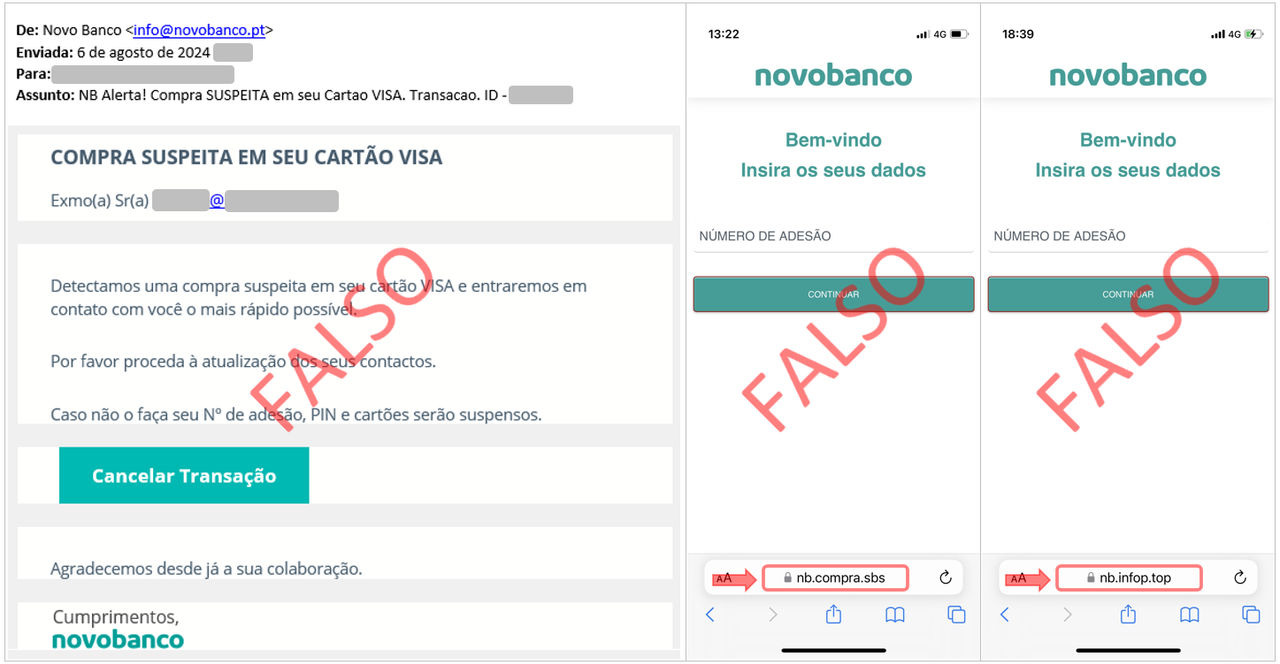
novobanco will never send you emails with this kind of procedure, nor will we contact you by phone asking for codes for a supposed account unblock or transaction cancellation.

  • Always be suspicious of emails with links indicating a “mandatory procedure” or verification to unlock anything, such as your account, access or cards. 
  • Are you not a novobanco customer but still received an email? Attackers may have some information but do not know who you are. Do not confirm your identity and do not fill in the requested details. 
  • Always be suspicious of unexpected phone calls. The phone number shown may be falsified, “spoofing”. Never provide Cartão Matriz - Master Card positions or codes sent by SMS and do not accept validation requests viain the App for services or transactions that were not initiated by you, even if the person on the “other side” says they are “from the Bank”. 
  • To access your account, use the novobanco App or type www.novobanco.pt into your browser. Avoid accessing your account through links, browser history or search engine results. novobanco’s online address is always https://www.novobanco.pt.

Do not provide personal data or account information. Contact your Branch immediately or our Linha Direta - Direct Line on 707 24 7 365.

July 2024

Did you receive an SMS or email using the CTT brand containing a link you do not recognise? Be suspicious.

  • Do not enter bank card details to make a payment you do not recognise. 
  • When you enter card details, this not only allows transactions to be made but also identifies your bank. If you are then shown a page with the novobanco image, it is a fraudulent page. Do not enter your account access details, Subscriber Number and PIN.

Stay alert.

  • Always be suspicious of SMS messages with links. The sender name shown on your phone may be falsified, “spoofing”, and does not guarantee that the SMS is authentic. 
  • Always be suspicious of unexpected phone calls. The phone number shown may be falsified, “spoofing”. Never provide Cartão Matriz - Master Card positions or codes sent by SMS and do not accept validation requests viain the App for services or transactions that were not initiated by you, even if the person on the “other side” says they are “from the Bank”. 
  • To access your account, use the novobanco App or type www.novobanco.pt into your browser. Avoid accessing your account through links, browser history or search engine results. novobanco’s online address is always https://www.novobanco.pt.

Do not provide personal data or account information. Contact your Branch immediately or our Linha Direta - Direct Line on 707 24 7 365.

July 2024

novobanco informs you that it has become aware of phishing emails sent indiscriminately using the novobanco name.

The emails were received by customers and also by recipients who are not novobanco customers.

novobanco will never send you emails with these procedures, nor will we contact you by phone asking for codes for a supposed account unblock or transaction cancellation.

  • Always be suspicious of emails with links indicating a “mandatory procedure” or verification to unlock anything, such as your account, access or cards. 
  • Are you not a novobanco customer but still received an email? Attackers may have some information but do not know who you are. Do not confirm your identity and do not fill in the requested details. 
  • It is not us. Always check the sender’s email address. 
  • We do not ask for your mobile number on a website. If you are our customer, novobanco already knows your contact number. 
  • We do not request information from your debit or credit card. The card is yours to use for payments and purchases. 
  • Always be suspicious of unexpected phone calls. The phone number shown may be falsified, “spoofing”. Never provide Cartão Matriz - Master Card positions or codes sent by SMS and do not accept validation requests viain the App for services or transactions that were not initiated by you, even if the person on the “other side” says they are “from the Bank”. 
  • To access your account, use the novobanco App or type www.novobanco.pt into your browser. Avoid accessing your account through links, browser history or search engine results. novobanco’s online address is always https://www.novobanco.pt.

Do not provide personal data or account information. Contact your Branch immediately or our Linha Direta - Direct Line on 707 24 7 365.

June 2024

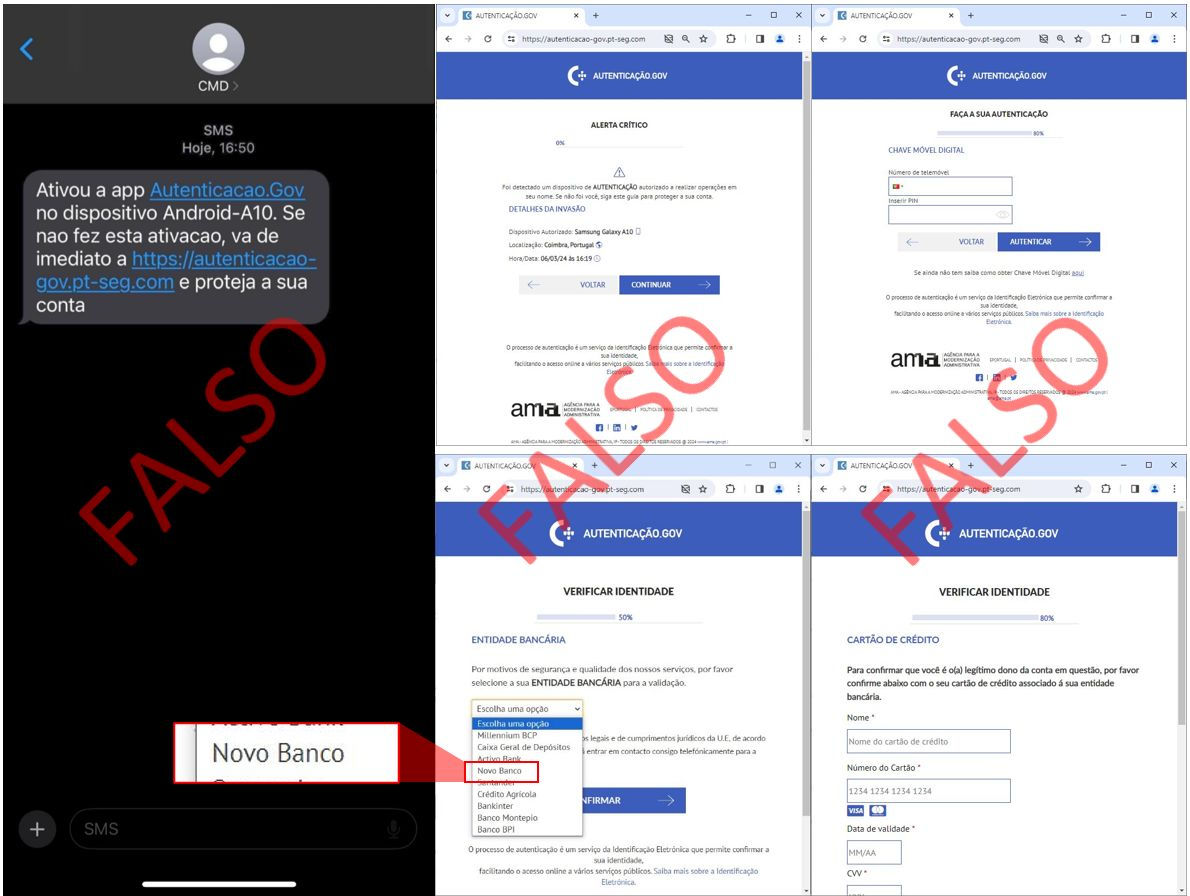
  • Always be suspicious of messages with links indicating a “mandatory procedure” or verification to unlock anything, such as your account, access or cards. 
  • Do not provide personal data, account data or card data on internet addresses informed through suspicious messages. 
  • Chave Móvel Digital - Digital Mobile Key will never request information about your bank or your cards as a form of identification.

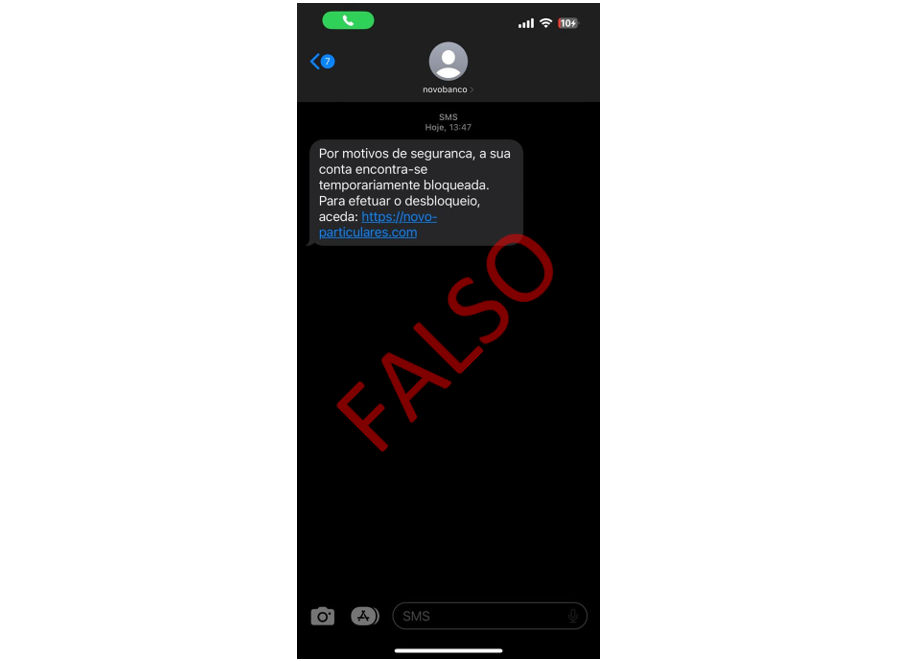
If you have received a suspicious phone call about a supposed “Account block” or the SMS below, or similar, do not take any action.

May 2024

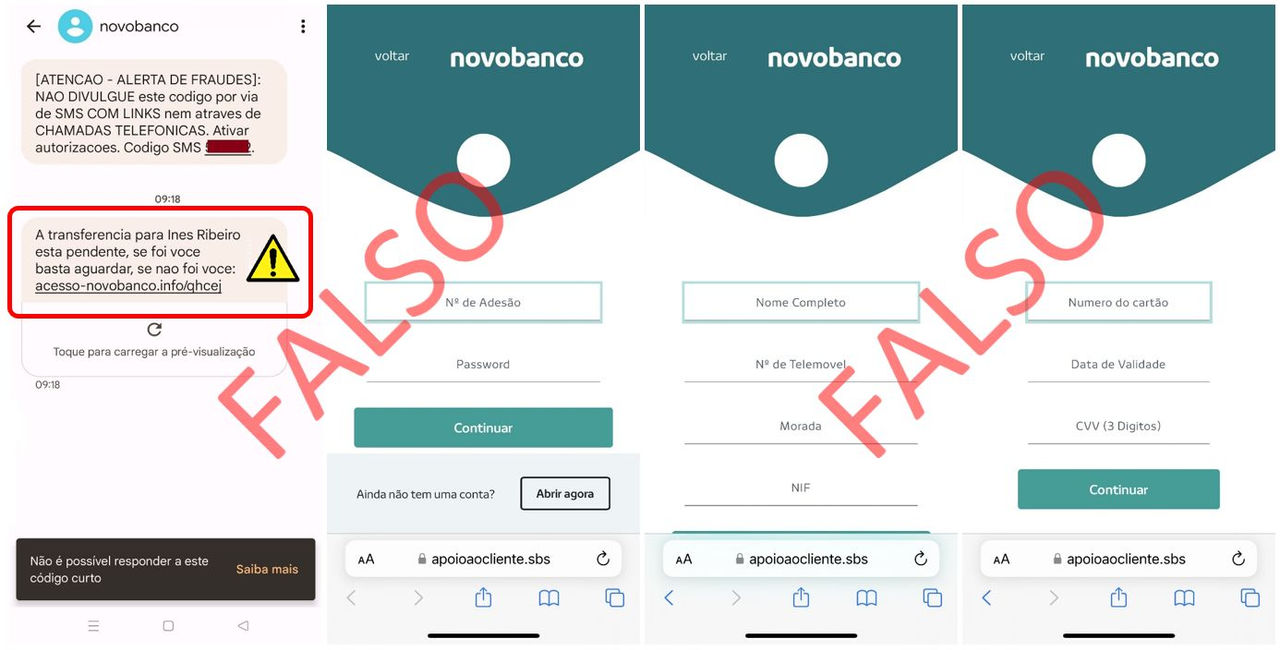
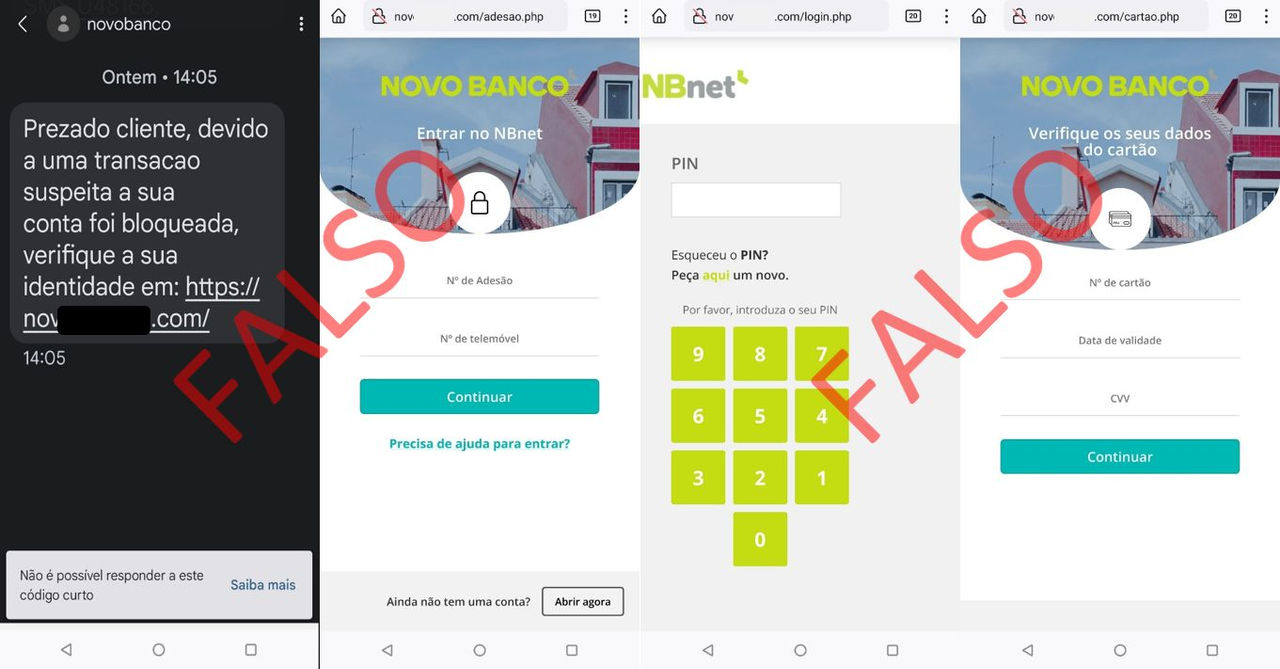
novobanco never sends you SMS with links, nor will we contact you by phone asking for codes for a supposed account unblock or transaction cancellation.

  • Always be suspicious of messages with links indicating a “mandatory procedure” or verification to unlock anything, such as your account, access or cards. 
  • It is not us. novobanco will never send you SMS with links. The sender name shown on your phone may be falsified, “spoofing”. 
  • Always be suspicious of unexpected phone calls. The phone number shown may be falsified, “spoofing”. Never provide Cartão Matriz - Master Card positions or codes sent by SMS and do not accept validation requests via the App for services or transactions that were not initiated by you, even if the person on the “other side” says they are “from the Bank”. 
  • To access your account, use the novobanco App or type www.novobanco.pt into your browser. Avoid accessing your account through links, browser history or search engine results. novobanco’s online address is always https://www.novobanco.pt.

Do not provide personal data or account information. Contact your Branch immediately or our Linha Direta - Direct Line on 707 24 7 365.

April 2024

novobanco will never send you emails with this kind of procedure, nor will we contact you by phone asking for codes for a supposed account unblock or transaction cancellation.

  • Always be suspicious of emails with links indicating a “mandatory procedure” or verification to unlock anything, such as your account, access or cards. 
  • It is not us. Always check the sender’s email address. 
  • Always be suspicious of unexpected phone calls. The phone number shown may be falsified, “spoofing”. Never provide Cartão Matriz - Master Card positions or codes sent by SMS and do not accept validation requests viain the App for services or transactions that were not initiated by you, even if the person on the “other side” says they are “from the Bank”. 
  • To access your account, use the novobanco App or type www.novobanco.pt into your browser. Avoid accessing your account through links, browser history or search engine results. novobanco’s online address is always https://www.novobanco.pt.

Do not provide personal data or account information. Contact your Branch immediately or our Linha Direta - Direct Line on 707 24 7 365.

April 2024

Did you receive an SMS or email using the CTT brand containing a link you do not recognise? Be suspicious.

  • Do not enter bank card details to make a payment you do not recognise. 
  • When you enter card details, this not only allows transactions to be made but also identifies your bank. If you are then shown a page with the novobanco image, it is a fraudulent page. Do not enter your account access details, Subscriber Number and PIN.

Stay alert.

  • Always be suspicious of SMS messages with links. The sender name shown on your phone may be falsified, “spoofing”, and does not guarantee that the SMS is authentic. 
  • Always be suspicious of unexpected phone calls. The phone number shown may be falsified, “spoofing”. Never provide Cartão Matriz - Master Card positions or codes sent by SMS and do not accept validation requests via the App for services or transactions that were not initiated by you, even if the person on the “other side” says they are “from the Bank”. 
  • To access your account, use the novobanco App or type www.novobanco.pt into your browser. Avoid accessing your account through links, browser history or search engine results. novobanco’s online address is always https://www.novobanco.pt.

Do not provide personal data or account information. Contact your Branch immediately or our Linha Direta - Direct Line on 707 24 7 365.

April 2024

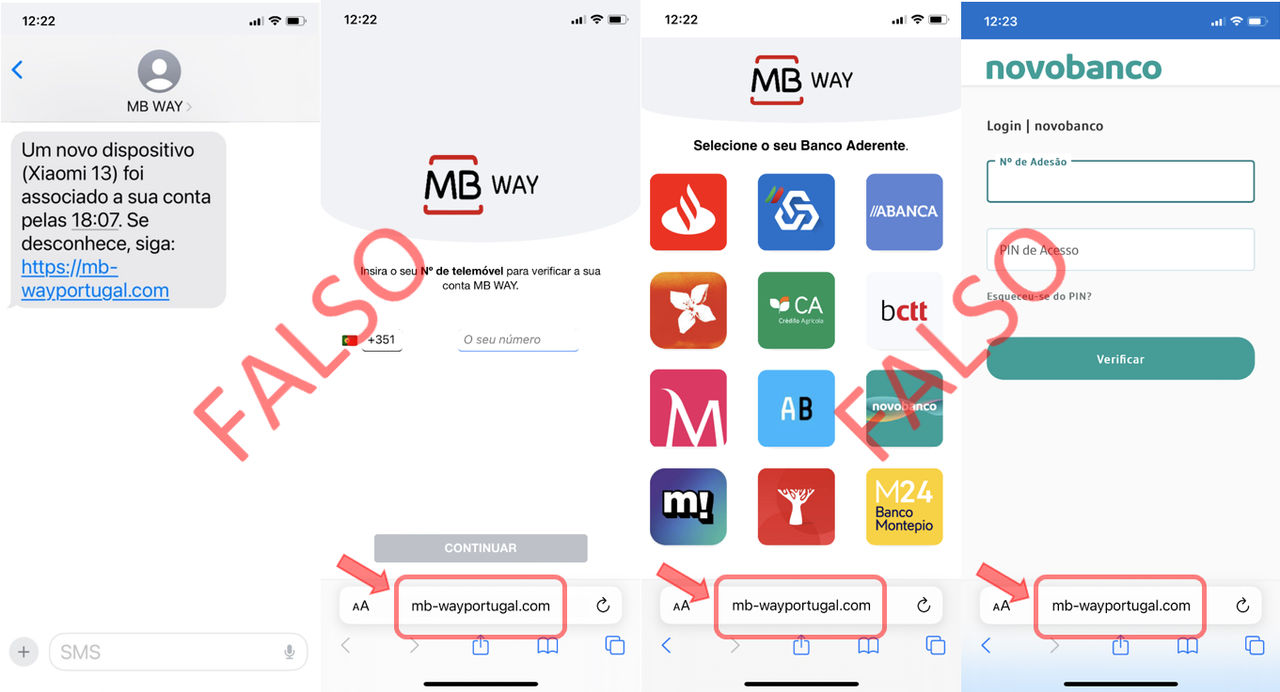
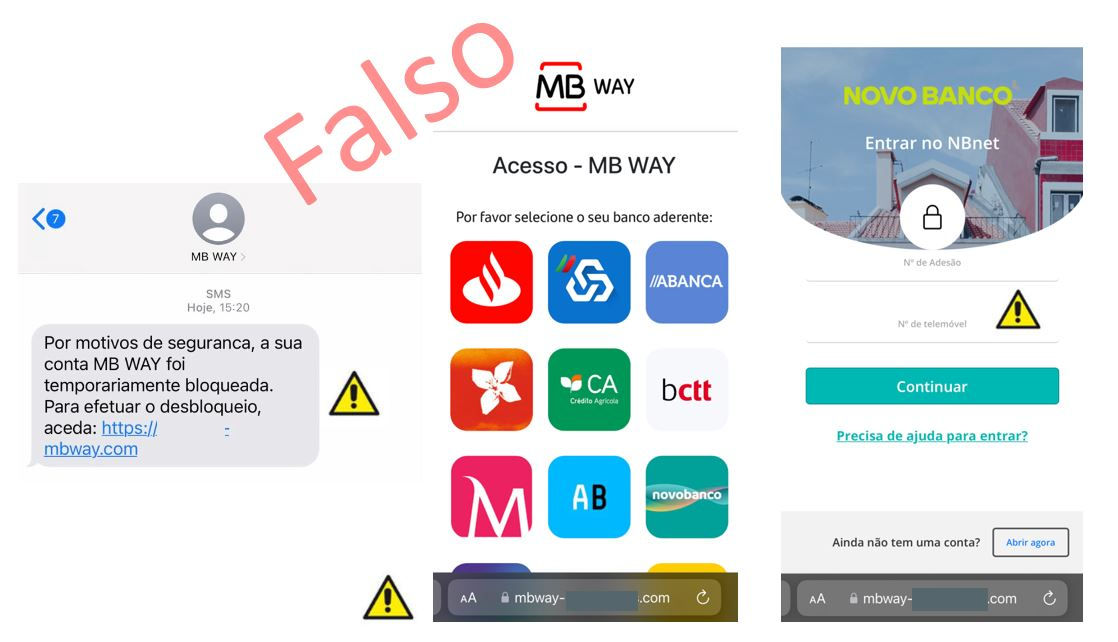
MB WAY:

  • Does not send SMS with links 
  • Does not call users 
  • Does not request passwords or verification codes outside the app

Stay alert.

  • Always be suspicious of SMS messages with links. The sender name shown on your phone may be falsified, “spoofing”, and does not guarantee that the SMS is authentic. 
  • Always be suspicious of unexpected phone calls. The phone number shown may be falsified, “spoofing”. Never provide Cartão Matriz - Master Card positions or codes sent by SMS and do not accept validation requests viain the App for services or transactions that were not initiated by you, even if the person on the “other side” says they are “from the Bank”. 
  • To access your account, use the novobanco App or type www.novobanco.pt into your browser. Avoid accessing your account through links, browser history or search engine results. novobanco’s online address is always https://www.novobanco.pt.

Do not provide personal data or account information. Contact your Branch immediately or our Linha Direta - Direct Line on 707 24 7 365.

March 2024

  • novobanco never requests the installation of software to use Digital Channels on a computer. Always be suspicious of email or SMS messages implying a “mandatory procedure” to install security software. 
  • Stay alert. If, while using novobanco Digital Channels, your browser becomes blocked and displays a pop-up window like those shown on the following screens, it is not us. Your computer has malicious software installed and is being controlled remotely. Do not provide Cartão Matriz - Master Card positions, codes sent by SMS or any other information on pop-up screens. 
  • Avoid using the computer until the malicious software has been removed. In addition to access to novobanco Digital Channels, other personal data in on the computer may be compromised. If necessary, use an IT technician to analyse the computer and remove the Malware.

If your browser becomes blocked while displaying similar screens, contact your Branch immediately or our Linha Direta - Direct Line on 707 24 7 365.

March 2024

  • Always be suspicious of messages with links indicating a “mandatory procedure” or verification to unlock anything, such as your account, access or cards. 
  • Do not provide personal data, account data or card data on internet addresses informed through suspicious messages. 
  • Chave Móvel Digital - Digital Mobile Key will never request information about your bank or your cards as a form of identification.

If you have received a suspicious phone call about a supposed “Account block” or the SMS below, or similar, do not take any action.

January 2024

Attention. novobanco never sends you SMS with links, nor will we contact you by phone asking for codes for a supposed transaction cancellation.

  • Stay alert. novobanco never sends you SMS with links and never requests this kind of action. 
  • Always be suspicious of email or SMS messages with unexpected actions that lead you to click a link or button on impulse. 
  • It is not us. Be alert to expressions not used by the bank or spelling mistakes in email or SMS messages. 
  • novobanco’s online address is always https://www.novobanco.pt. 
  • Be careful with calls from unknown people. Pay attention to unexpected phone calls even if the person on the “other side” says they are “from the Bank”. By phone, in an unexpected situation not initiated by you, never provide Cartão Matriz - Master Card positions and codes sent by SMS to validate transactions. Not even for a supposed “cancellation of operations or transactions”.

January 2024

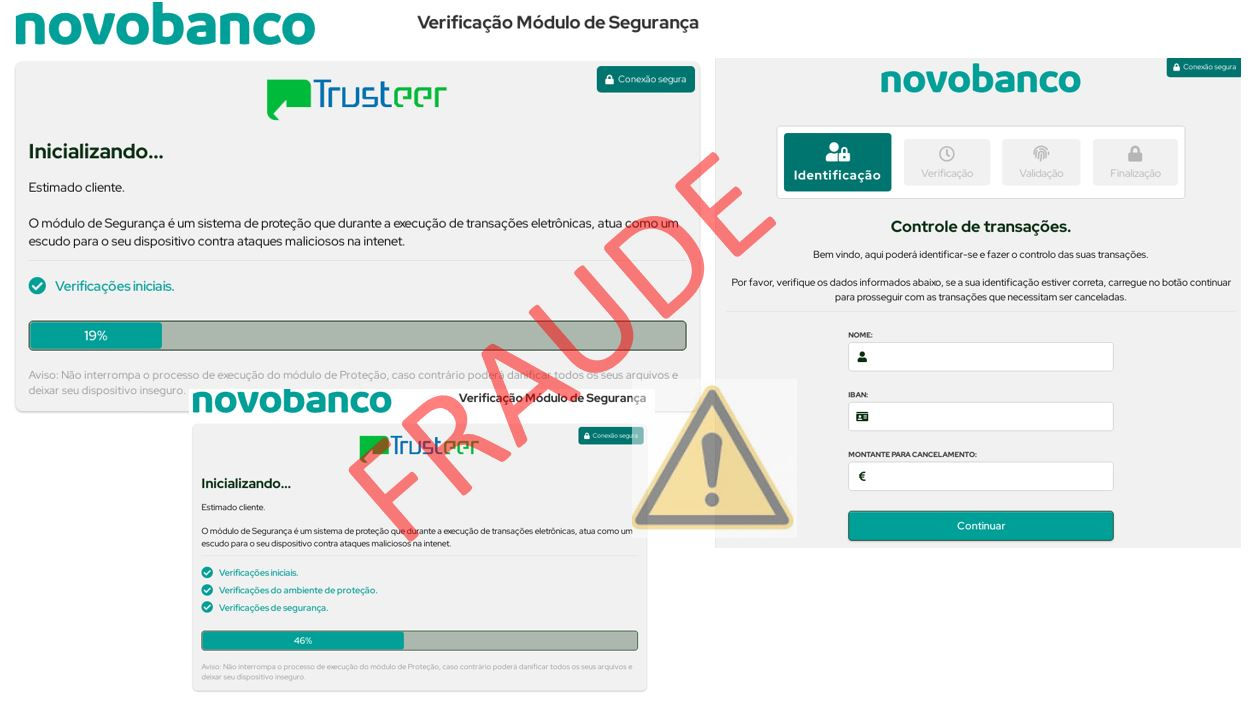
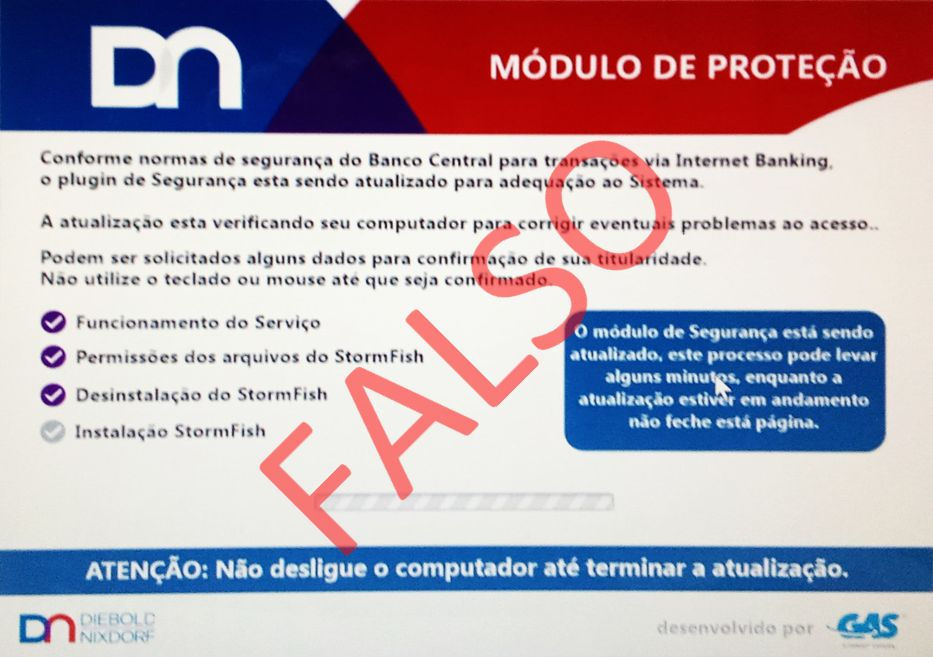
  • Stay alert. If you are confronted with a request to install a “Protection Module” or security plugin, it is not us. 
  • novobanco will never request this type of “Security Update” or the “Installation of a Security add-on” for the use of PC or Mobile App Digital Channels. 
  • Always protect your data. In unexpected phone calls on a subject not initiated by you, never provide Cartão Matriz - Master Card positions and codes sent by SMS to validate operations. 
  • Always be suspicious of email or SMS messages implying a “mandatory procedure” or “threats of blocking or suspension of accounts, access or cards”. 
  • Avoid clicking links contained in emails or SMS messages. If in doubt, always confirm the authenticity of the email or SMS by phone with the sender.

If you received a suspicious phone call as part of a fraud or were confronted with the screens below, do not take any action.

Do not provide personal data or account information. Contact your Branch immediately or our Linha Direta - Direct Line on 707 24 7 365.

January 2024

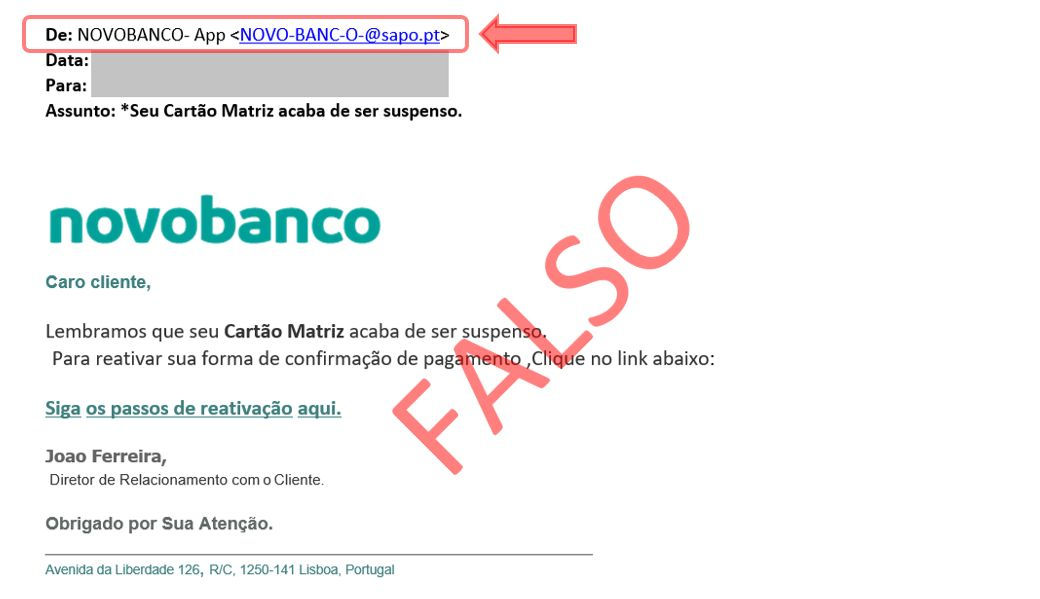
novobanco will never send you emails with this kind of action, nor will we contact you by phone asking for codes for a supposed account unblock or transaction cancellation.

  • Always be suspicious of emails with links indicating a “mandatory procedure” or verification to unlock anything, such as your account, access or cards. 
  • It is not us. Always check the sender’s email address. 
  • Be careful with unexpected phone calls. Never provide Cartão Matriz - Master Card positions and codes sent by SMS, even if the person on the “other side” says they are “from the Bank”.

If you received a suspicious phone call about a supposed “Account block” or the email below, or similar, do not take the requested action.

Do not provide personal data or account information. Contact your Branch immediately or our Linha Direta - Direct Line on 707 24 7 365.

October 2023

  • Stay alert. novobanco never sends you SMS with links and never requests this kind of action. 
  • Always be suspicious of email or SMS messages with unexpected actions that lead you to click a link or button on impulse. 
  • It is not us. Be alert to expressions not used by the bank or spelling mistakes in email or SMS messages. 
  • novobanco’s online address is always https://www.novobanco.pt. 
  • Be careful with calls from unknown people. Pay attention to unexpected phone calls even if the person on the “other side” says they are “from the Bank”. By phone, in an unexpected situation not initiated by you, never provide Cartão Matriz - Master Card positions and codes sent by SMS to validate transactions. Not even for a supposed “cancellation of operations or transactions”.

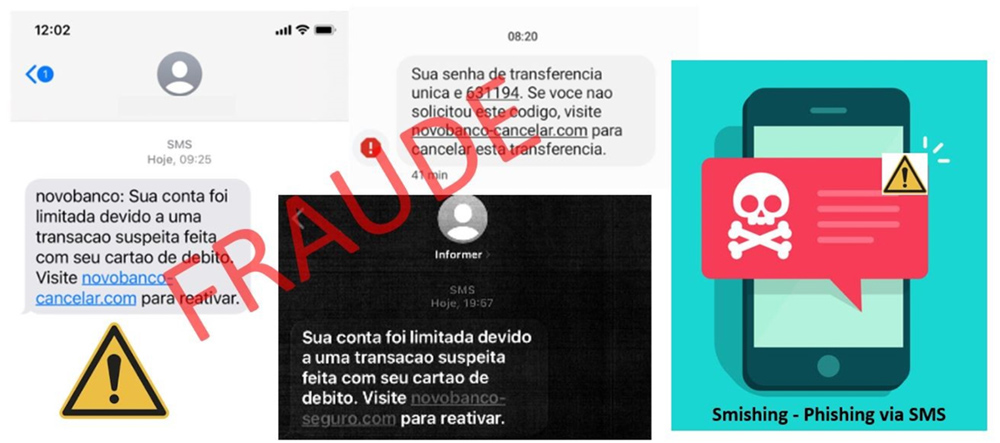
If you received the SMS below, or similar, and or a suspicious phone call in novobanco’s name, do not take any action. Do not provide personal data or account information. Contact your Branch immediately or our Linha Direta - Direct Line on 707 24 7 365.

October 2023

  • Stay alert. novobanco never sends you SMS with links and never requests this kind of action. 
  • Always be suspicious of email or SMS messages with unexpected actions that lead you to click a link or button on impulse. 
  • It is not us. Be alert to expressions not used by the bank or spelling mistakes in email or SMS messages. 
  • novobanco’s online address is always https://www.novobanco.pt. 
  • Be careful with calls from unknown people. Pay attention to unexpected phone calls even if the person on the “other side” says they are “from the Bank”. By phone, in an unexpected situation not initiated by you, never provide  Cartão Matriz - Master Card positions and codes sent by SMS to validate transactions. Not even for a supposed “cancellation of operations or transactions”.

If you received the SMS below, or similar, and or a suspicious phone call in novobanco’s name, do not take any action. Do not provide personal data or account information. Contact your Branch immediately or our Linha Direta - Direct Line on 707 24 7 365.

September 2023

novobanco never sends you SMS with links, nor will we contact you by phone asking for codes for a supposed transaction cancellation.

  • Stay alert. novobanco will never contact you by phone requesting personal and non-transferable access data to digital channels for a supposed “cancellation of transactions”. 
  • In phone calls, never provide Cartão Matriz - Master Card positions and codes sent by SMS. 
  • Always be suspicious of messages implying a “mandatory procedure” or “threats of blocking or suspension of accounts, access or cards”. 
  • It is not us. novobanco will never send you SMS with links. 
  • novobanco’s online address is always https://www.novobanco.pt. 
  • If you received a suspicious phone call about a supposed “Account Block” or the SMS below, do not take any action.

Do not provide personal data or account information. Contact your Branch immediately or our Linha Direta - Direct Line  on 707 24 7 365.

September 2023

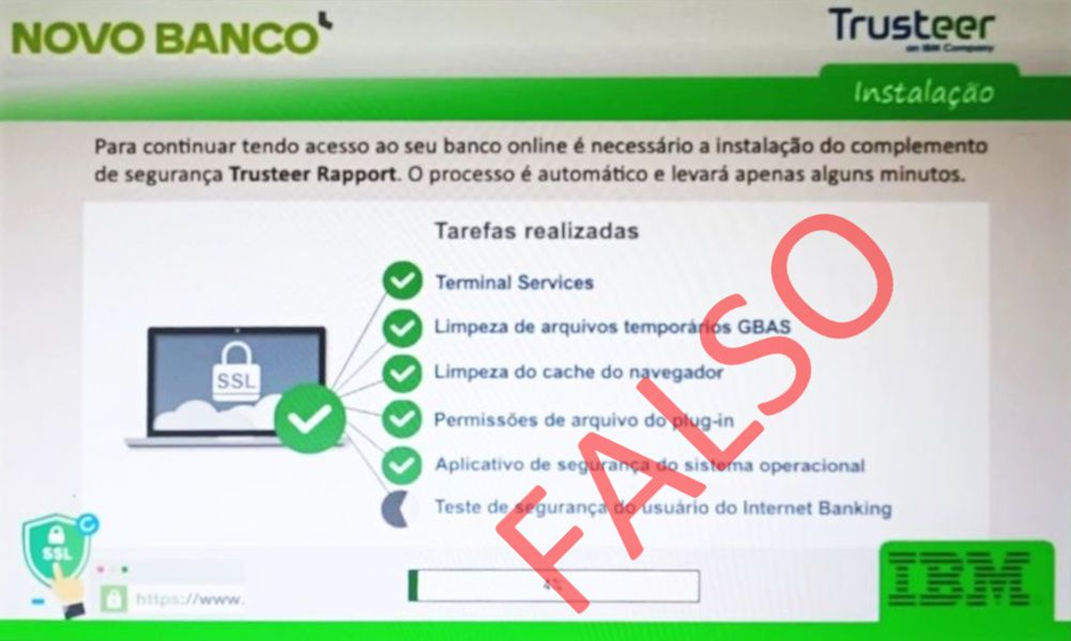
  • Stay alert. If you are confronted with a request to install a “Trusteer Rapport Security Add-on” to “continue having access to your online banking”, it is not us. 
  • novobanco will never request this type of “Security Update” or the “Installation of a Security add-on” for the use of PC or Mobile App Digital Channels. 
  • Always protect your data. In unexpected phone calls on a subject not initiated by you, never provide Cartão Matriz - Master Card positions and codes sent by SMS to validate operations. 
  • Always be suspicious of email or SMS messages implying a “mandatory procedure” or “threats of blocking or suspension of accounts, access or cards”. 
  • Avoid clicking links contained in emails or SMS messages. If in doubt, always confirm the authenticity of the email or SMS by phone with the sender.

If you received a suspicious phone call as part of a fraud or were confronted with the screens below, do not take any action.

Do not provide personal data or account information. Contact your Branch immediately or our Linha Direta - Direct Line on 707 24 7 365.

May 2023

MB WAY:

  • Does not send SMS with links 
  • Does not call users 
  • Does not request passwords or verification codes outside the app

And also. novobanco never sends you SMS with links, nor will we contact you by phone asking for codes for a supposed transaction cancellation.

  • Stay alert. novobanco will never contact you by phone requesting personal and non-transferable access data to digital channels for a supposed “cancellation of transactions”. 
  • In phone calls, never provide Cartão Matriz - Master Card positions and codes sent by SMS. 
  • Always be suspicious of messages implying a “mandatory procedure” or “threats of blocking or suspension of accounts, access or cards”. 
  • It is not us. novobanco will never send you SMS with links. 
  • novobanco’s online address is always https://www.novobanco.pt. 
  • If you received a suspicious phone call about a supposed “Cancellation of Transactions” or the SMS below, do not take any action.

Do not provide personal data or account information. Contact your Branch immediately or our Linha Direta - Direct Line on 707 24 7 365.

May 2023

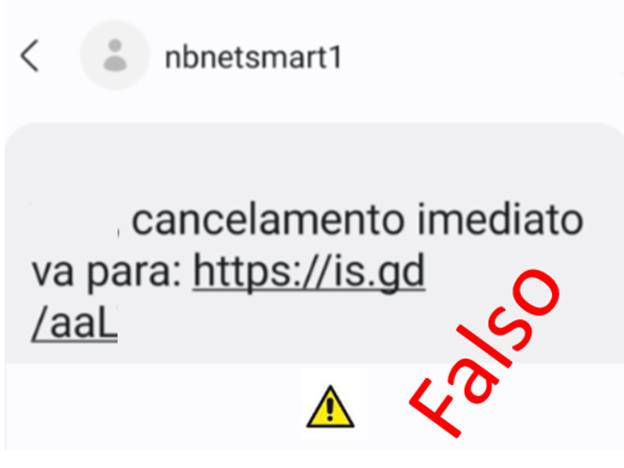
Attention. novobanco never sends you SMS with links, nor will we contact you by phone asking for codes for a supposed transaction cancellation.

  • Stay alert. novobanco will never contact you by phone requesting personal and non-transferable access data to digital channels for a supposed “cancellation of transactions”. 
  • In phone calls, never provide Cartão Matriz - Master Card positions and codes sent by SMS. 
  • Always be suspicious of messages implying a “mandatory procedure” or “threats of blocking or suspension of accounts, access or cards”. 
  • It is not us. novobanco will never send you SMS with links. 
  • novobanco’s online address is always https://www.novobanco.pt. 
  • If you received a suspicious phone call about a supposed “Cancellation of Transactions” or the SMS below, do not take any action.

Do not provide personal data or account information. Contact your Branch immediately or our Linha Direta - Direct Line on 707 24 7 365.

January 2023

Attention. novobanco never sends you SMS with links, nor will we contact you by phone asking for codes for a supposed transaction cancellation.

  • Stay alert. novobanco never sends you SMS with links and never requests this kind of action. 
  • Always be suspicious of email or SMS messages with unexpected actions that lead you to click a link or button on impulse. 
  • It is not us. Be alert to expressions not used by the bank or spelling mistakes in email or SMS messages. 
  • novobanco’s online address is always https://www.novobanco.pt. 
  • Be careful with calls from unknown people. Pay attention to unexpected phone calls even if the person on the “other side” says they are “from the Bank”. By phone, in an unexpected situation not initiated by you, never provide Cartão Matriz - Master Card positions and codes sent by SMS to validate transactions. Not even for a supposed “cancellation of operations or transactions”.

If you received the SMS below, or similar, and or a suspicious phone call in novobanco’s name, do not take any action. Do not provide personal data, account data or card data.

Contact your Branch immediately or our Linha Direta - Direct Line on 707 24 7 365.

November 2022

  • Stay alert. novobanco never sends you SMS with links and never requests this kind of action. 
  • Always be suspicious of email or SMS messages with unexpected actions that lead you to click a link or button on impulse. 
  • It is not us. Be alert to expressions not used by the bank or spelling mistakes in email or SMS messages. 
  • novobanco’s online address is always https://www.novobanco.pt. 
  • Be careful with calls from unknown people. Pay attention to unexpected phone calls even if the person on the “other side” says they are “from the Bank”. By phone, in an unexpected situation not initiated by you, never provide Cartão Matriz - Master Card positions and codes sent by SMS to validate transactions. Not even for a supposed “cancellation of operations or transactions”.

If you received the SMS below, or similar, and or a suspicious phone call in novobanco’s name, do not take any action. Do not provide personal data or account information. Contact your Branch immediately or our Linha Direta - Direct Line on 707 247 365.

Novembro 2022

  • Stay alert. novobanco never sends you SMS with links and never requests this kind of action. 
  • Always be suspicious of email or SMS messages with unexpected actions that lead you to click a link or button on impulse. 
  • It is not us. Be alert to expressions not used by the bank or spelling mistakes in email or SMS messages. 
  • novobanco’s online address is always https://www.novobanco.pt. 
  • Be careful with calls from unknown people. Pay attention to unexpected phone calls even if the person on the “other side” says they are “from the Bank”. By phone, in an unexpected situation not initiated by you, never provide Cartão Matriz - Master Card positions and codes sent by SMS to validate transactions. Not even for a supposed “cancellation of operations or transactions”.

If you received the SMS below, or similar, and or a suspicious phone call in novobanco’s name, do not take any action. Do not provide personal data or account information. Contact your Branch immediately or our Linha Direta - Direct Line on 707 247 365.

October 2022

  • novobanco will never send you emails with this kind of action. 
  • Always be suspicious of phone calls or emails where a certain action was not initiated by you. Be alert to situations of “Urgency” or requests where immediate action is demanded. 
  • NEVER provide additional security system codes sent by SMS through phone calls, emails or unknown websites. 
  • If you are confronted with such a situation, hang up the phone immediately and do not click links or buttons similar to those shown in the email below. 
  • Ensure the security of your personal data and your access data for the bank’s digital channels. Do not share sensitive data or information with third parties.

If in doubt, contact Linha Direta - Direct Line on 707 24 7 365.

September 2022

  • Stay alert. novobanco never sends you SMS with links and never requests this kind of action. 
  • Always be suspicious of email or SMS messages with unexpected actions that lead you to click a link or button on impulse. 
  • It is not us. Be alert to expressions not used by the bank or spelling mistakes in email or SMS messages. 
  • novobanco’s online address is always https://www.novobanco.pt. 
  • Be careful with calls from unknown people. Pay attention to unexpected phone calls even if the person on the “other side” says they are “from the Bank”. By phone, in an unexpected situation not initiated by you, never provide Cartão Matriz - Master Card positions and codes sent by SMS to validate transactions. Not even for a supposed “cancellation of operations or transactions”.

If you received the SMS below, or similar, and or a suspicious phone call in novobanco’s name, do not take any action. Do not provide personal data or account information. Contact your Branch immediately or our Linha Direta - Direct Line on 707 24 7 365.

September 2022

  • novobanco will never send you emails with this kind of alert or procedure. 
  • Always be suspicious of email or SMS messages with unexpected, urgent or important actions that lead you to click a link or button immediately on impulse. 
  • novobanco’s online address is always https://www.novobanco.pt. 
  • It is not us. Be alert to expressions not used by the bank or spelling mistakes in email or SMS messages.

If you received the email below, or similar, do not take any action. Do not provide your personal data or your account or card details. Contact your Branch immediately or our Linha Direta - Direct Line on 707 24 7 365. 

Follow our main security recommendations available at https://www.novobanco.pt/en/personal/security

Setembro 2022

  • Stay alert. novobanco never sends you SMS with links and never requests this kind of action. 
  • Always be suspicious of email or SMS messages with unexpected actions that lead you to click a link or button on impulse. 
  • It is not us. Be alert to expressions not used by the bank or spelling mistakes in email or SMS messages. 
  • novobanco’s online address is always https://www.novobanco.pt. 
  • Be careful with calls from unknown people. Pay attention to unexpected phone calls even if the person on the “other side” says they are “from the Bank”. By phone, in an unexpected situation not initiated by you, never provide Cartão Matriz - Master Card positions and codes sent by SMS to validate transactions. Not even for a supposed “cancellation of operations or transactions”.

If you received the SMS below, or similar, and or a suspicious phone call in novobanco’s name, do not take any action. Do not provide personal data or account information. Contact your Branch immediately or our Linha Direta - Direct Line on 707 24 7 365.

August 2022

  • Stay alert. If you are confronted with a request for “Security Module Verification” for “Transaction Control or Cancellation”, it is not us. 
  • novobanco will never request this type of “Security Update” or “Installation or Verification of Security Modules” when using PC or Mobile App Digital Channels. 
  • Protect your data. In unexpected phone calls on a subject not initiated by you, never provide Cartão Matriz - Master Card positions and codes sent by SMS to validate operations. 
  • Always be suspicious of email or SMS messages implying a “mandatory procedure” or “threats of blocking or suspension of accounts, access or cards”. 
  • Avoid clicking links contained in emails or SMS messages. If in doubt, always confirm the authenticity of the email or SMS by phone with the sender.

If you received a suspicious phone call about a supposed “Cancellation of Transactions” as part of a fraud, or were confronted with the screens below, do not take any action.

Do not provide personal data or account information. Contact your Branch immediately or our Linha Direta - Direct Line on 707 24 7 365.

Agosto 2022

  • Stay alert. novobanco will never contact you by phone asking for personal and non-transferable access data to digital channels for a supposed “cancellation of transactions”. 
  • In phone calls, never provide Cartão Matriz - Master Card positions and codes sent by SMS to validate operations. 
  • Always be suspicious of messages implying a “mandatory procedure” or “threats of blocking or suspension of accounts, access or cards”. 
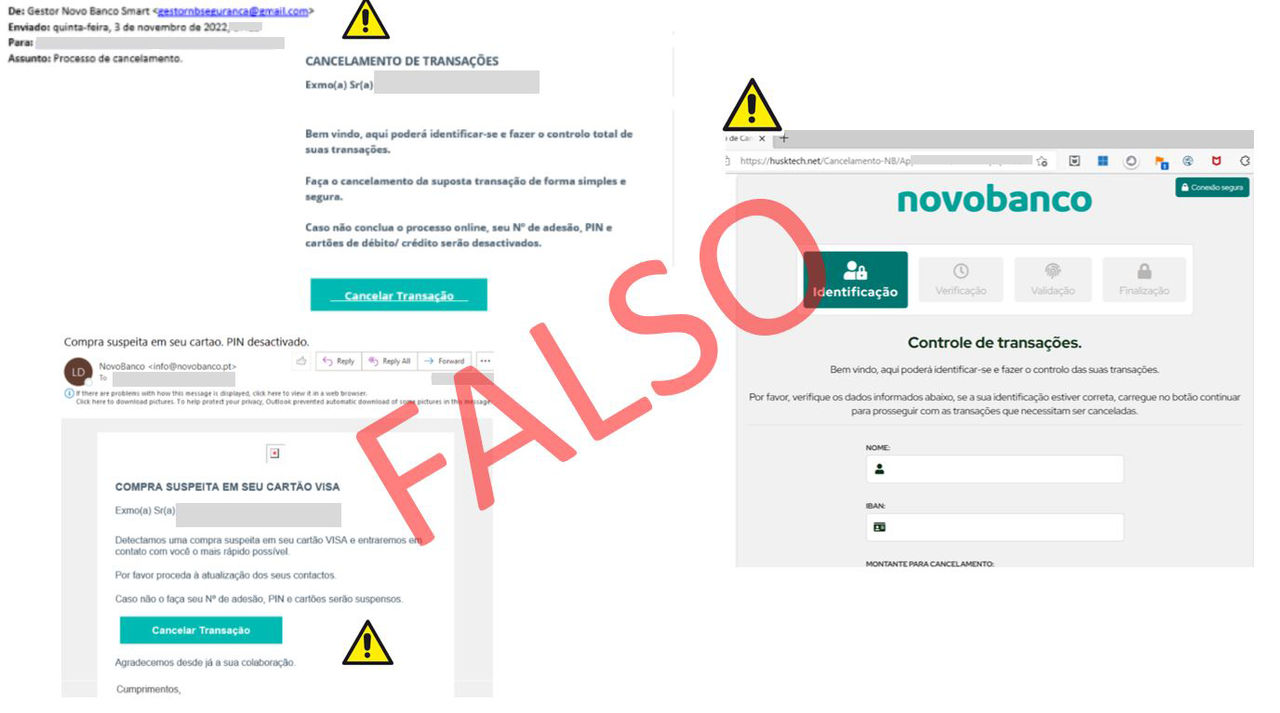
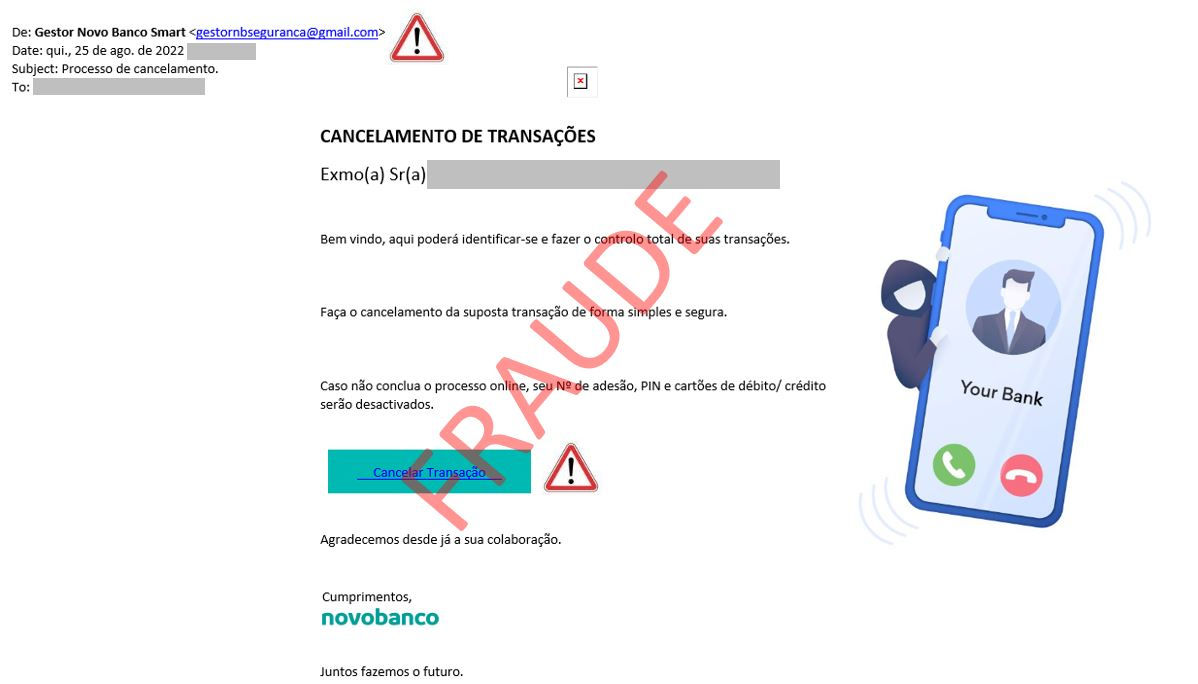
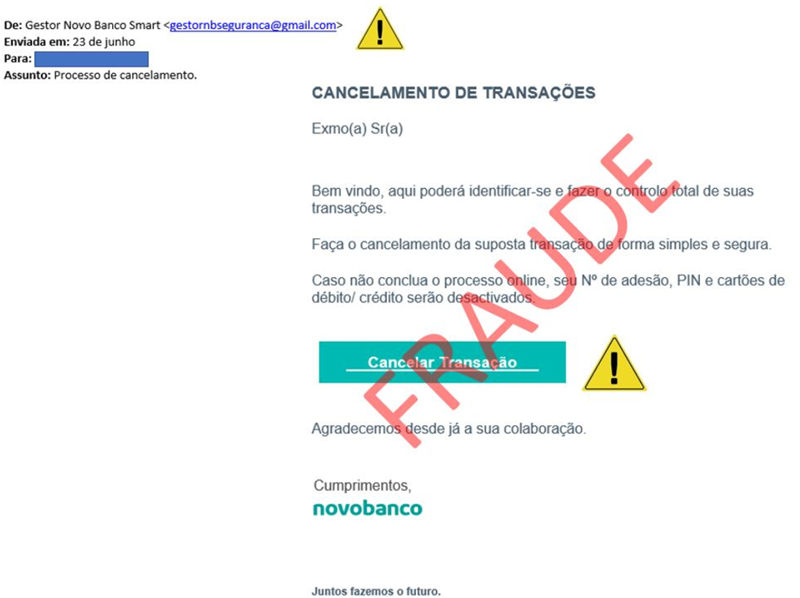
  • It is not us. novobanco does not have an email address “Gestor Novo Banco Smart gestornbseguranca@gmail.com”. We never use Gmail to contact you. 
  • novobanco’s online address is always https://www.novobanco.pt.

If you received a suspicious phone call about a supposed “Cancellation of Transactions” or the email below, do not take any action.

Do not provide personal data or account information. Contact your Branch immediately or our Linha Direta - Direct Line on 707 24 7 365.

July 2022

  • Stay alert. novobanco never sends you SMS with links and never requests this kind of action. 
  • Always be suspicious of messages with links involving an unexpected action or threats of blocking. 
  • Check the wording carefully. We would never approach you in this way. It is not us. 
  • novobanco’s online address is always https://www.novobanco.pt.

If you received this SMS, do not click the link and delete the SMS immediately.

If in doubt, contact Linha Direta - Direct Line on 707 24 7 365.

June 2022

  • Stay alert. novobanco never sends you SMS with links and never requests this kind of action. 
  • Always be suspicious of messages with links involving an unexpected action. 
  • novobanco’s online address is always https://www.novobanco.pt.

If you received this SMS, do not click the link and delete the SMS immediately.

If in doubt, contact Linha Direta - Direct Line on 707 24 7 365.

June 2022

  • Stay alert. novobanco never approaches you in this way. 
  • Always be suspicious of email or SMS messages with unexpected actions that lead you to click a link or button on impulse. 
  • It is not us. Be alert to expressions not used by the bank or spelling mistakes in email and SMS messages. 
  • Be careful with calls from unknown people. Beware of phone calls about a supposed “Cancellation of Transactions”. By phone, in an unexpected situation not initiated by you, never provide Cartão Matriz - Master Card positions and codes sent by SMS to validate operations.

If you received a suspicious phone call about a supposed “Cancellation of Transactions” or the email below, do not take any action. Do not provide personal data or account information. Contact your Branch immediately or our Linha Direta - Direct Line on 707 24 7 365.

June 2022

  • Stay alert. novobanco never sends you SMS with links and never requests this kind of action. 
  • Always be suspicious of messages implying a “mandatory procedure” or “threats of blocking or suspension of accounts or access”. 
  • novobanco’s online address is always https://www.novobanco.pt.

If you received this SMS, do not click the link and delete the SMS immediately.

If in doubt, contact Linha Direta - Direct Line on 707 24 7 365.

June 2022

When using novobanco online or novobanco online empresas, if you are confronted with this information, your computer is very likely infected with a computer virus, a Banking Trojan. You should stop all activity on the computer where you noticed this situation and contact an IT technician immediately.

novobanco never requests this type of procedure when using its internet banking services.

If you are confronted with this malicious screen, contact Linha Direta - Direct Line on 707 24 7 365, do not provide Cartão Matriz - Master Card data and always read carefully the content of the Additional Security System SMS messages.

May 2022

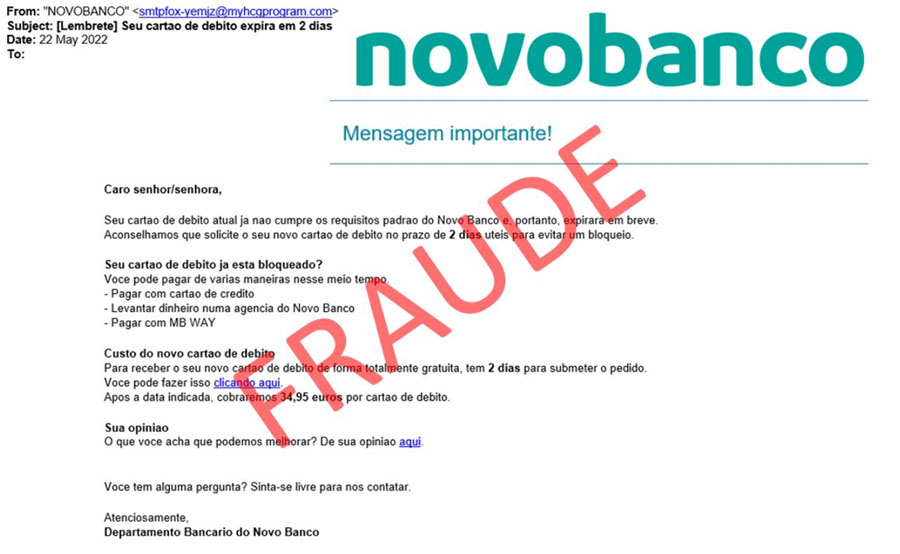
  • Stay alert. novobanco never sends you emails with this kind of content and never requests this kind of action. 
  • Always be suspicious of messages implying a “mandatory procedure” or “threats of blocking or suspension of accounts, access or cards”. 
  • novobanco’s online address is always https://www.novobanco.pt.

If you received this email, do not click the links and delete the email immediately.

If in doubt, contact Linha Direta - Direct Line on 707 24 7 365.

May 2022

  • Stay alert. novobanco never sends you SMS with links and never requests this kind of action. 
  • Always be suspicious of messages implying a “mandatory procedure” or “threats of blocking or suspension of accounts or access”. 
  • novobanco’s online address is always https://www.novobanco.pt.

If you received this SMS, do not click the link and delete the SMS immediately.

If in doubt, contact Linha Direta - Direct Line on 707 24 7 365.

May 2022

  • Stay alert. novobanco never sends you SMS with links and never requests this kind of action. 
  • Always be suspicious of messages implying a “mandatory procedure” or “threats of blocking or suspension of accounts or access”. 
  • novobanco’s online address is always https://www.novobanco.pt.

If you received this SMS, do not click the link and delete the SMS immediately.

If in doubt, contact Linha Direta - Direct Line on 707 24 7 365.

May 2022

Be alert to possible phone calls from unknown individuals claiming to be from novobanco and requesting personal and non-transferable data for a supposed cancellation of a fraudulent transaction.

  • novobanco never requests this kind of action. 
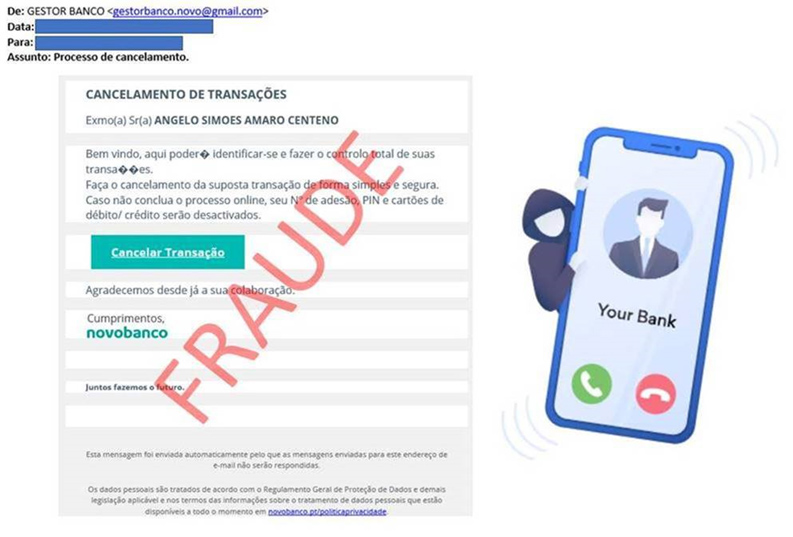
  • The bank’s official email is not gestorbanco.novo@gmail.com. We do not have any email registered with the Gmail service. 
  • Always be suspicious of phone calls or emails where a certain action was not initiated by you. Be alert to situations of “Urgency” or requests where immediate action is demanded. 
  • NEVER provide additional security system codes sent by SMS through phone calls, emails or unknown websites.

If you are confronted with such a situation, hang up the phone immediately and do not click links or buttons similar to those shown in the email below.

Ensure the security of your personal data and your access data for the bank’s digital channels. Do not share sensitive data or information with third parties.

If in doubt, contact Linha Direta - Direct Line on 707 24 7 365.

April 2022

  • novobanco will never send you emails with this kind of alert or procedure. 
  • Always be suspicious of messages implying urgent action, prizes or receipt of an attractive payment.

Stay alert, do not click the links. Delete the message immediately.

If in doubt, contact Linha Direta - Direct Line on 707 24 7 365.

March 2022

  • novobanco never sends you SMS with links and never requests this kind of action. 
  • Always be suspicious of messages implying “immediate action” or “threats of blocking or suspension of accounts or access”. 
  • We will never ask you for your full credit card details in this way. 
  • novobanco’s online address is always www.novobanco.pt.

If you received these SMS messages, do not click the link and delete the SMS immediately.

Stay alert. If in doubt, contact Linha Direta - Direct Line on 707 24 7 365.

February 2022

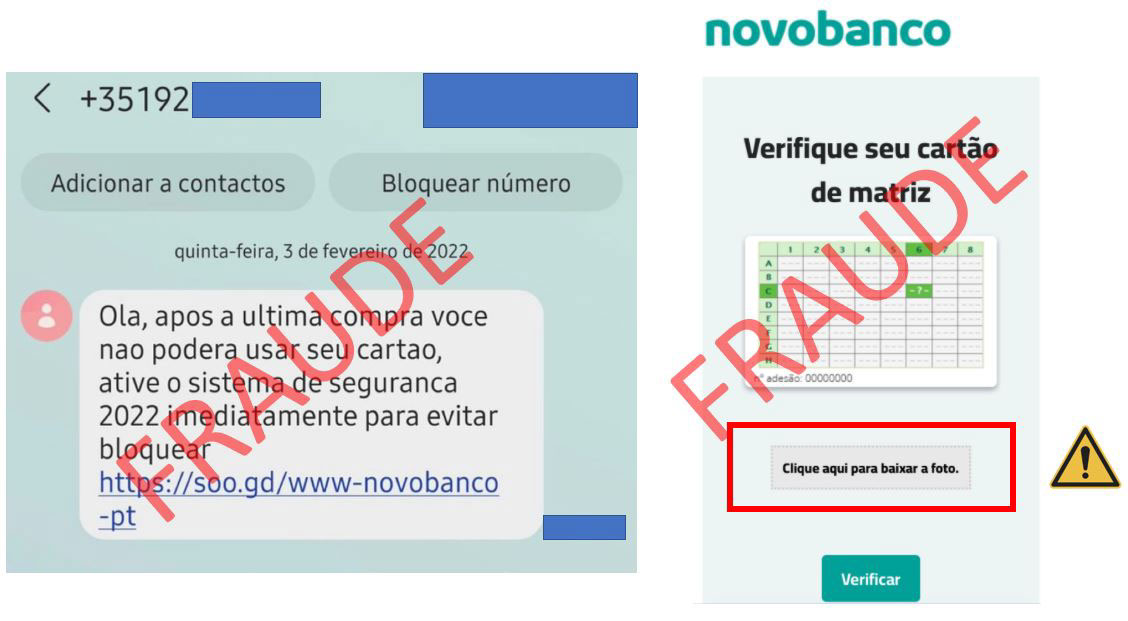
  • novobanco never sends you SMS with links and never requests this kind of action. 
  • Always be suspicious of messages implying “immediate action” or “threats of blocking or suspension of accounts or access”. 
  • We will never ask you for photographs of the Cartão Matriz - Master Card. 
  • novobanco’s online address is always https://www.novobanco.pt.

If you received this SMS, do not click the link and delete the SMS immediately.

If in doubt, contact Linha Direta - Direct Line on 707 24 7 365.

February 2022

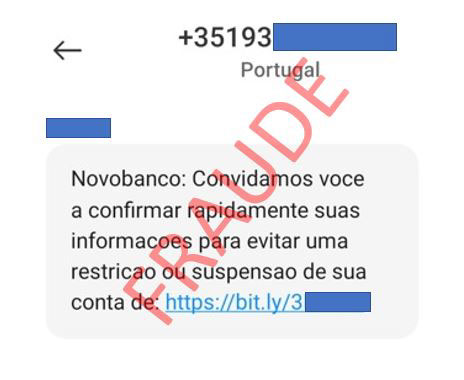
novobanco never sends you SMS with links and never requests this kind of action.

Always be suspicious of messages implying a “mandatory procedure” or “threats of blocking or suspension of accounts or access”.

novobanco’s online address is always https://www.novobanco.pt.

If you received this SMS, do not click the link and delete the SMS immediately. 

If in doubt, contactLinha Direta - Direct Line on 707 24 7 365.

February 2022

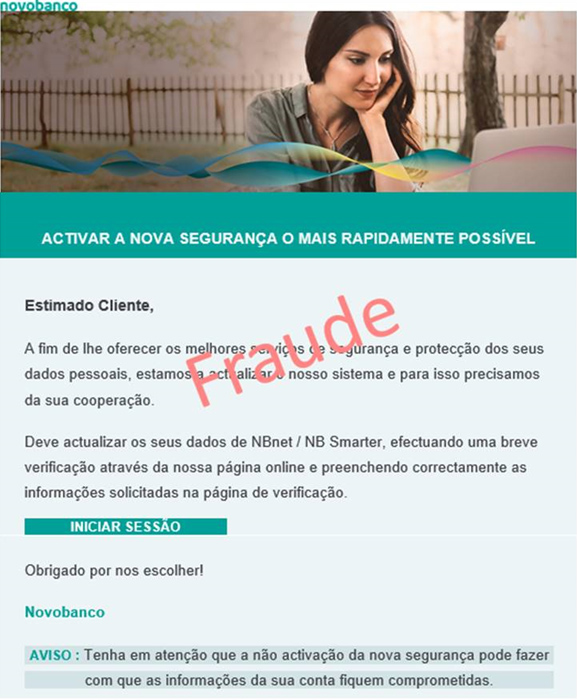
Always be suspicious of messages implying an unexpected “security” procedure and also pay attention to wording and spelling mistakes.

Do not click the links. Delete the message immediately.

If in doubt, contact Linha Direta - Direct Line immediately on 707 24 7 365.

February 2022

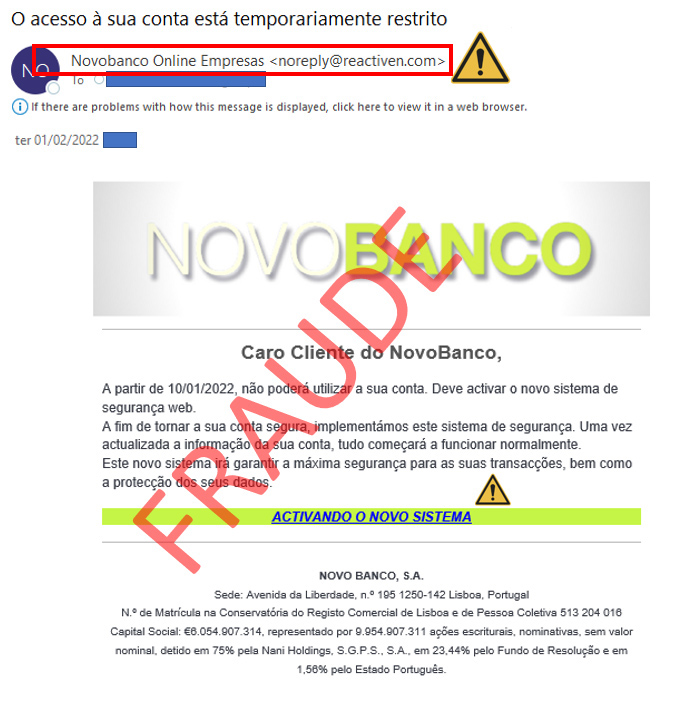
novobanco will never send you emails with this kind of procedure.

Always be suspicious of messages implying a “mandatory procedure”, “threats of blocking” and “activation of security systems”. 

Stay alert, do not click the links. Delete the message immediately.

If in doubt, contact Linha Direta - Direct Line immediately on 707 24 7 365. 

February 2022

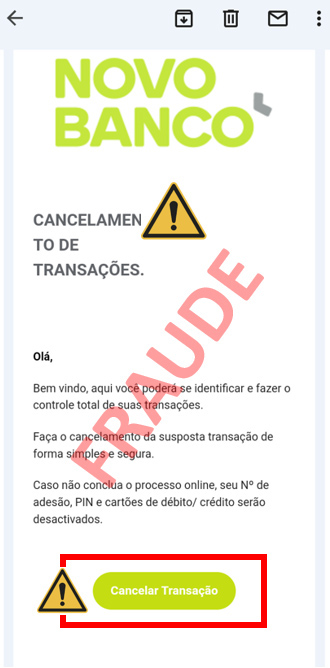
novobanco will never send you emails with this kind of procedure.

Always be suspicious of messages implying a “procedure” and “threats of blocking”. novobanco never interacts with its customers in this way. 

Stay alert, do not click the links. Delete the message immediately.

If in doubt, contact Linha Direta - Direct Line immediately on 707 24 7 365. 

February 2022

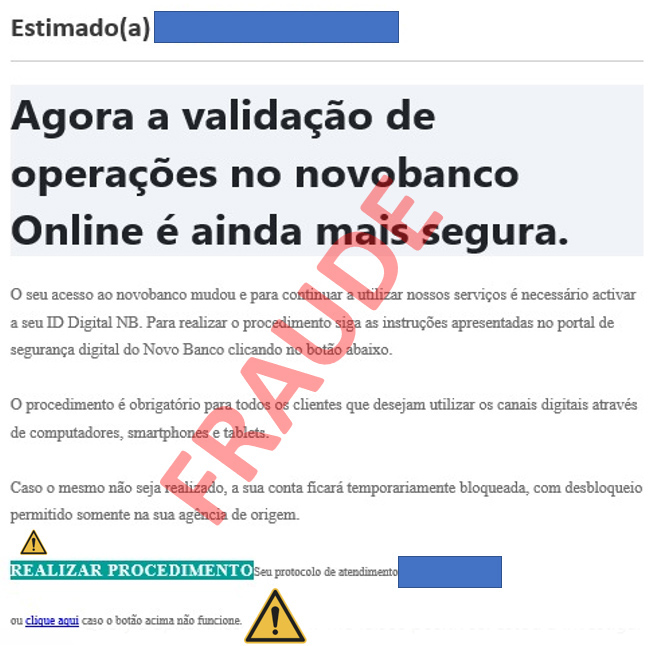
novobanco will never send you emails with this kind of procedure.

Always be suspicious of messages implying a “mandatory procedure” and “threats of blocking”. novobanco never interacts with its customers in this way. 

Stay alert, do not click the links. Delete the message immediately.

If in doubt, contact Linha Direta - Direct Line immediately on 707 24 7 365. 

February 2022

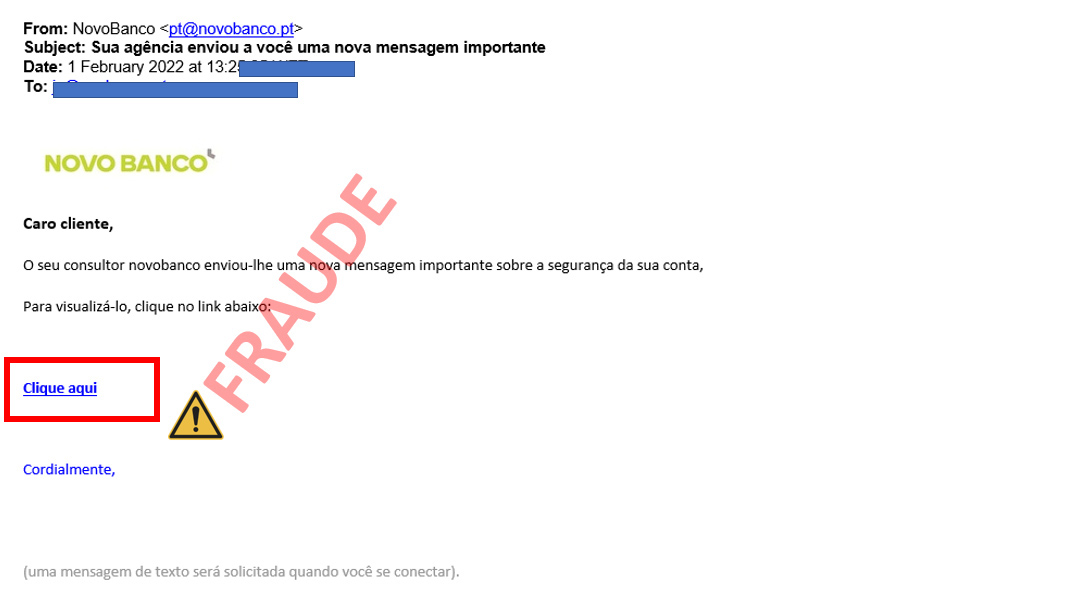
novobanco will never send you emails with this kind of procedure.

Always be suspicious of messages whose content implies an “important or urgent action”. In more than 90% of cases, these are phishing or fraud messages.

Stay alert, do not click the links. Delete the message immediately.

If in doubt, contact Linha Direta - Direct Line immediately on 707 24 7 365. 

January 2022

novobanco will never send you emails with this kind of approach.

Be alert to wording and “urgent requests with 24-hour deadlines”. Do not click. Do not provide any kind of data. Delete the email.

If in doubt, contact Linha Direta - Direct Line immediately on 707 24 7 3

January 2022

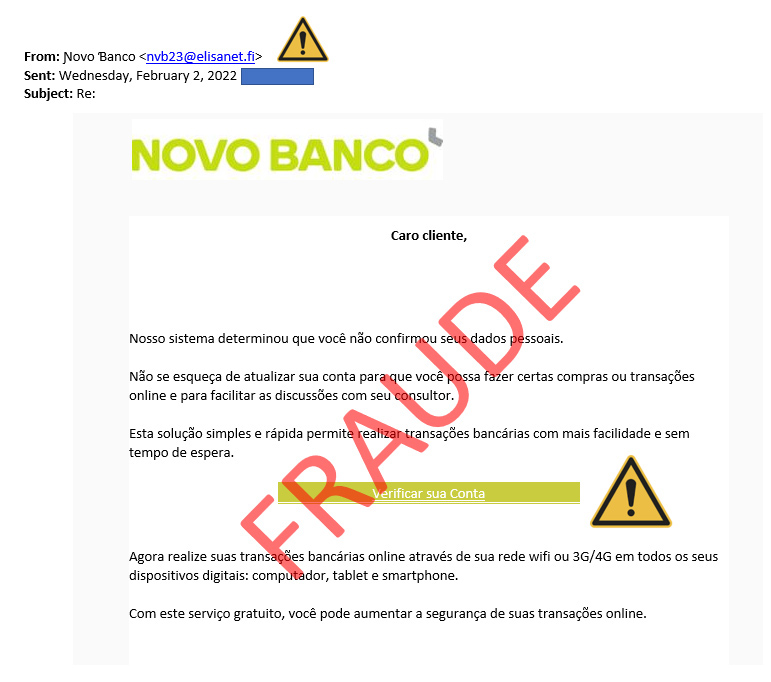
novobanco never sends emails with this type of procedure.

Stay alert, do not click! Do not provide any kind of data.

If in doubt, contact the Linha Direta - Direct Line  immediately on +351 707 24 7 365.

PUB | NOVO BANCO S.A. | Registered no. 7 at Banco de Portugal